


Where a Discovery Implementer Works in ServiceNow
On this page
In this lesson, you will learn:
- What Discovery Admin Workspace is for
- What guided setup helps with
- Which classic records you still use
🔁 Quick look back: Last time: Discovery Methods: IP-Based, Cloud API, ACC and Credential-less Options. You learned the four discovery methods and which SNWR zone uses each.
1 The Problem: Discovery Settings Live in Many Places
On snwrdev, Hana tries to find the Discovery settings. She finds:
- A workspace with schedules and results.
- A guided setup page.
- Many Discovery modules in the All menu.
👉 The fix: Learn the three places you’ll work, and what each one is best for.
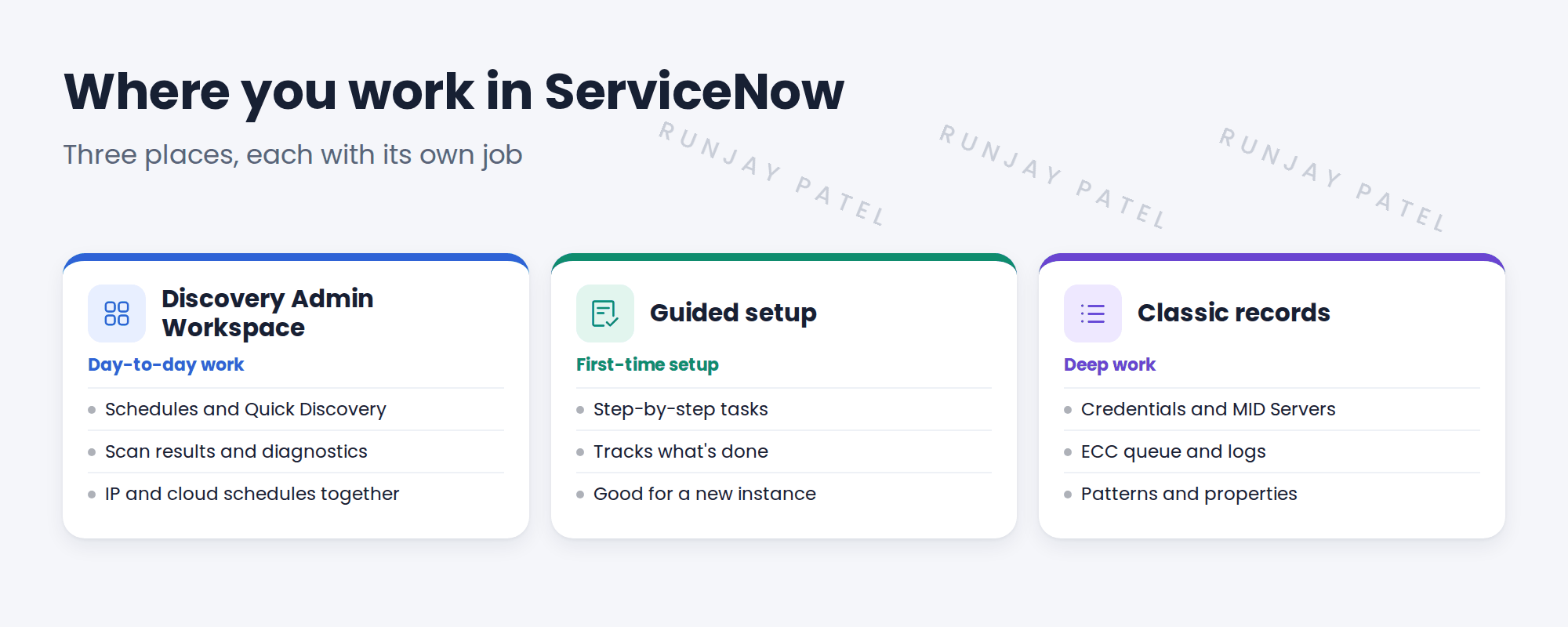
2 The three places
Key term: Discovery Admin Workspace
A workspace for daily Discovery work: schedules, Quick Discovery, results and diagnostics.
Key term: Guided setup
A step-by-step checklist for setting up Discovery and other ITOM features, such as ITOM Guided Setup.
Key term: Classic records
The lists and forms in the All menu, such as credentials, the ECC queue and Pattern Designer.
💡 Good to know: Discovery Admin Workspace and some guided setups are Store apps. Their menus change between versions, so check what your instance has.
3 Which place for which job
| Job | Best place |
|---|---|
| Create or run a schedule | Discovery Admin Workspace |
| Set up Discovery the first time | Guided setup |
| Read the ECC queue or logs | Classic records |
| Edit a pattern | Pattern Designer (classic) |
| Check a failed scan | Workspace diagnostics, then classic records |
💡 Good to know: Need a refresher? See Fundamentals › User Interfaces › Workspaces for how workspaces work.
4 Project Clear View: How We Implemented It
📍 Situation: Hana’s team will run Discovery after handover, so they need to know where things live.
🧭 Decision: Show them the three places early, and use the same places all project.
🛠️ Steps we took:
- Opened Discovery Admin Workspace on snwrdev and showed schedules and results.
- Opened the guided setup and showed which steps are done.
- Showed the classic records Hana will need: credentials, MID Servers, ECC queue.
- Wrote a one-page ‘where to find it’ guide.
✅ What we verified:
- Hana found each place on her own, without help.
- The guide matches the menus on snwrdev.
📁 Evidence: The ‘where to find it’ guide. It becomes part of the runbook (see Operations Handover › Writing the Operations Runbook).
5 Quick recap
- Discovery Admin Workspace is for daily work: schedules, Quick Discovery, results.
- Guided setup walks you through first-time setup.
- Classic records hold credentials, the ECC queue, logs and patterns.
- Menus change between versions, so check your instance.
6 Check yourself
Think of your answer first. Then tap to check.
1 Where would you run Quick Discovery on one IP address? Show answer
In Discovery Admin Workspace.
2 Where do you read ECC queue records? Show answer
In the classic records, from the All menu.
3 Why check your own instance’s menus? Show answer
Workspaces and guided setups are Store apps, so their menus change between versions.
Nice work! You know where Discovery lives in ServiceNow. 🎉
Next up: Reading the Statement of Work
Was this lesson helpful?
Please log in to share lesson feedback.
Have a question or doubt?
Ask here and get help from instructors and fellow learners.
Only logged-in learners can post.





