


CI Classes Discovery Will Populate
On this page
In this lesson, you will learn:
- Which CI classes Discovery fills
- Why the class of a CI matters
- The classes in scope for Clear View
🔁 Quick look back: Last time: Why Discovery Depends on a Healthy CMDB. You learned why a messy CMDB makes Discovery create duplicates and overwrite data.
1 The Problem: The Wrong Class Hides a CI
In SNWR’s CMDB, some servers were saved as the generic ‘Computer’ class. So:
- They don’t appear in the Linux Server list.
- Rules for servers don’t apply to them.
👉 The fix: Know which classes Discovery fills, and plan for CIs in the wrong class today.
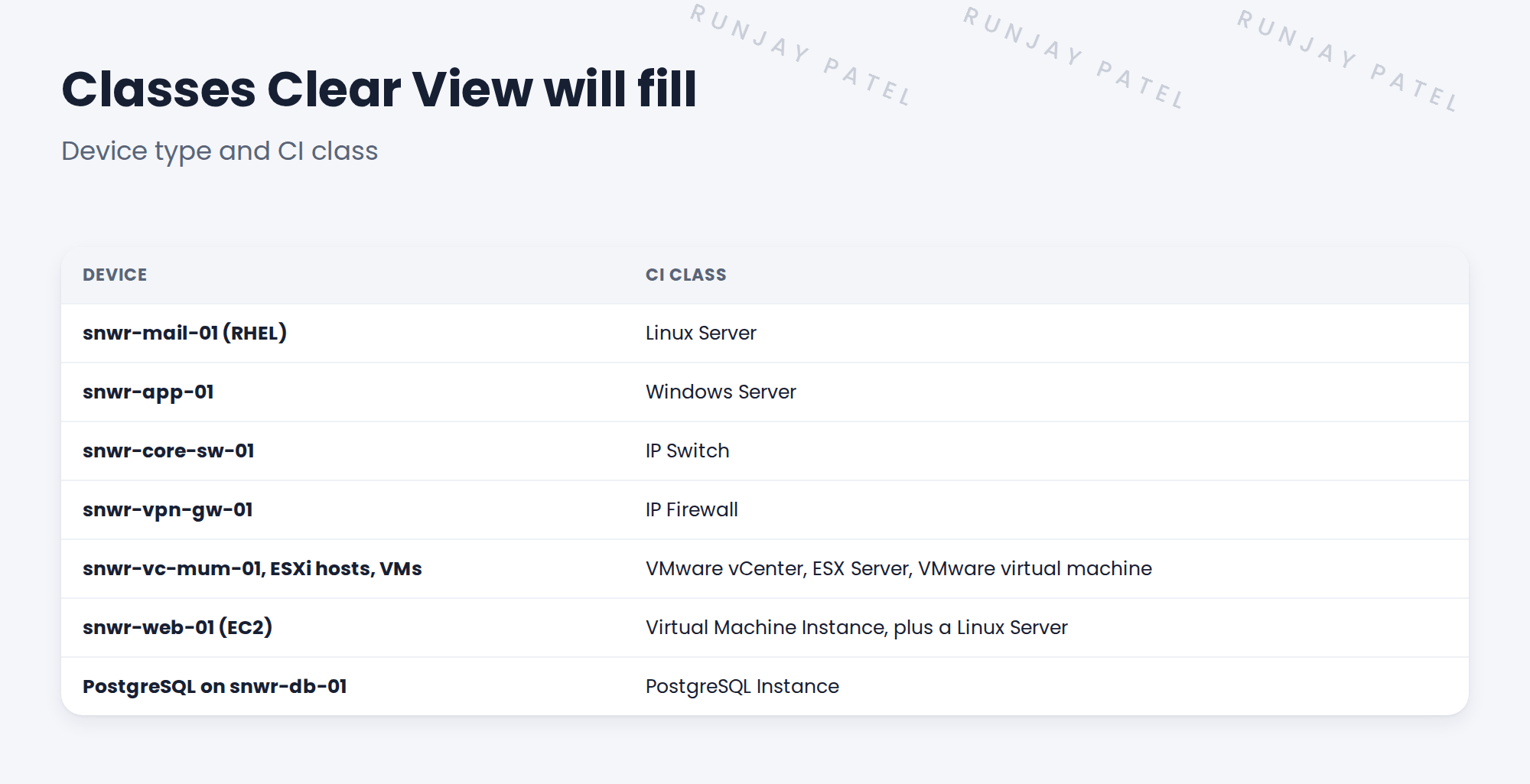
2 Why the class matters
- The class decides which fields a CI has.
- Identification rules are set per class.
- Health rules and reports work per class.
- Lists and filters, like ‘all Linux servers’, use the class.
💡 Good to know: Need a refresher? See Fundamentals › CMDB Essentials › CI Classes & Relationships for how classes work.
3 Checking the classes
Open CI Class Manager to see each class, its parent and its identification rule. Names can vary a little by release, so check your instance.
💡 Good to know: Don’t create new classes for things ServiceNow already has a class for.
4 Project Clear View: How We Implemented It
📍 Situation: Some SNWR servers sit in the generic Computer class.
🧭 Decision: List the classes Clear View will fill, and find CIs in the wrong class today.
🛠️ Steps we took:
- Listed the classes for each device type in scope.
- Checked each one in CI Class Manager on snwrdev.
- Found 11 servers saved as Computer.
- Noted them for the reclassification check later in this chapter.
✅ What we verified:
- Hana agreed the list of classes.
- The 11 misclassed servers are on the cleanup list.
📁 Evidence: The class list in the CMDB readiness report.
5 Quick recap
- Discovery fills specific classes, such as Linux Server and IP Switch.
- The class decides fields, rules, health and reports.
- Check classes in CI Class Manager.
- Find CIs in the wrong class before scanning.
6 Check yourself
Think of your answer first. Then tap to check.
1 Which class will snwr-vpn-gw-01 go into? Show answer
IP Firewall.
2 Why does the class matter? Show answer
It decides the fields, identification rules, health rules and reports.
3 Where do you check classes and their rules? Show answer
In CI Class Manager.
Nice work! You know which classes Clear View fills. 🎉
Next up: Relationships Discovery Creates
Was this lesson helpful?
Please log in to share lesson feedback.
Have a question or doubt?
Ask here and get help from instructors and fellow learners.
Only logged-in learners can post.





