


Building the Service Account and Privilege Matrix
On this page
In this lesson, you will learn:
- What a privilege matrix is
- The rights SNWR’s accounts need
- Why too few rights fail quietly
🔁 Quick look back: Last time: Building the Discovery Port Matrix. You learned how to build a port matrix for every firewall rule.
1 The Problem: Accounts With Too Little Access Fail Quietly
On a past project, the Linux account could log in, but couldn’t run some commands. The scans said ‘Completed’, but:
- Serial numbers were empty.
- Some software was missing.
👉 The fix: List exactly what each account must be able to do, and get it approved.
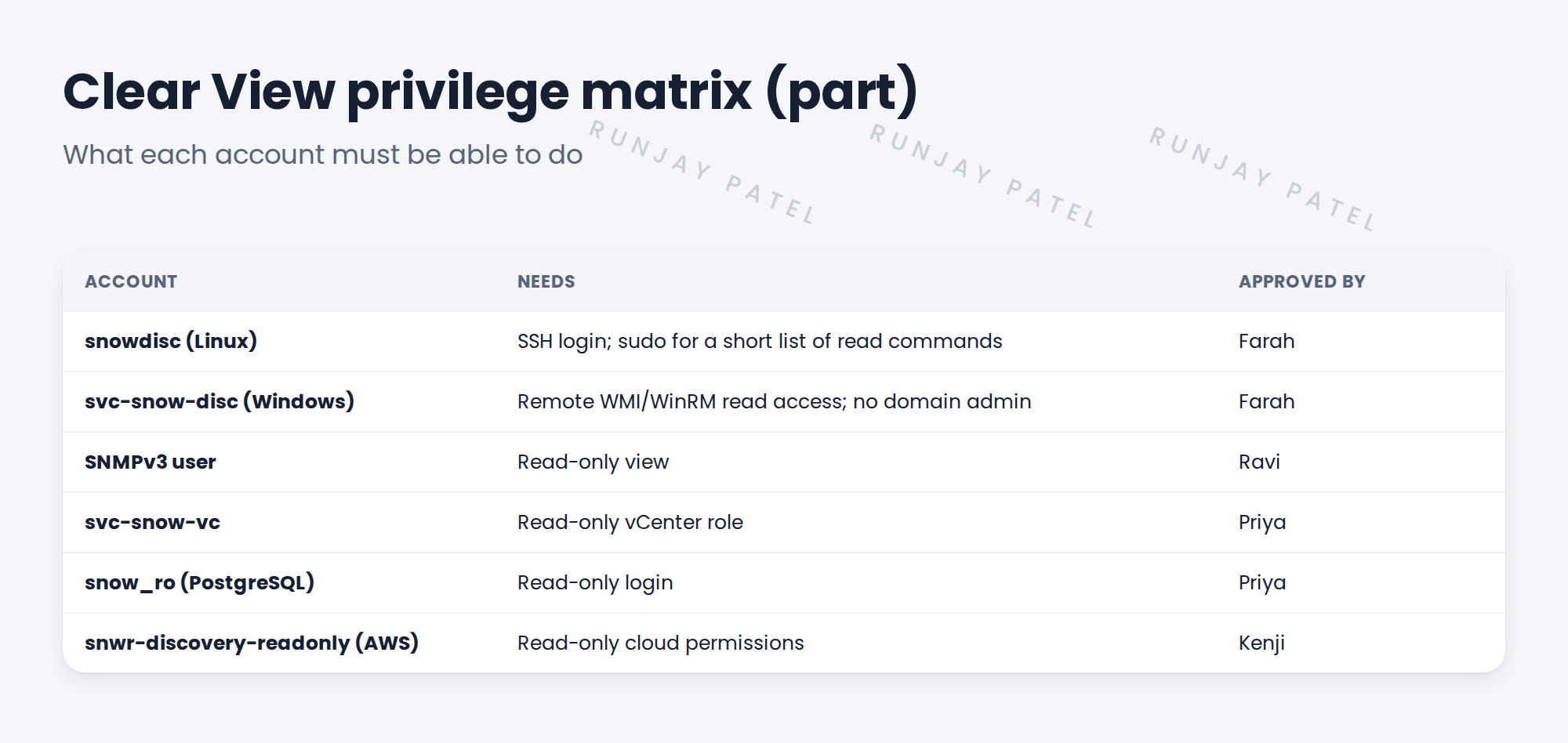
2 What goes in the matrix
- The account and its owner.
- The rights it needs, as exact as possible.
- For Linux: the commands that need sudo.
- Who approved it.
3 Finding the exact rights
Pattern Designer can list the commands a pattern runs. Use that list to build the sudo rules, instead of guessing.
💡 Good to know: Ask for a little too little, then add what the test shows is missing. It’s safer than asking for too much.
4 Project Clear View: How We Implemented It
📍 Situation: Farah wants the fewest rights possible. You need complete data.
🧭 Decision: Build the privilege matrix from the commands the patterns really run.
🛠️ Steps we took:
- Listed each account and its owner.
- Pulled the commands from the Linux and PostgreSQL patterns.
- Wrote the sudo list from those commands only.
- Sent the matrix to Farah, who approved it.
✅ What we verified:
- Every right has a reason.
- Farah approved all six accounts.
📁 Evidence: The Clear View privilege matrix. The sudo list is tested later (see Client Prerequisites › Validating Pattern Commands and sudo Permissions).
5 Quick recap
- A privilege matrix lists each account’s exact rights.
- Too few rights fail quietly, with gaps in data.
- Use the commands patterns really run.
- Get security to approve each account.
6 Check yourself
Think of your answer first. Then tap to check.
1 How can too few rights show up? Show answer
Scans complete, but fields like serial numbers or software are missing.
2 Where can you find the commands a pattern runs? Show answer
In Pattern Designer.
3 Who approved SNWR’s accounts? Show answer
Farah Siddiqui, with owners like Ravi, Priya and Kenji.
Nice work! SNWR’s account rights are exact and approved. 🎉
Next up: Getting Security Approval
Was this lesson helpful?
Please log in to share lesson feedback.
Have a question or doubt?
Ask here and get help from instructors and fellow learners.
Only logged-in learners can post.





