


IP Ranges, Range Sets and Exclusions
On this page
In this lesson, you will learn:
- Ranges, range sets and exclusions
- How to build them from the IP plan
- How to check exclusions work
🔁 Quick look back: Last time: Process Classifiers for Applications. You learned how process classifiers find applications on a server.
1 The Problem: The Exclusion List Isn’t in ServiceNow Yet
Farah signed the exclusion list. But it lives in a document. If a schedule scans 10.10.0.0/16:
- It includes 10.10.30.0/24, the building systems.
- Nothing in ServiceNow stops it.
👉 The fix: Build ranges from the IP plan, and add exclusions to every range set that could reach them.
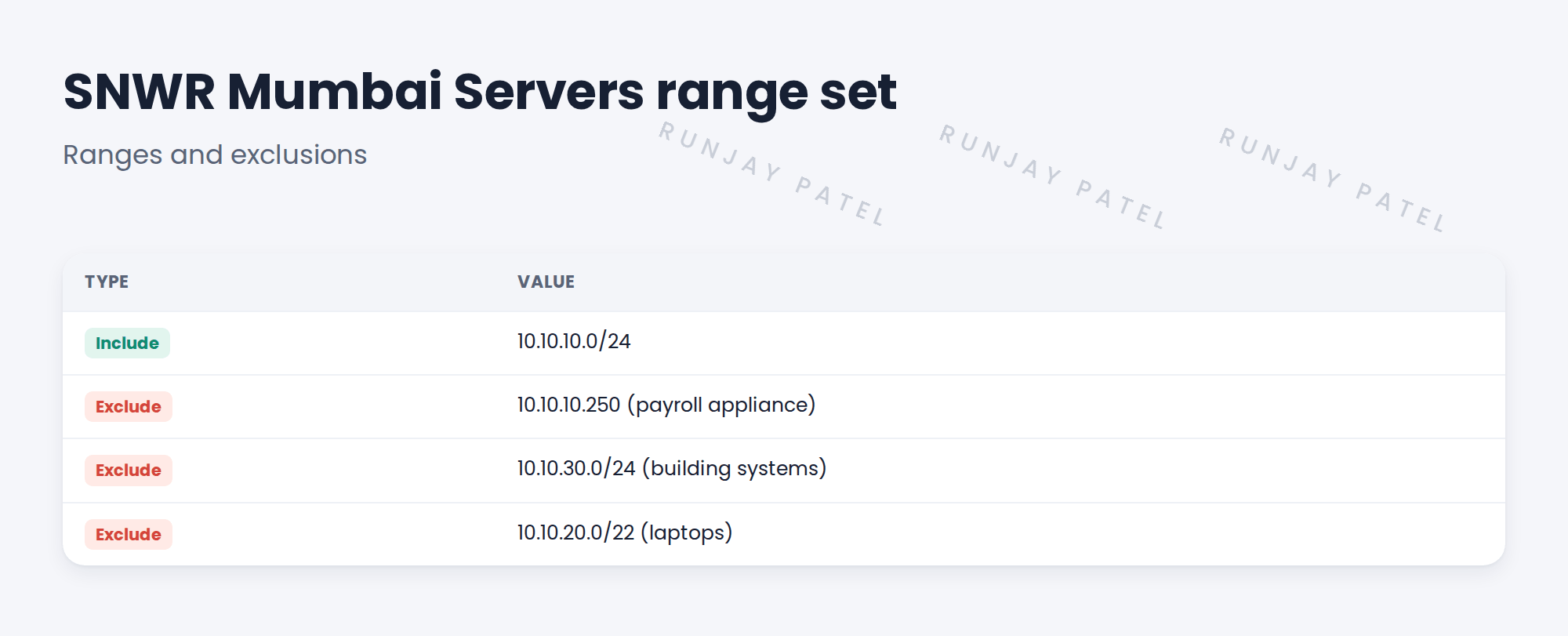
2 Ranges and range sets
Key term: IP range
A list, block or network of addresses to scan.
Key term: Range set
A named group of ranges that a schedule uses.
Key term: Exclusion
An address or range the schedule must skip.
💡 Good to know: Name range sets after the zone, like SNWR Mumbai Servers, so anyone can see what they cover.
3 Checking exclusions
- Add exclusions to the range set.
- Run the schedule in a test.
- Check the results: no excluded address should appear.
4 Project Clear View: How We Implemented It
📍 Situation: Exclusions lived only in a signed document.
🧭 Decision: Build the range sets and add every exclusion.
🛠️ Steps we took:
- Created range sets for each zone from the IP plan.
- Added the three exclusions to the Mumbai range set.
- Ran a test scan on snwrtest.
- Checked no excluded address was touched.
✅ What we verified:
- No excluded address appears in results.
- Farah reviewed the range sets.
📁 Evidence: Range sets on snwrdev and snwrtest. Exclusions are tested again as AC-09 in Quality Assurance.
5 Quick recap
- Ranges list addresses. Range sets group them.
- Exclusions skip addresses that must never be scanned.
- Name range sets after zones.
- Test that excluded addresses never appear.
6 Check yourself
Think of your answer first. Then tap to check.
1 What is a range set? Show answer
A named group of ranges that a schedule uses.
2 Which Mumbai addresses are excluded? Show answer
10.10.10.250, 10.10.30.0/24 and 10.10.20.0/22.
3 How do you prove an exclusion works? Show answer
Run a test scan and check no excluded address appears in the results.
Nice work! SNWR’s no-go areas are enforced in ServiceNow. 🎉
Next up: Creating a Discovery Schedule
Was this lesson helpful?
Please log in to share lesson feedback.
Have a question or doubt?
Ask here and get help from instructors and fellow learners.
Only logged-in learners can post.





