


Network Devices and Appliances
On this page
In this lesson, you will learn:
- What to capture about network devices
- Why SNMP version matters
- What to do with third-party devices
🔁 Quick look back: Last time: Servers and Operating Systems. You learned how to count servers by OS, and why the OS mix matters.
1 The Problem: Some Devices Aren’t SNWR’s to Scan
Ravi listed SNWR’s network devices. But then he added:
- ‘The London router is managed by our internet provider.’
- ‘Some old switches only speak SNMP v2c.’
👉 The fix: For each device, record the owner, the SNMP version and whether SNWR may scan it.
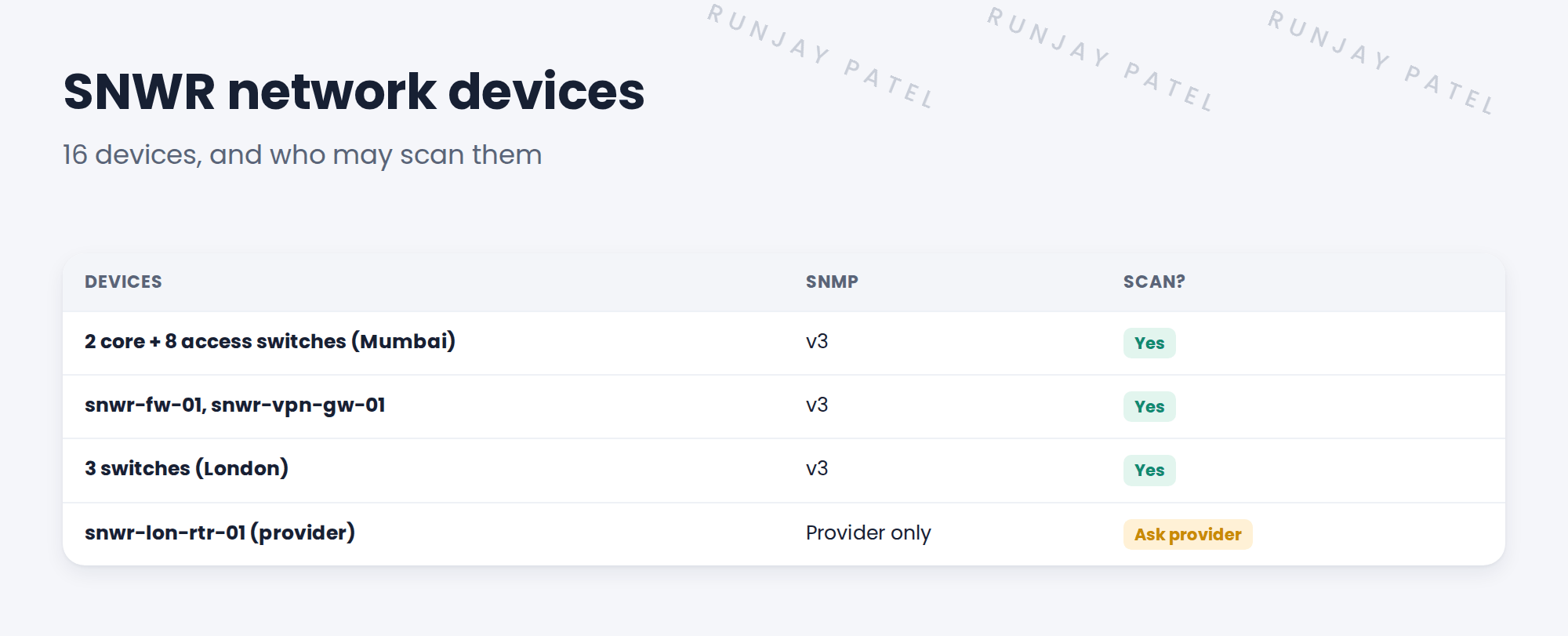
2 What to capture
- Device type and model.
- Management IP address.
- SNMP version allowed.
- Who manages it: SNWR or a third party.
- Whether a scan could affect it.
Key term: SNMP v2c
An older version that uses a ‘community string’ as a shared password. Easy to guess.
Key term: SNMP v3
A newer version with real user names, passwords and encryption. Prefer it.
3 Third-party devices
If a provider manages a device, you usually need their permission to scan it. Ask early, or leave it out.
⚠️ Heads up: Scanning a provider’s device without permission can break your client’s contract with them.
4 Project Clear View: How We Implemented It
📍 Situation: Ravi’s list had one provider-managed router and some SNMP v2c switches.
🧭 Decision: Record owner and SNMP version for each device, and agree what to scan.
🛠️ Steps we took:
- Listed all 16 devices with model, IP and SNMP version.
- Ravi upgraded the old switches to SNMPv3 in his normal maintenance.
- Oliver asked the provider about snwr-lon-rtr-01.
- Marked the router ‘scan only with provider approval’.
✅ What we verified:
- All SNWR-managed devices support SNMPv3.
- The provider agreed to read-only SNMPv3 access. The router is now in scope.
📁 Evidence: The network device section of the requirements.
5 Quick recap
- Record type, IP, SNMP version and owner for each device.
- Prefer SNMPv3 over v2c.
- Get permission before scanning third-party devices.
- Mark unclear devices ‘to confirm’.
6 Check yourself
Think of your answer first. Then tap to check.
1 Why prefer SNMPv3 over v2c? Show answer
v3 uses real user names, passwords and encryption. v2c uses an easy-to-guess community string.
2 A provider manages a router. Can you scan it? Show answer
Only with the provider’s permission.
3 How many network devices does SNWR have? Show answer
16.
Nice work! SNWR’s network devices are captured. 🎉
Next up: Virtualization, Cloud and Containers
Was this lesson helpful?
Please log in to share lesson feedback.
Have a question or doubt?
Ask here and get help from instructors and fellow learners.
Only logged-in learners can post.





