


The Project Clear View Environment
On this page
In this lesson, you will learn:
- What a network zone and a subnet are
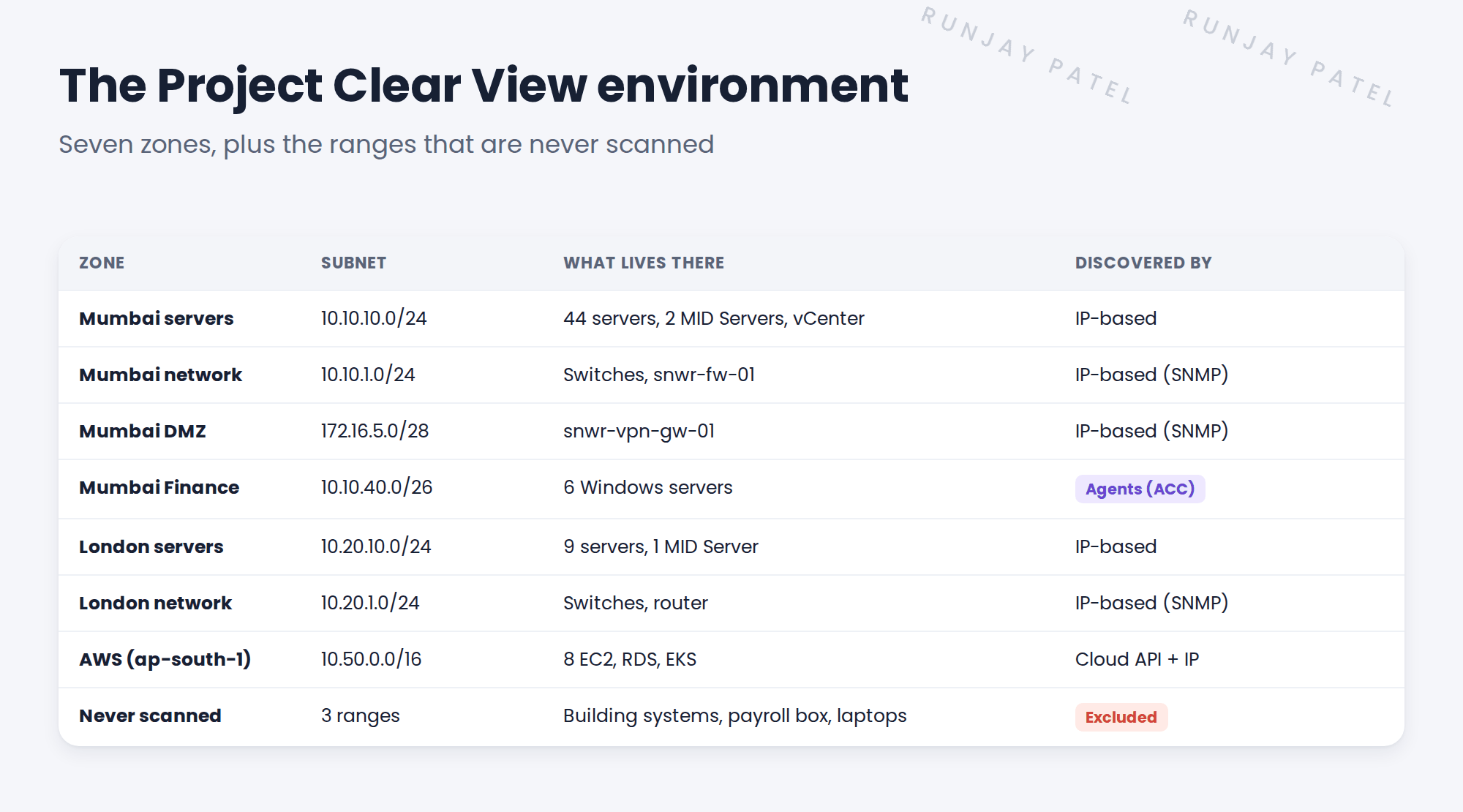
- The seven zones in SNWR’s network, and what lives in each
- Which parts of SNWR are never scanned
🔁 Quick look back: Last time: Meet the Client: SNWR and Project Clear View. You learned who SNWR is and the ten people on Clear View.
1 The Problem: You Can’t Plan Discovery Without a Map
Discovery scans networks. So before anything else, you need a map of SNWR’s networks. Today, the facts are spread out:
- Ravi knows the subnets, but they’re in his head.
- Priya knows the servers, but not their subnets.
- Kenji knows AWS, but nobody else does.
👉 The fix: Build one map: every zone, its subnet, what lives there, and how Discovery will reach it. Reuse it for the whole project.
2 Zones and subnets, in plain words
Key term: Network zone
A part of the network with its own security rules. The DMZ faces the internet, so it’s locked down.
Key term: Subnet
A block of IP addresses. 10.10.10.0/24 means 256 addresses, from 10.10.10.0 to 10.10.10.255.
Key term: Range
The addresses you tell Discovery to scan. You build ranges from subnets.
Zones matter because firewalls sit between them. A MID Server in one zone may not reach another zone. That shapes where MID Servers go.
3 What SNWR has
- 67 servers. 61 are scanned without agents. 6 in the Finance zone use agents.
- 16 network devices. Switches, one router and two firewalls, including snwr-vpn-gw-01.
- Virtual machines. vCenter snwr-vc-mum-01 runs three ESXi hosts in Mumbai.
- Cloud. One AWS account with 8 EC2 instances, one database and one Kubernetes cluster.
- Key servers you’ll meet often: snwr-mail-01 (10.10.10.21), snwr-mail-02 (10.10.10.22), snwr-db-01 (10.10.10.30) and snwr-app-01 (10.10.10.40).
⚠️ Never scan: Three ranges are never scanned: building systems (10.10.30.0/24), the payroll appliance (10.10.10.250) and user laptops (10.10.20.0/22).
4 Project Clear View: How We Implemented It
📍 Situation: The facts about SNWR’s network are spread across Ravi, Priya and Kenji.
🧭 Decision: Put everything on one map in week 1, and treat it as the single source of truth.
🛠️ Steps we took:
- Sat with Ravi for an hour and listed every zone and subnet.
- Asked Priya which servers live in which zone.
- Added Kenji’s AWS account, VPC and EKS cluster.
- Marked the three ranges that must never be scanned, in red.
✅ What we verified:
- Ravi, Priya and Kenji each signed off their part of the map.
- Nothing on the map is a guess. Unknowns are marked ‘to confirm’.
📁 Evidence: The Clear View environment map. It feeds the IP plan in Requirements Gathering and the port matrix in Client Prerequisites.
5 Quick recap
- A network zone is a part of the network with its own security rules.
- A subnet like 10.10.10.0/24 is a block of 256 addresses.
- SNWR has seven zones, 67 servers and 16 network devices.
- Three ranges are never scanned. They’re marked from day one.
6 Check yourself
Think of your answer first. Then tap to check.
1 How many addresses are in 10.10.10.0/24? Show answer
256, from 10.10.10.0 to 10.10.10.255.
2 Why do network zones matter for Discovery? Show answer
Firewalls sit between zones. A MID Server may not reach another zone, which decides where MID Servers go.
3 Which SNWR zone uses agents instead of scans? Show answer
The Mumbai Finance zone (10.10.40.0/26). It allows no inbound connections.
Nice work! You have the map you’ll use for the whole path. 🎉
Next up: Discovery Terms Every Implementer Uses
Was this lesson helpful?
Please log in to share lesson feedback.
Have a question or doubt?
Ask here and get help from instructors and fellow learners.
Only logged-in learners can post.





