


How Discovery Talks to Devices: SSH, WMI, PowerShell and SNMP
On this page
In this lesson, you will learn:
- Which protocol Discovery uses for each kind of device
- The main ports each protocol needs
- How this shapes firewall requests
🔁 Quick look back: Last time: The Four Discovery Phases. You learned the four phases of an IP-based scan.
1 The Problem: Each Device Speaks a Different Language
SNWR has Linux servers, Windows servers, switches, a vCenter and AWS. Ravi asks a fair question:
- ‘Which ports do you need to each of them?’
- ‘Is it the same for all devices?’
👉 The fix: Match every SNWR device type to the protocol and port Discovery uses.
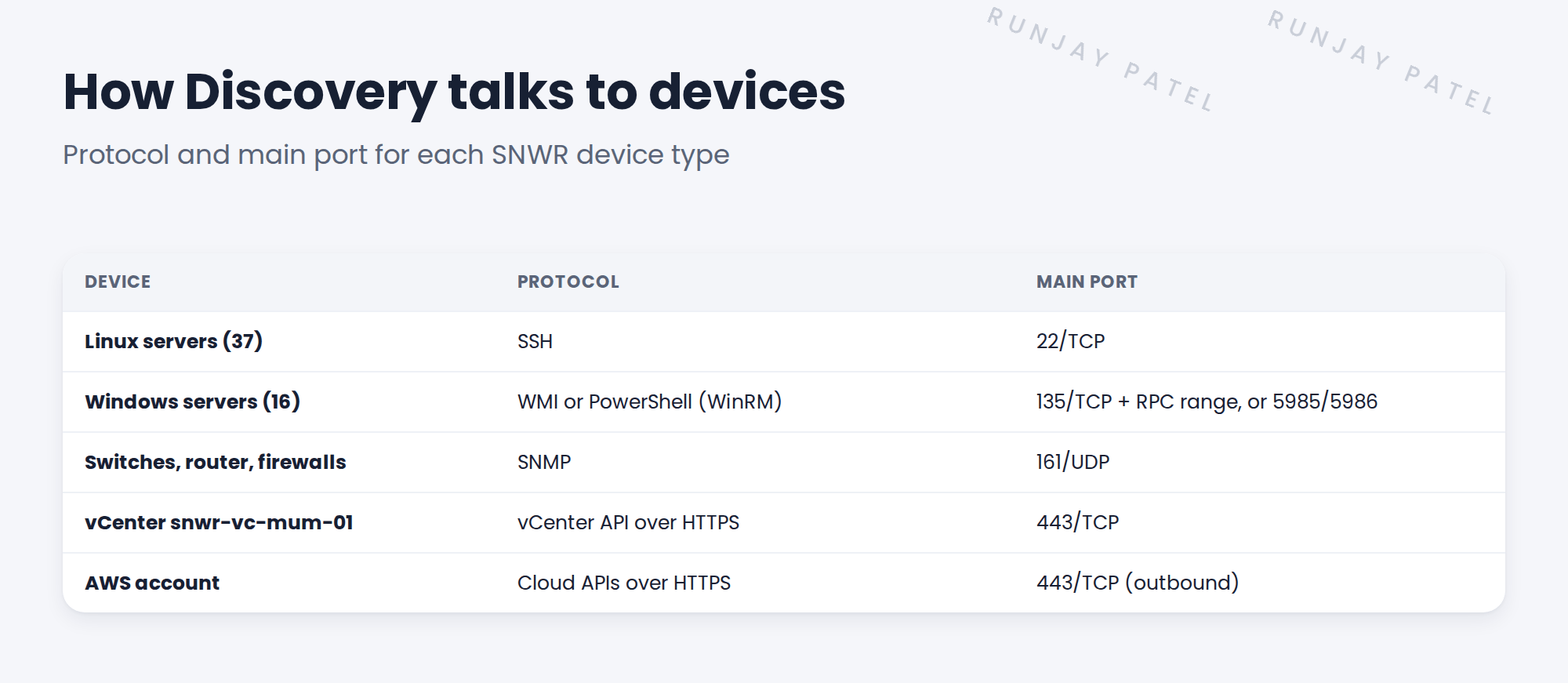
2 The protocols
Key term: SSH
Secure Shell. How Discovery logs in to Linux and Unix servers and runs commands.
Key term: WMI
Windows Management Instrumentation. The classic way to ask Windows for details.
Key term: PowerShell (WinRM)
A newer way to talk to Windows, over Windows Remote Management.
Key term: SNMP
Simple Network Management Protocol. Switches, routers and firewalls answer SNMP questions.
Key term: API
A way for programs to talk. vCenter and AWS answer Discovery through their APIs.
📝 Note: SNWR’s six Finance servers are the exception. They use agents, so the MID Server doesn’t connect in at all.
3 Why protocols matter for the project
- Each protocol needs a firewall rule from the MID Server to the devices.
- Each protocol needs its own kind of credential.
- Windows needs a Windows MID Server for WMI. That affects the MID Server design.
⚠️ Heads up: WMI uses port 135 plus a wide range of dynamic ports. Security teams often dislike this. Discuss it early.
4 Project Clear View: How We Implemented It
📍 Situation: Ravi needs to know which ports to plan for.
🧭 Decision: Map every SNWR device type to its protocol and port, and share it before the firewall requests.
🛠️ Steps we took:
- Listed each device type from the Clear View environment map.
- Wrote the protocol and main port for each.
- Flagged WMI’s dynamic ports for Farah and Ravi to discuss.
- Noted that the Finance servers need no inbound ports, because they use agents.
✅ What we verified:
- Ravi confirmed that SNMP is allowed on all network devices.
- Farah asked to prefer PowerShell (WinRM) where possible.
📁 Evidence: The protocol table, the first draft of the port matrix (see Client Prerequisites › Building the Discovery Port Matrix).
5 Quick recap
- Linux uses SSH. Windows uses WMI or PowerShell.
- Network devices use SNMP. vCenter and AWS use APIs over HTTPS.
- Every protocol needs a firewall rule and a credential.
- Raise WMI’s dynamic ports with security early.
6 Check yourself
Think of your answer first. Then tap to check.
1 Which protocol does Discovery use for Linux servers? Show answer
SSH, usually on port 22.
2 Which protocol do switches and firewalls answer? Show answer
SNMP, usually on UDP port 161.
3 Why do the Finance servers need no inbound ports? Show answer
They use agents that send data out, so the MID Server never connects in.
Nice work! You know how Discovery talks to each device. 🎉
Next up: Patterns: How Discovery Explores a Device
Was this lesson helpful?
Please log in to share lesson feedback.
Have a question or doubt?
Ask here and get help from instructors and fellow learners.
Only logged-in learners can post.





