


Building the Discovery Port Matrix
On this page
In this lesson, you will learn:
- What a port matrix is
- The columns every row needs
- SNWR’s key rows
🔁 Quick look back: Last time: Requesting MID Server Hosts. You learned how to write an exact request for MID Server hosts.
1 The Problem: ‘Open the Firewall’ Isn’t a Request
Ravi can’t act on ‘please open the firewall for Discovery’. He needs to know:
- From which server, to which targets?
- Which protocol and port?
- Why, and for how long?
👉 The fix: Build a port matrix: one row per rule, with every detail.
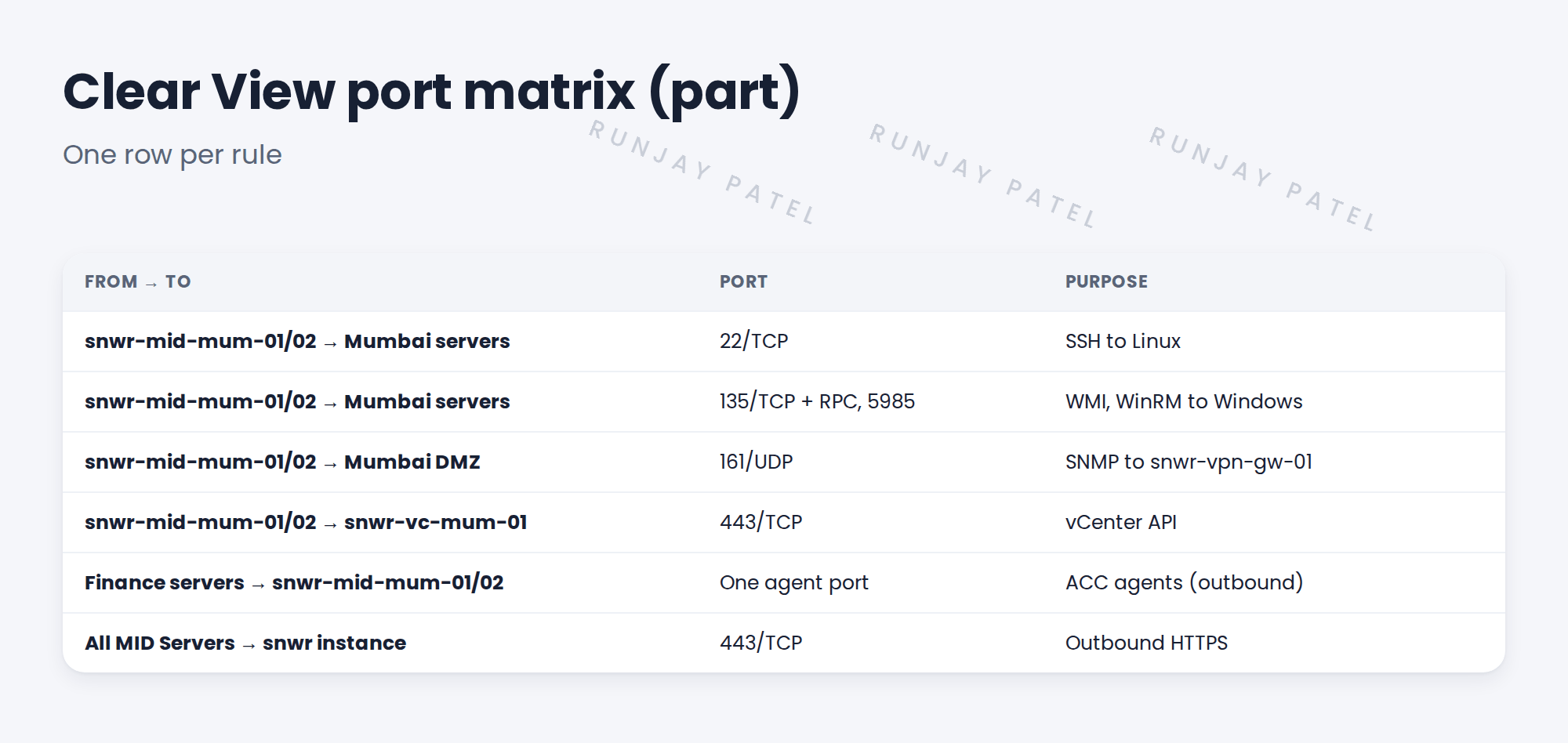
2 The columns
| Column | Example |
|---|---|
| Source | snwr-mid-mum-01 |
| Target | Mumbai DMZ, 172.16.5.0/28 |
| Protocol and port | SNMP, 161/UDP |
| Direction | Outbound from the MID Server |
| Purpose | Discover snwr-vpn-gw-01 |
| Owner | Ravi |
| Status | Requested, approved, open, tested |
3 Tips
- Start from the protocol table and the MID Server design.
- Group rules by zone to make approval easier.
- Keep status per row, up to ‘tested’.
⚠️ Heads up: WMI needs port 135 and a range of dynamic ports. Agree the range with Ravi and Farah, or use WinRM where possible.
4 Project Clear View: How We Implemented It
📍 Situation: Ravi needs exact rules to raise firewall changes.
🧭 Decision: Build the port matrix from the design, one row per rule.
🛠️ Steps we took:
- Listed every MID Server and the zones it reaches.
- Added protocol, port, direction and purpose for each.
- Added the one outbound port for Finance agents.
- Sent it to Ravi and Oliver, who raised the changes.
✅ What we verified:
- Ravi accepted every row.
- Each row now tracks status up to ‘tested’.
📁 Evidence: The Clear View port matrix. Each row is tested later (see Client Prerequisites › Validating Network Connectivity Before Discovery).
5 Quick recap
- A port matrix has one row per firewall rule.
- Each row: source, target, protocol, port, direction, purpose, owner, status.
- Build it from the protocol table and MID design.
- Track each row up to ‘tested’.
6 Check yourself
Think of your answer first. Then tap to check.
1 Name five columns of a port matrix. Show answer
Any five of: source, target, protocol, port, direction, purpose, owner, status.
2 Which port does SNMP use? Show answer
161/UDP.
3 Which way do the Finance agents connect? Show answer
Outbound, from the Finance servers to the Mumbai MID cluster.
Nice work! Ravi has an exact firewall request. 🎉
Next up: Building the Service Account and Privilege Matrix
Was this lesson helpful?
Please log in to share lesson feedback.
Have a question or doubt?
Ask here and get help from instructors and fellow learners.
Only logged-in learners can post.





