


Designing the Credential Strategy
On this page
In this lesson, you will learn:
- Why shared admin accounts are a bad idea
- SNWR’s six Discovery accounts
- Owners and rotation
🔁 Quick look back: Last time: Choosing the Discovery Method for Each Zone. You learned how SNWR chose a discovery method for each zone.
1 The Problem: Shared Admin Accounts Are a Security Risk
Priya first offered a domain admin account ‘to make it easy’. But:
- It could change any Windows server.
- It breaks Farah’s no-domain-admin rule.
- If it leaked, all of SNWR would be exposed.
👉 The fix: Use one read-only account per technology, each with an owner and a rotation date.
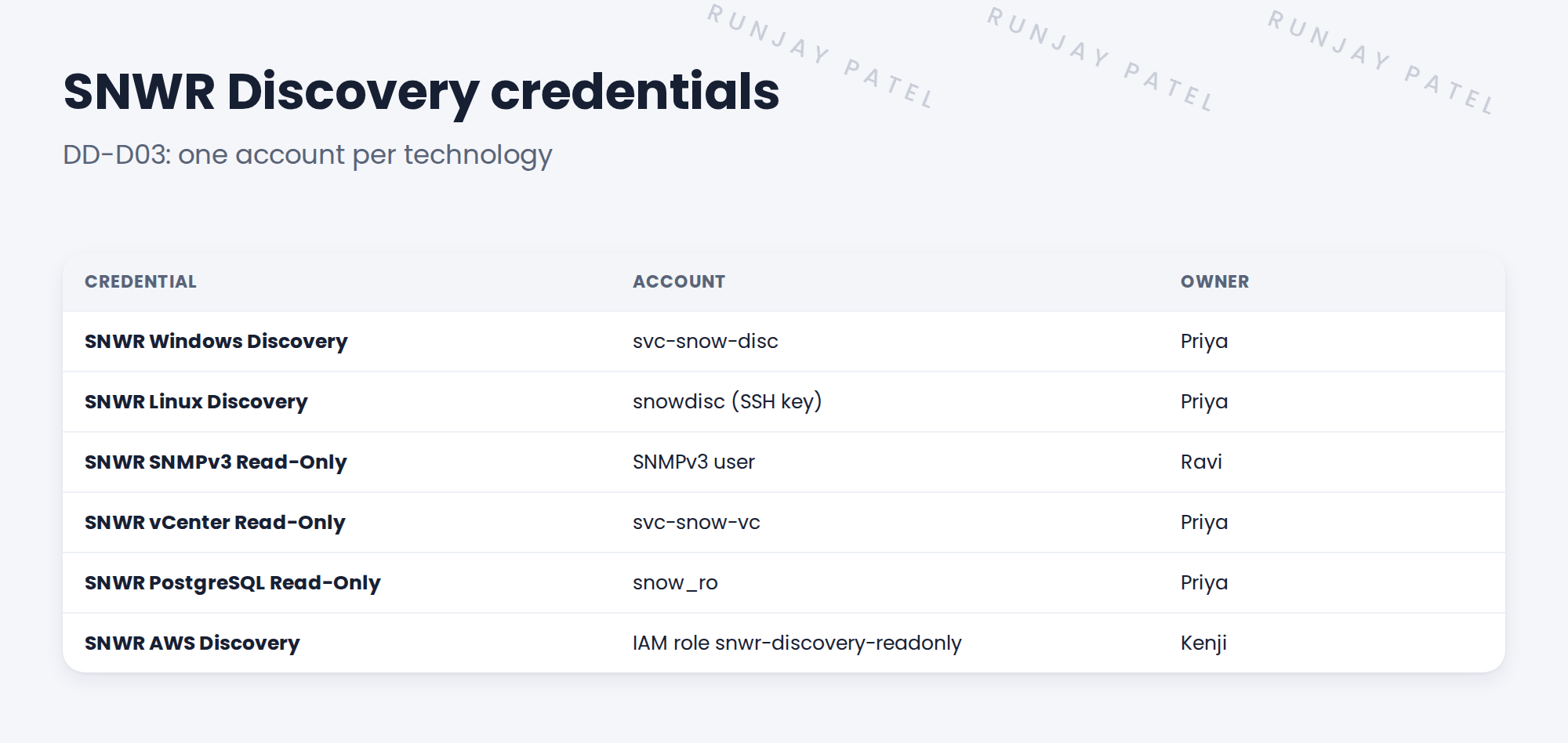
2 Design rules
- One account per technology, never shared with people.
- Read-only rights, as few as possible.
- An owner for each account.
- Rotation every 90 days, with a plan to update ServiceNow.
⭐ Remember: An account that can change things is an account that can break things.
3 Linux: key or password?
SNWR chose an SSH key for Linux. Keys are harder to guess and easy to rotate. The sudo list says exactly which commands may run with extra rights.
4 Project Clear View: How We Implemented It
📍 Situation: Priya offered a domain admin account.
🧭 Decision: Design six read-only accounts, one per technology.
🛠️ Steps we took:
- Listed the technologies in scope.
- Defined one account each, with owner and rights.
- Chose an SSH key for Linux, with a short sudo list.
- Wrote DD-D03 and sent it to Farah.
✅ What we verified:
- Farah approved all six accounts.
- Priya agreed to create them in week 4.
📁 Evidence: DD-D03 in the design document.
5 Quick recap
- Never use shared or admin accounts for Discovery.
- One read-only account per technology.
- Each account has an owner and a rotation date.
- SNWR uses an SSH key with a short sudo list for Linux.
6 Check yourself
Think of your answer first. Then tap to check.
1 Why not use a domain admin account? Show answer
It could change any server, breaks security rules, and exposes everything if it leaks.
2 How many Discovery accounts does SNWR use? Show answer
Six, one per technology.
3 Who owns the AWS role? Show answer
Kenji Watanabe.
Nice work! SNWR’s credential design is approved. 🎉
Next up: Designing Schedules and Scan Windows
Was this lesson helpful?
Please log in to share lesson feedback.
Have a question or doubt?
Ask here and get help from instructors and fellow learners.
Only logged-in learners can post.





