


Relationships Discovery Creates
On this page
In this lesson, you will learn:
- The relationships Discovery creates
- Why relationships matter
- What Discovery doesn’t link
🔁 Quick look back: Last time: CI Classes Discovery Will Populate. You learned which CI classes Discovery fills and why the class matters.
1 The Problem: A CI Without Links Can’t Show Impact
In SNWR’s CMDB, snwr-mail-02 stands alone. So when Mei’s CAB looks at a change:
- It can’t see which software runs on it.
- It can’t see which host it runs on.
👉 The fix: Know which relationships Discovery creates, and which need another tool.
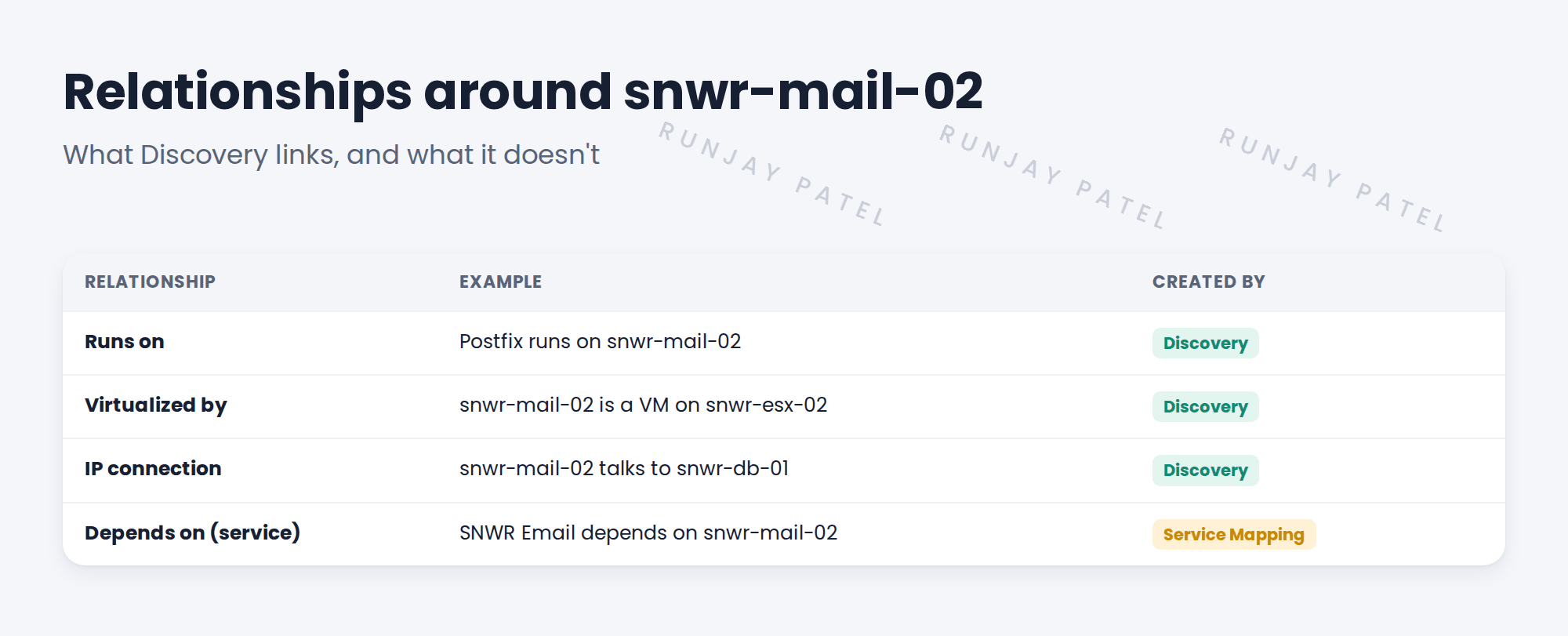
2 What Discovery links
- Software to the server it runs on.
- Virtual machines to their hosts.
- Servers to switch ports.
- Network connections between processes on different servers.
💡 Good to know: Need a refresher? See Fundamentals › CMDB Essentials › CI Classes & Relationships for relationship basics.
3 What it doesn’t link
Discovery doesn’t know which business service a server supports. Linking SNWR Email to its servers is Service Mapping, or manual work.
📝 Note: SNWR Email’s service links were set by hand in ITSM Implementation. Discovery won’t remove them.
4 Project Clear View: How We Implemented It
📍 Situation: Mei wants to see change impact on snwr-mail-02.
🧭 Decision: Explain which links Discovery will add, and which stay manual.
🛠️ Steps we took:
- Listed the relationships Discovery will create for SNWR’s server types.
- Showed Mei an example of Runs on and Virtualized by.
- Confirmed that service links stay as set in ITSM.
- Added relationship checks to the acceptance criteria.
✅ What we verified:
- Mei understands what she’ll see after go-live.
- AC-04 now covers expected relationships.
📁 Evidence: The relationships section of the CMDB readiness report.
5 Quick recap
- Discovery links software to servers, VMs to hosts and servers to network ports.
- Relationships show the impact of changes.
- Service links, like SNWR Email to its servers, need Service Mapping or manual work.
- Check expected relationships during testing.
6 Check yourself
Think of your answer first. Then tap to check.
1 Which relationship links Postfix to snwr-mail-02? Show answer
Runs on.
2 Does Discovery link SNWR Email to its servers? Show answer
No. That’s Service Mapping or manual work.
3 Why do relationships matter for change? Show answer
They show what a change could affect.
Nice work! You know which links Discovery builds. 🎉
Next up: Assessing the Existing CMDB Before Discovery
Was this lesson helpful?
Please log in to share lesson feedback.
Have a question or doubt?
Ask here and get help from instructors and fellow learners.
Only logged-in learners can post.





