


Showing the Value and Closing the Project
On this page
In this lesson, you will learn:
- How to show value
- What goes in a closure report
- How gate 6 is signed
🔁 Quick look back: Last time: Knowledge Transfer Sessions. You learned how four KT sessions prepared Hana’s team.
1 The Problem: Anita Must Show the Board What SNWR Got
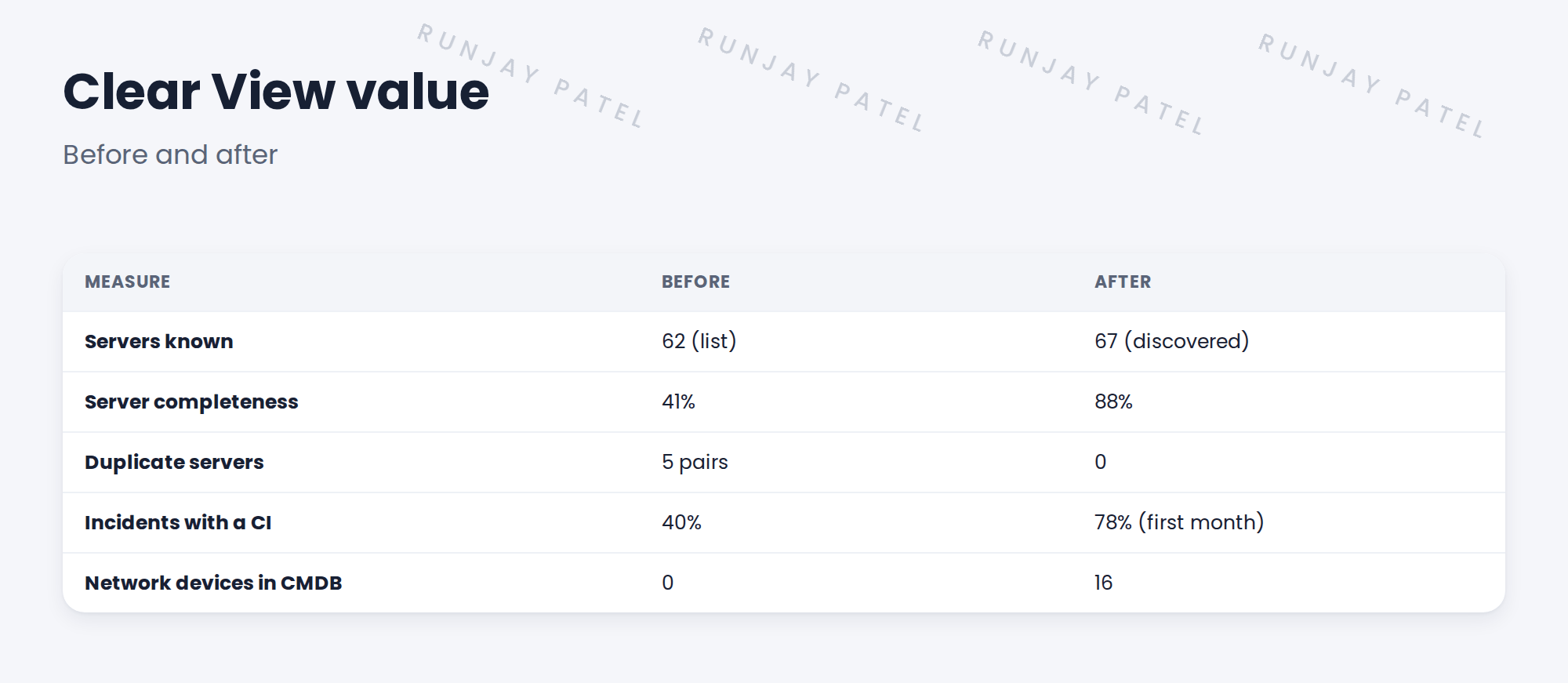
Anita promised the board better data. At closure she needs:
- Numbers, not opinions.
- A clear before and after.
👉 The fix: Write a closure report with before-and-after numbers and sign gate 6.
2 The closure report
- What was delivered, against the SOW.
- Acceptance criteria results.
- Before-and-after numbers.
- Open items and owners.
- Recommended next steps.
3 Closing
⭐ Remember: Gate 6 is the formal end. After it, support moves to the client’s team and normal change.
4 Project Clear View: How We Implemented It
📍 Situation: Week 12: handover time.
🧭 Decision: Write the closure report and ask Anita to sign gate 6.
🛠️ Steps we took:
- Collected the numbers from CMDB Health and the dashboard.
- Showed each acceptance criterion as met.
- Listed two open items with owners.
- Anita signed gate 6.
✅ What we verified:
- All twelve acceptance criteria met.
- Gate 6 signed.
📁 Evidence: The Clear View closure report (gate 6).
5 Quick recap
- Show value with before-and-after numbers.
- Report against the SOW and acceptance criteria.
- List open items with owners.
- Gate 6 formally closes the project.
6 Check yourself
Think of your answer first. Then tap to check.
1 What was SNWR’s server completeness after Clear View? Show answer
88%.
2 What happened to incidents with a CI? Show answer
They rose from 40% to 78% in the first month.
3 Who signed gate 6? Show answer
Anita Rao.
Nice work! Project Clear View is closed. 🎉
Next up: Next Steps: Service Mapping, Laptops and Certificates
Was this lesson helpful?
Please log in to share lesson feedback.
Have a question or doubt?
Ask here and get help from instructors and fellow learners.
Only logged-in learners can post.





