


Choosing the Schedule Type
On this page
In this lesson, you will learn:
- The main schedule types
- What each one does
- SNWR’s schedule types
🔁 Quick look back: Last time: Creating a Discovery Schedule. You learned the parts of a Discovery schedule and how to create one.
1 The Problem: One Schedule Type Doesn’t Fit Every Job
SNWR needs full server details nightly. But it also wants to find unknown devices, without logging in to them. One type can’t do both well.
- Full scans take longer.
- A quick sweep doesn’t collect details.
👉 The fix: Choose the type that matches what each schedule is for.
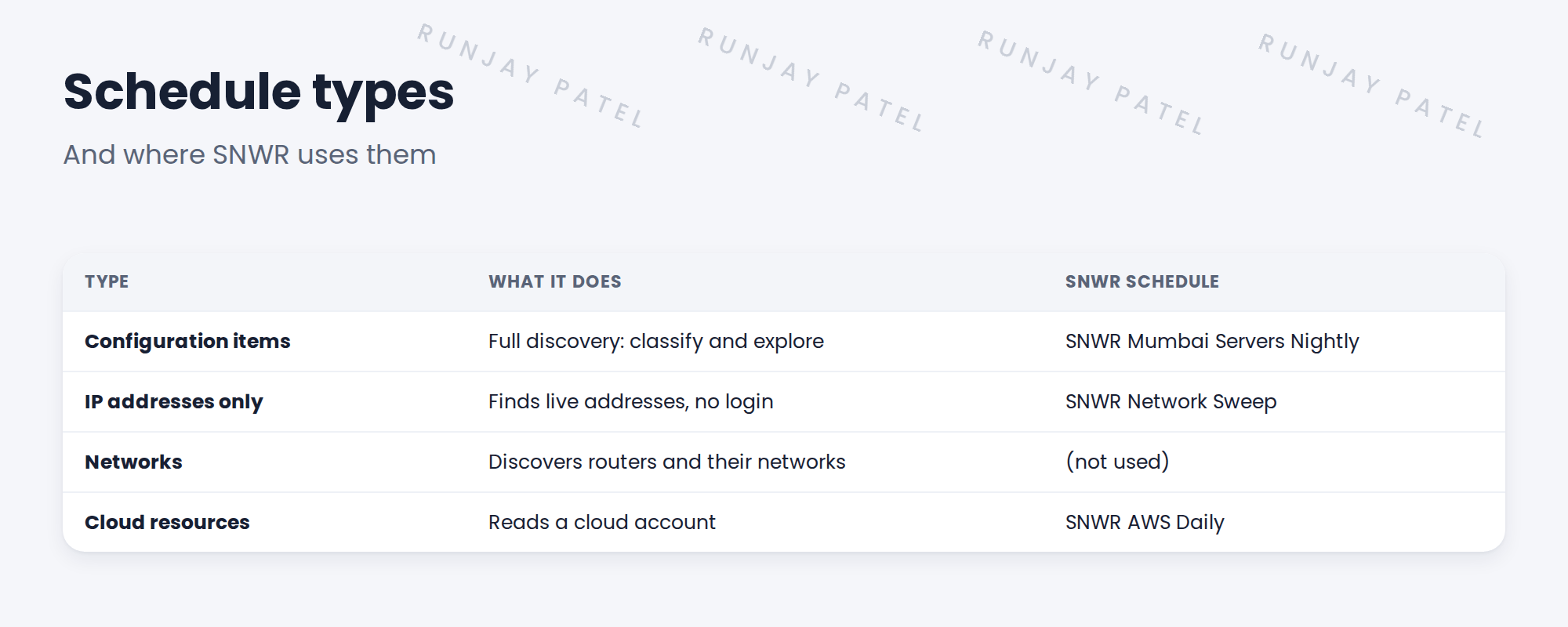
2 The types
Key term: Configuration items
Full discovery. Scans, classifies, identifies and explores.
Key term: IP addresses only
Finds which addresses answer, without logging in.
Key term: Networks
Finds routers and the networks they know about.
Key term: Cloud resources
Discovers a cloud account through its APIs.
3 Choosing
- Need details for the CMDB? Configuration items.
- Just want to see what’s out there? IP addresses only.
- Cloud account? Cloud resources.
4 Project Clear View: How We Implemented It
📍 Situation: SNWR wanted both nightly details and a monthly look for unknown devices.
🧭 Decision: Use Configuration items for nightly scans and IP addresses only for the sweep.
🛠️ Steps we took:
- Kept SNWR Mumbai Servers Nightly as Configuration items.
- Created SNWR Network Sweep as IP addresses only.
- Set SNWR Network Weekly as Configuration items for network devices.
- Planned SNWR AWS Daily as Cloud resources.
✅ What we verified:
- Each schedule’s type matches its job.
- The sweep finishes quickly.
📁 Evidence: Schedule types recorded in the migration matrix.
5 Quick recap
- Configuration items: full discovery.
- IP addresses only: find live addresses.
- Cloud resources: read a cloud account.
- Match the type to the job.
6 Check yourself
Think of your answer first. Then tap to check.
1 Which type does a full nightly server scan use? Show answer
Configuration items.
2 Which type finds unknown devices without logging in? Show answer
IP addresses only.
3 Which type does SNWR AWS Daily use? Show answer
Cloud resources.
Nice work! Each SNWR schedule has the right type. 🎉
Next up: Quick Discovery for One Device
Was this lesson helpful?
Please log in to share lesson feedback.
Have a question or doubt?
Ask here and get help from instructors and fellow learners.
Only logged-in learners can post.





