


Designing Schedules and Scan Windows
On this page
In this lesson, you will learn:
- What a schedule design covers
- How to choose scan times
- SNWR’s schedules
🔁 Quick look back: Last time: Designing the Credential Strategy. You learned how SNWR designed one read-only account per technology.
1 The Problem: Scans in Business Hours Worry Everyone
If scans run during the day:
- Users may notice slow networks.
- Security alerts may fire during working hours.
- Farah’s rule says 22:00 to 06:00 only.
👉 The fix: Plan each schedule inside approved windows, using each site’s local time.
2 What to decide
- What each schedule scans.
- When it runs, in local time.
- How long it may run.
- Which MID Servers it uses.
3 Choosing times
- Use the site’s local time zone.
- Stay inside the security window.
- Align network scans with maintenance windows.
- Leave gaps so schedules don’t overlap on the same MID Server.
💡 Good to know: Need a refresher? See ITSM Implementation › Change Risk › Maintenance Windows and Blackout Schedules for SNWR’s maintenance windows.
4 Project Clear View: How We Implemented It
📍 Situation: Farah allows scans only from 22:00 to 06:00.
🧭 Decision: Place every schedule inside that window, by site.
🛠️ Steps we took:
- Listed what needs scanning and how often.
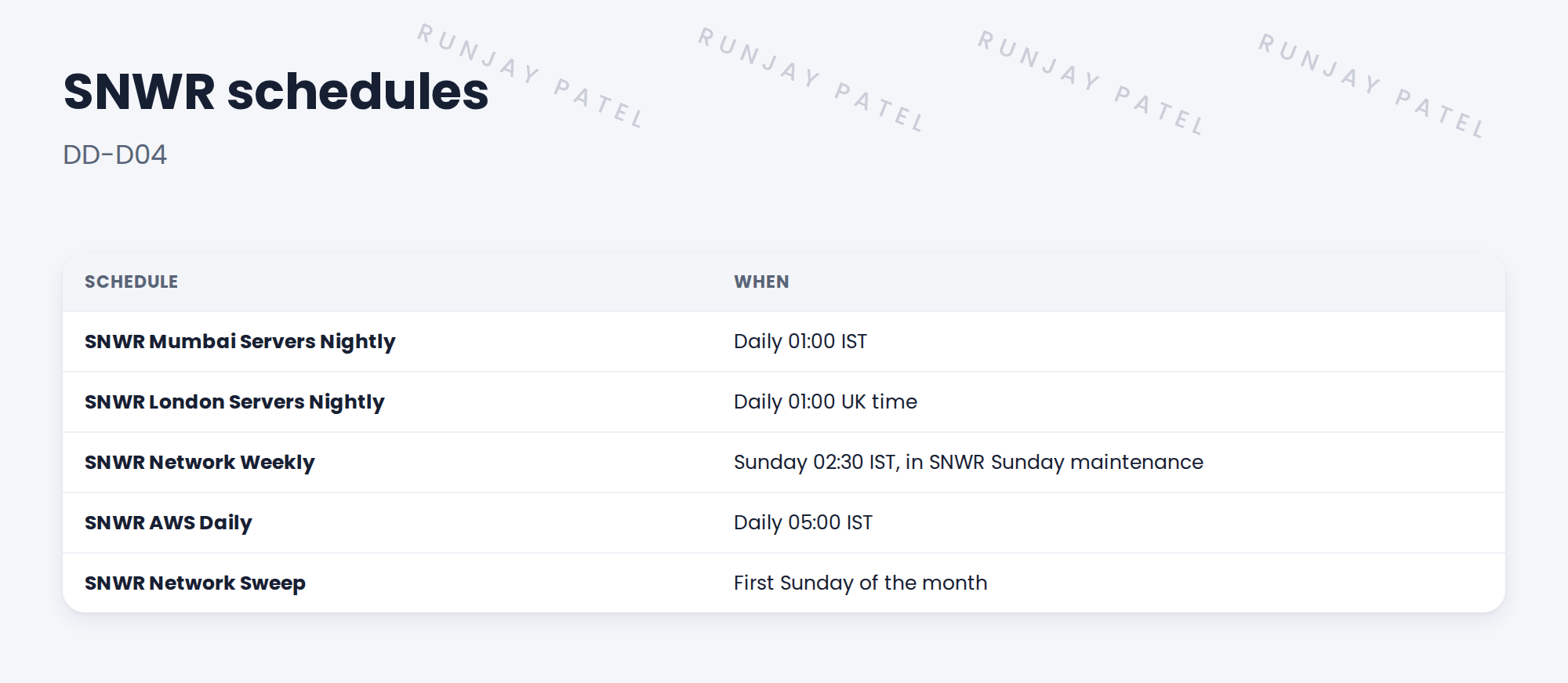
- Set server scans at 01:00 local time for each site.
- Put network scans in SNWR Sunday maintenance.
- Wrote DD-D04 with run limits.
✅ What we verified:
- All schedules fit Farah’s window.
- No two big schedules share a MID Server at the same time.
📁 Evidence: DD-D04 in the design document.
5 Quick recap
- Plan what, when, how long and which MID Server for each schedule.
- Use local time and stay inside the security window.
- Align network scans with maintenance windows.
- Avoid overlaps on the same MID Server.
6 Check yourself
Think of your answer first. Then tap to check.
1 When does SNWR Mumbai Servers Nightly run? Show answer
Daily at 01:00 IST.
2 Why run network scans in SNWR Sunday maintenance? Show answer
It’s an agreed window when network work is expected.
3 Why use each site’s local time? Show answer
So scans stay inside that site’s quiet hours.
Nice work! SNWR’s scan times are designed. 🎉
Next up: Designing CMDB and Identification Decisions
Was this lesson helpful?
Please log in to share lesson feedback.
Have a question or doubt?
Ask here and get help from instructors and fellow learners.
Only logged-in learners can post.





