


Roles and the Discovery Admin Team
On this page
In this lesson, you will learn:
- Which roles Discovery uses
- How to set up the admin team
- Least privilege for operations
🔁 Quick look back: Last time: Discovery Dashboards and KPIs. You learned how the SNWR Discovery Health dashboard shows KPIs.
1 The Problem: Too Many People Have Discovery Admin
During the project, several people got Discovery admin rights. After handover:
- Anyone could change a schedule.
- Nobody is clearly responsible.
👉 The fix: Create one admin team, give roles through groups, and remove extra access.
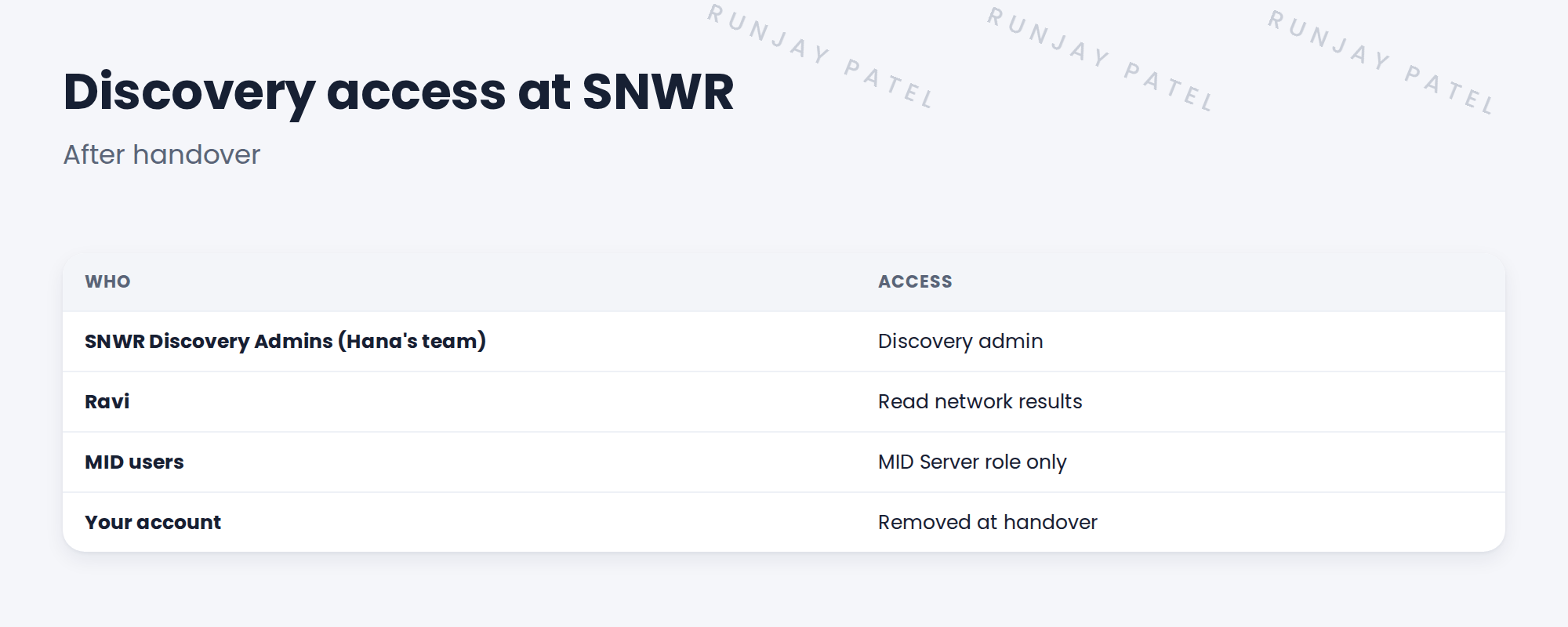
2 Roles
- Discovery admin: runs and changes Discovery.
- MID Server role: only for MID users.
- Read access for those who need results.
💡 Good to know: Need a refresher? See Fundamentals › User Administration › Roles & Role Inheritance for role basics.
3 Least privilege
- Give roles through groups, not to people directly.
- Remove project access at handover.
- Review membership each quarter.
4 Project Clear View: How We Implemented It
📍 Situation: Five people had Discovery admin from the project.
🧭 Decision: Move access into one group and remove the rest.
🛠️ Steps we took:
- Created SNWR Discovery Admins with Hana’s team.
- Gave the group the Discovery admin role.
- Removed direct admin from others, including your own account.
- Gave Ravi read access to network results.
✅ What we verified:
- Only the admin group can change Discovery.
- Your account has no access after handover.
📁 Evidence: Access changes recorded in the handover checklist.
5 Quick recap
- Give roles through groups.
- One admin team owns Discovery.
- MID users keep only their role.
- Remove project access at handover.
6 Check yourself
Think of your answer first. Then tap to check.
1 Which group runs Discovery at SNWR? Show answer
SNWR Discovery Admins.
2 What happens to your access at handover? Show answer
It’s removed.
3 Why give roles through groups? Show answer
It’s easier to manage and review.
Nice work! SNWR’s Discovery access is clean. 🎉
Next up: Keeping Pattern Content Up to Date
Was this lesson helpful?
Please log in to share lesson feedback.
Have a question or doubt?
Ask here and get help from instructors and fellow learners.
Only logged-in learners can post.





