


How Discovery Works: The Big Picture
On this page
In this lesson, you will learn:
- The path of one scan, step by step
- Why the MID Server only needs outbound connections
- What the ECC queue does
🔁 Quick look back: Last time: What Discovery Finds, and What It Doesn’t. You learned what Discovery finds, and what it can’t know.
1 The Problem: Farah Asks How Scanning Works
Farah Siddiqui leads security at SNWR. Before she approves anything, she asks:
- ‘Does ServiceNow connect into our network from the internet?’
- ‘Who talks to our servers?’
- ‘Where do the results go?’
👉 The fix: Walk her through one scan, step by step, in plain words.
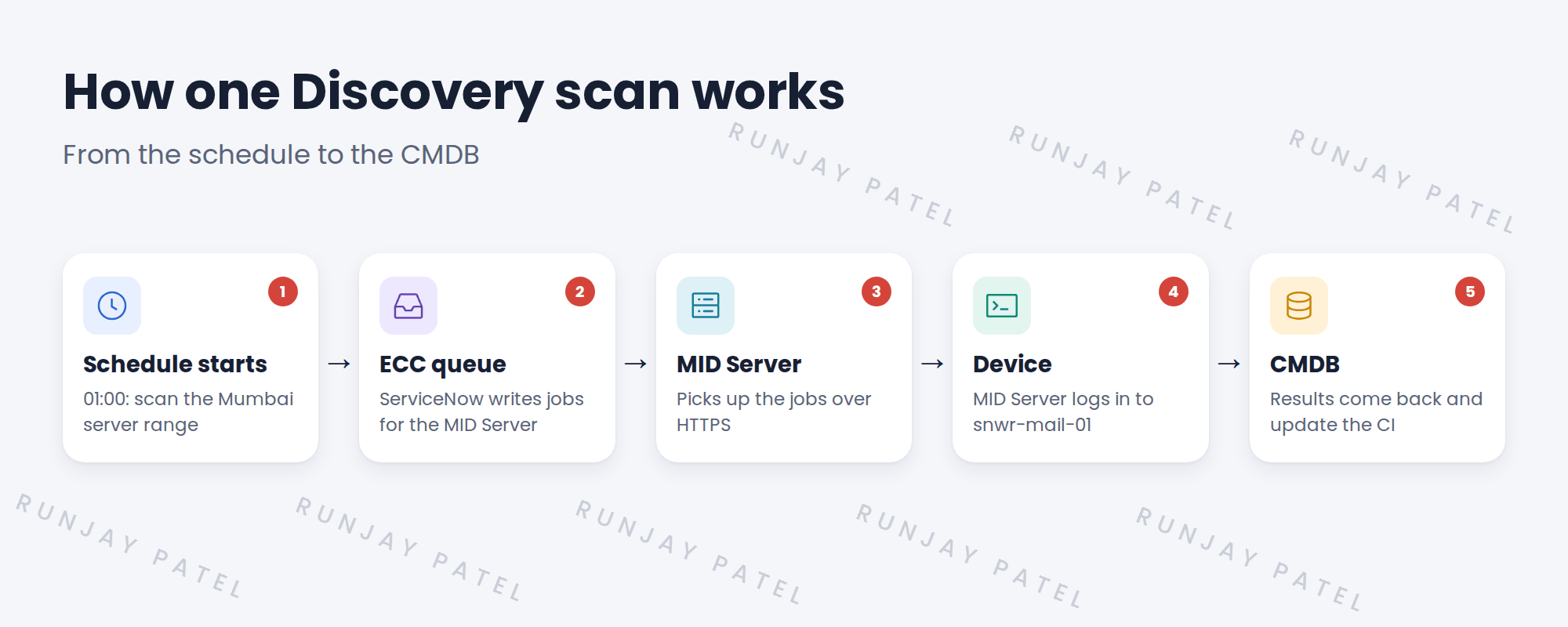
2 One scan, step by step
- A schedule starts at 01:00 and lists the addresses to scan.
- ServiceNow writes jobs into the ECC queue (External Communication Channel).
- The MID Server inside SNWR’s network asks ServiceNow for work, and gets the jobs.
- The MID Server connects to snwr-mail-01 and runs the checks.
- It sends the results back to the ECC queue. ServiceNow processes them and updates the CMDB.
⭐ Remember: The MID Server always starts the conversation. ServiceNow never connects into SNWR’s network. The MID Server only needs outbound HTTPS to the instance.
3 Why this design matters
- SNWR doesn’t open any inbound firewall ports from the internet.
- Passwords are used only by the MID Server, inside SNWR’s network.
- If the MID Server is down, jobs wait in the ECC queue until it’s back.
💡 Good to know: Need a refresher? See Fundamentals › Integration Basics › MID Server Basics for what a MID Server is.
4 Project Clear View: How We Implemented It
📍 Situation: Farah won’t approve scans until she understands the traffic.
🧭 Decision: Explain one real scan of snwr-mail-01, and show where each connection goes.
🛠️ Steps we took:
- Drew the five steps on one page, with arrows showing each connection’s direction.
- Showed that the only link to the internet is outbound HTTPS from the MID Server to snwr.
- Listed the connections from the MID Server to servers: SSH for Linux, WMI for Windows, SNMP for network devices.
- Walked Farah through it in a 20-minute call.
✅ What we verified:
- Farah confirmed: no inbound internet connections are needed.
- She asked for the full list of ports later. You added it to the plan.
📁 Evidence: The one-page ‘How Discovery works’ explainer, used again at kickoff. The port list becomes the port matrix (see Client Prerequisites › Building the Discovery Port Matrix).
5 Quick recap
- A schedule creates jobs in the ECC queue.
- The MID Server picks up jobs, talks to the device and sends results back.
- The MID Server only needs outbound HTTPS to ServiceNow.
- Results are processed and update the CMDB.
6 Check yourself
Think of your answer first. Then tap to check.
1 Does ServiceNow connect into SNWR’s network to run a scan? Show answer
No. The MID Server inside SNWR’s network connects out to ServiceNow and asks for work.
2 What is the ECC queue for? Show answer
It holds jobs for the MID Server and the results it sends back.
3 What happens if the MID Server is down at 01:00? Show answer
The jobs wait in the ECC queue until the MID Server is back.
Nice work! You can explain a Discovery scan to a security lead. 🎉
Next up: The Four Discovery Phases
Was this lesson helpful?
Please log in to share lesson feedback.
Have a question or doubt?
Ask here and get help from instructors and fellow learners.
Only logged-in learners can post.





