


How Discovery Selects and Uses Credentials
On this page
In this lesson, you will learn:
- Where credentials are stored
- How Discovery picks a credential
- How passwords stay protected
🔁 Quick look back: Last time: MID Server Health, Upgrades and Operations. You learned how to watch MID health and handle upgrades.
1 The Problem: Discovery Tries the Wrong Credential First
In an early test, Discovery tried the Windows credential on Linux servers first. It worked in the end, but:
- Each server took longer.
- Failed logins showed up in Farah’s security logs.
👉 The fix: Understand how Discovery picks credentials, and set them up so it picks well.
2 Where credentials live
Credentials are records on the instance. Passwords and keys are stored encrypted. The MID Server gets them only when it needs them.
Key term: Credential type
The kind of login, such as Windows, SSH key or SNMPv3.
Key term: Order
A number that decides which credential of a type is tried first.
Key term: Credential affinity
Discovery remembers which credential worked for a device, and tries it first next time.
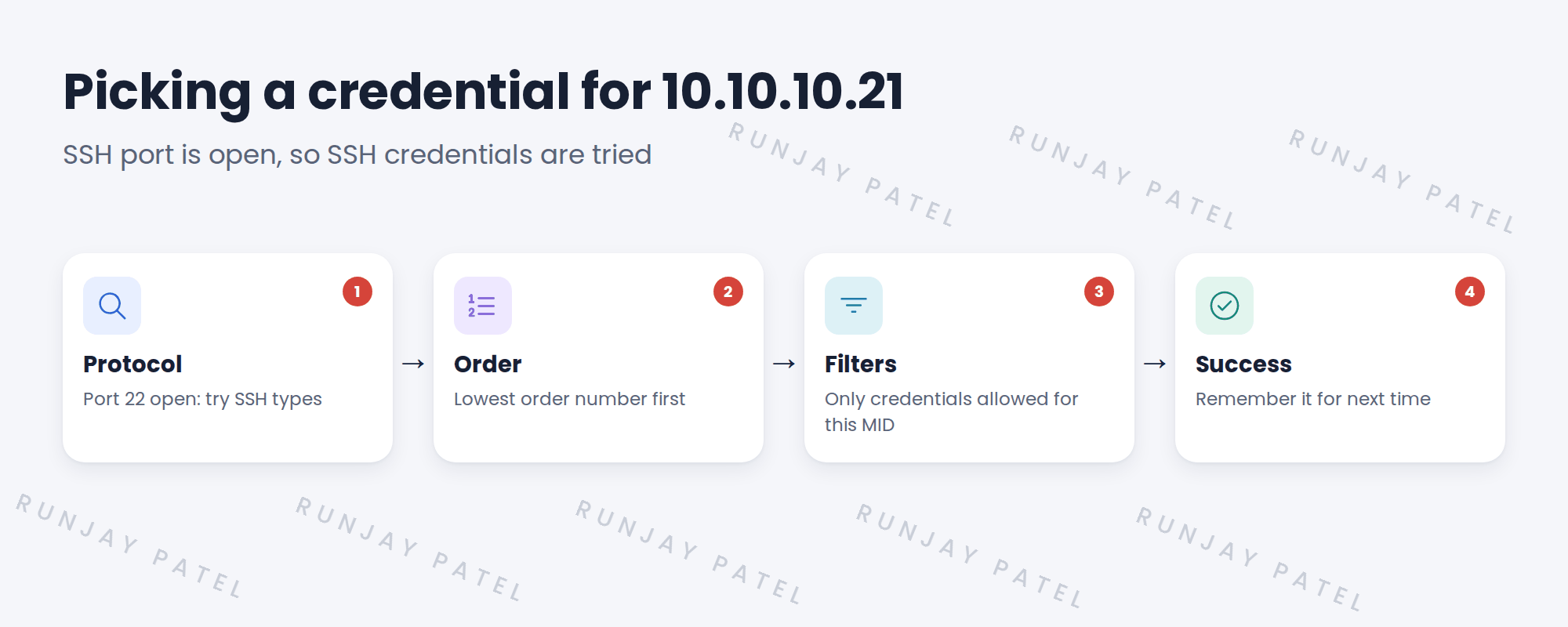
3 How Discovery picks
- It finds which protocol the device answers on.
- It tries credentials of that type, lowest order first.
- It can skip credentials limited to other MID Servers.
- When one works, it remembers it for that device.
💡 Good to know: You’ll learn order and affinity in depth in Credential Order and Credential Affinity.
4 Project Clear View: How We Implemented It
📍 Situation: Failed Windows logins on Linux servers showed up in Farah’s logs.
🧭 Decision: Set credential types correctly, so each protocol only tries its own credentials.
🛠️ Steps we took:
- Checked each SNWR credential’s type.
- Found the Windows one was fine; the test had used a generic setting.
- Confirmed SSH credentials are only tried on SSH.
- Reran the test on snwr-mail-01.
✅ What we verified:
- No failed Windows logins on Linux servers.
- Farah’s logs are clean for the test.
📁 Evidence: Credential notes for the credential register.
5 Quick recap
- Credentials are stored encrypted on the instance.
- Discovery tries credentials of the right type, lowest order first.
- Affinity remembers what worked.
- Clean setup means fewer failed logins.
6 Check yourself
Think of your answer first. Then tap to check.
1 Where are Discovery credentials stored? Show answer
On the instance, encrypted.
2 Which credential of a type is tried first? Show answer
The one with the lowest order number.
3 What is credential affinity? Show answer
Discovery remembering which credential worked for a device.
Nice work! You know how Discovery chooses a credential. 🎉
Next up: Windows: WMI and PowerShell Access
Was this lesson helpful?
Please log in to share lesson feedback.
Have a question or doubt?
Ask here and get help from instructors and fellow learners.
Only logged-in learners can post.





