


Checking Licenses and Subscription Units
On this page
In this lesson, you will learn:
- Which ITOM package includes Discovery
- What a subscription unit is and what counts
- How to estimate usage before scanning
🔁 Quick look back: Last time: Reading the Statement of Work. You learned how to read an SOW, using SNWR-SOW-014.
1 The Problem: Discovered Devices Use Up Licenses
Discovery isn’t free to run. Each device it finds may count against SNWR’s license. Anita asks:
- ‘Do we have enough licenses for everything you’ll find?’
- ‘What if Discovery finds more servers than we think?’
👉 The fix: Confirm SNWR’s package, estimate the count, and check it against the subscription before scanning.
2 Packages and subscription units
Key term: ITOM Advanced
The ITOM package that includes Discovery, Service Mapping and Certificate Inventory.
Key term: ITOM Prime
A larger package that adds things like Event Management.
Key term: Subscription unit
The way ITOM is counted. Devices and cloud resources that Discovery manages use up units.
📦 Entitlement check: Package names and what counts change over time. Older contracts say ITOM Visibility. Always check SNWR’s own contract and subscription page, not a blog.
The exact rules for what counts, and how many units each device uses, are in ServiceNow’s subscription unit overview. Check the current version with your account team.
3 Why exclusions matter for cost
- Every range you scan can add devices to the count.
- Excluding laptops and building systems keeps the count honest.
- Scanning a test lab in production can use units by mistake.
4 Project Clear View: How We Implemented It
📍 Situation: Anita wants to be sure SNWR won’t go over its license.
🧭 Decision: Estimate the count from the environment map, and compare it with the subscription.
🛠️ Steps we took:
- Confirmed with Riya that SNWR has ITOM Advanced.
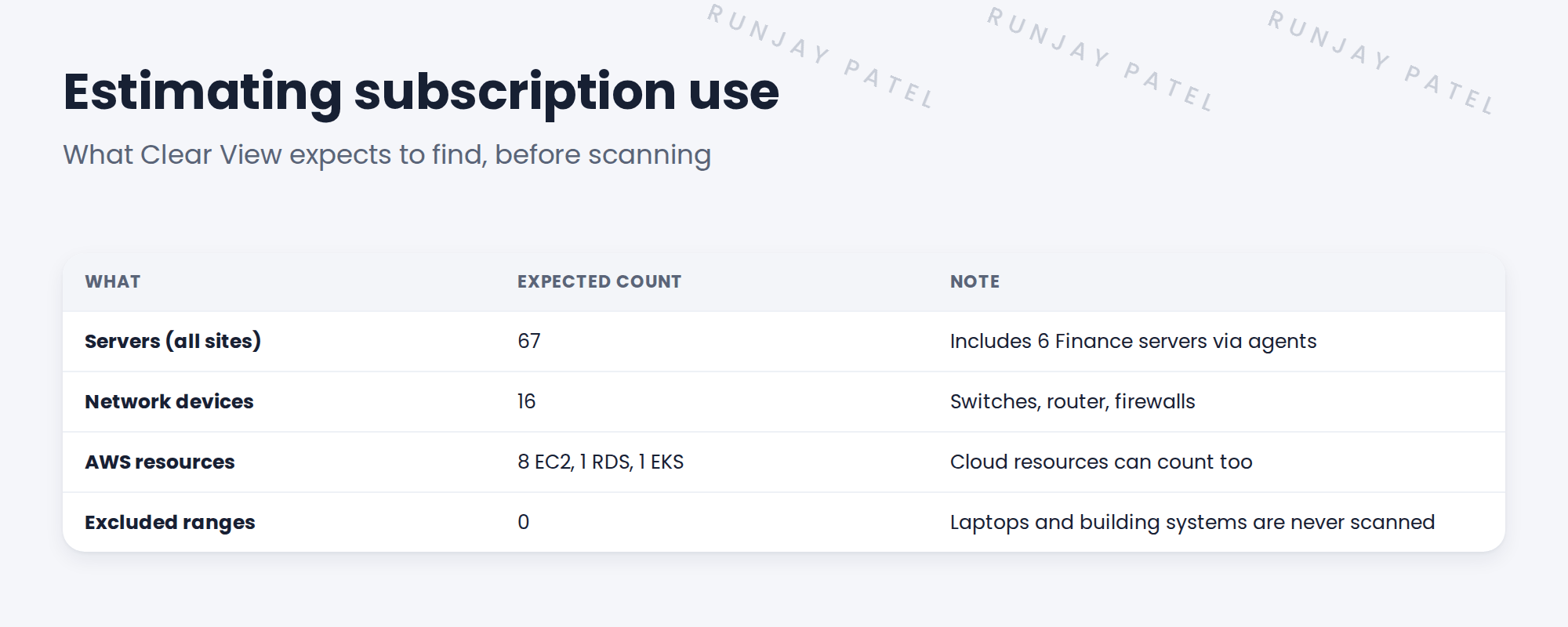
- Estimated the count from the Clear View environment map: 67 servers, 16 network devices and some AWS resources.
- Asked Riya to open the subscription page and show the units SNWR owns.
- Added a check after each rollout wave to compare the real count with the estimate.
✅ What we verified:
- SNWR’s units cover the estimate, with room to spare.
- The excluded ranges are written down, so they won’t be counted.
📁 Evidence: A licensing note in the project folder, and a ‘check units’ step in the rollout plan (see Production Rollout › Planning Rollout Waves).
5 Quick recap
- ITOM Advanced includes Discovery. Older contracts may say ITOM Visibility.
- Devices and cloud resources Discovery manages can use subscription units.
- Estimate the count before scanning, from the environment map.
- Exclusions keep the count honest.
6 Check yourself
Think of your answer first. Then tap to check.
1 Which ITOM package includes Discovery? Show answer
ITOM Advanced (ITOM Prime includes it too).
2 Why estimate the device count before scanning? Show answer
To check SNWR has enough subscription units before Discovery starts counting.
3 Where do you check what SNWR really owns? Show answer
SNWR’s own contract and the subscription page on the instance, with Riya.
Nice work! You’ve checked SNWR can afford what Discovery will find. 🎉
Next up: Checking Instance Readiness: Plugins, Apps and Roles
Was this lesson helpful?
Please log in to share lesson feedback.
Have a question or doubt?
Ask here and get help from instructors and fellow learners.
Only logged-in learners can post.





