


Creating a Discovery Schedule
On this page
In this lesson, you will learn:
- The parts of a schedule
- How to create one
- SNWR Mumbai Servers Nightly
🔁 Quick look back: Last time: IP Ranges, Range Sets and Exclusions. You learned how ranges, range sets and exclusions define what’s scanned.
1 The Problem: Discovery Needs to Know What, Where and When
The ranges exist. But nothing tells Discovery:
- Which ranges to scan.
- Which MID Server to use.
- When to run.
👉 The fix: A schedule brings these together.
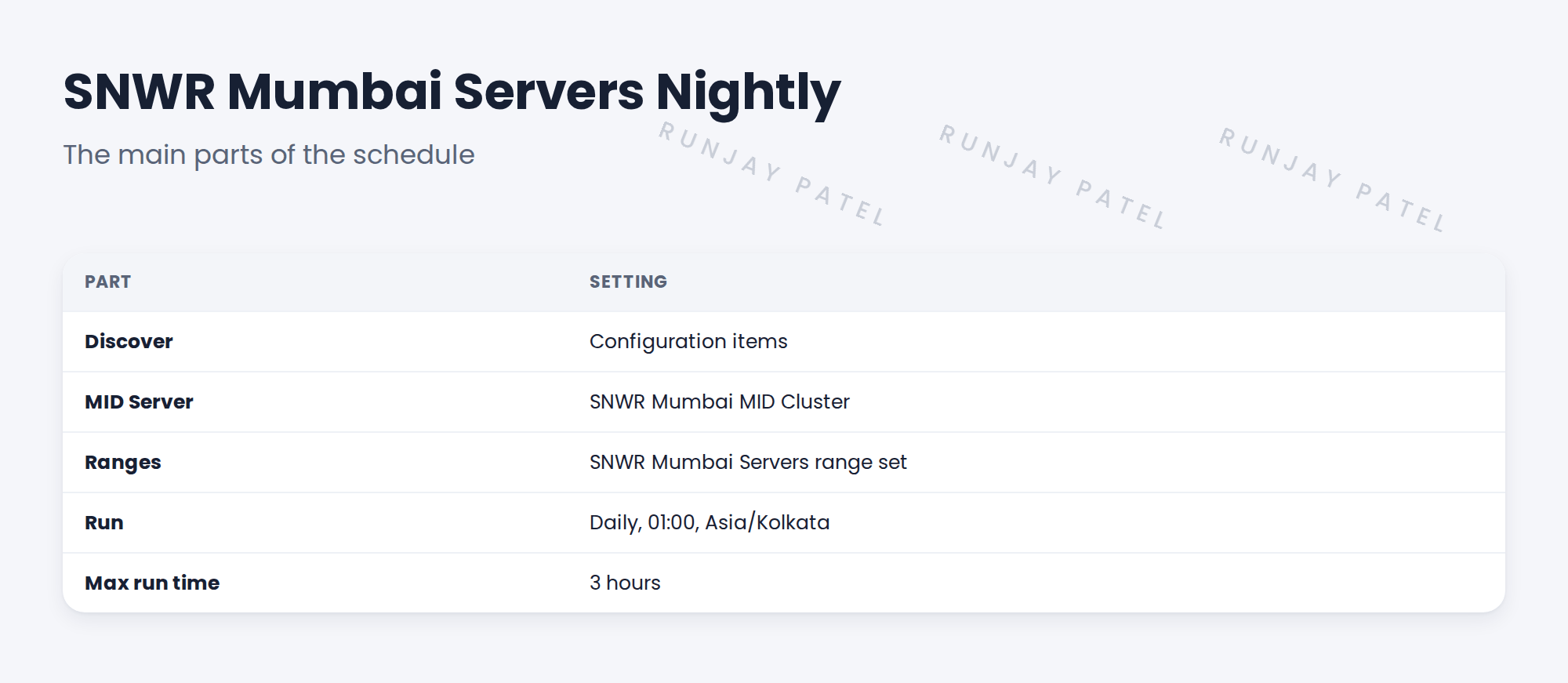
2 The parts of a schedule
- Discover: what type of discovery.
- MID Server selection: auto, a named MID or a cluster.
- Ranges: the range sets to scan.
- Run: how often and when.
- Max run time: a limit so it stops.
3 Creating it
- Open Discovery Admin Workspace and create a schedule.
- Name it clearly.
- Set discover type, MID selection and ranges.
- Set the time and run limit.
- Save it inactive until testing is done.
💡 Good to know: You can create schedules in the workspace or from the classic schedule form. Both make the same record.
4 Project Clear View: How We Implemented It
📍 Situation: The Mumbai ranges and cluster are ready on snwrtest.
🧭 Decision: Create SNWR Mumbai Servers Nightly from DD-D04.
🛠️ Steps we took:
- Created the schedule in Discovery Admin Workspace.
- Set Configuration items, the Mumbai cluster and range set.
- Set daily 01:00 IST with a 3-hour limit.
- Left it inactive until the pilot is approved.
✅ What we verified:
- The schedule matches DD-D04.
- It won’t run until activated.
📁 Evidence: The schedule record on snwrtest, listed in the migration matrix.
5 Quick recap
- A schedule sets what, where and when.
- Choose discover type, MID selection, ranges, time and limit.
- Name schedules clearly.
- Keep them inactive until tested.
6 Check yourself
Think of your answer first. Then tap to check.
1 Name four parts of a schedule. Show answer
Any four of: discover type, MID selection, ranges, run time, max run time.
2 Which MID selection does the Mumbai schedule use? Show answer
The SNWR Mumbai MID Cluster.
3 Why save a new schedule as inactive? Show answer
So it doesn’t run before testing and approval.
Nice work! SNWR’s first schedule is ready. 🎉
Next up: Choosing the Schedule Type
Was this lesson helpful?
Please log in to share lesson feedback.
Have a question or doubt?
Ask here and get help from instructors and fellow learners.
Only logged-in learners can post.





