


Applications and Databases in Scope
On this page
In this lesson, you will learn:
- Which applications to capture
- How to check pattern support
- How to spot apps that need custom work
🔁 Quick look back: Last time: Virtualization, Cloud and Containers. You learned how to capture vCenter, cloud accounts and container clusters.
1 The Problem: Not Every App Has a Pattern
Hana listed the apps SNWR cares about. Most are common products. But one is different:
- SNWR Mail Archiver is written in-house.
- No ServiceNow pattern knows it.
👉 The fix: List each key app, check pattern support, and flag the ones that need custom work.
2 What to capture
- App name and version.
- Which servers it runs on.
- Who owns it.
- Why it matters: which service it supports.
Then check current pattern content for each one. Common databases and web servers are usually covered.
3 Apps with no pattern
For an app with no pattern, you have three choices: build a custom pattern, extend a baseline one, or leave it out.
💡 Good to know: Don’t promise a custom pattern yet. Record it, and decide during design.
4 Project Clear View: How We Implemented It
📍 Situation: Hana and Arjun listed SNWR’s key apps.
🧭 Decision: Check pattern support for each, and flag custom work.
🛠️ Steps we took:
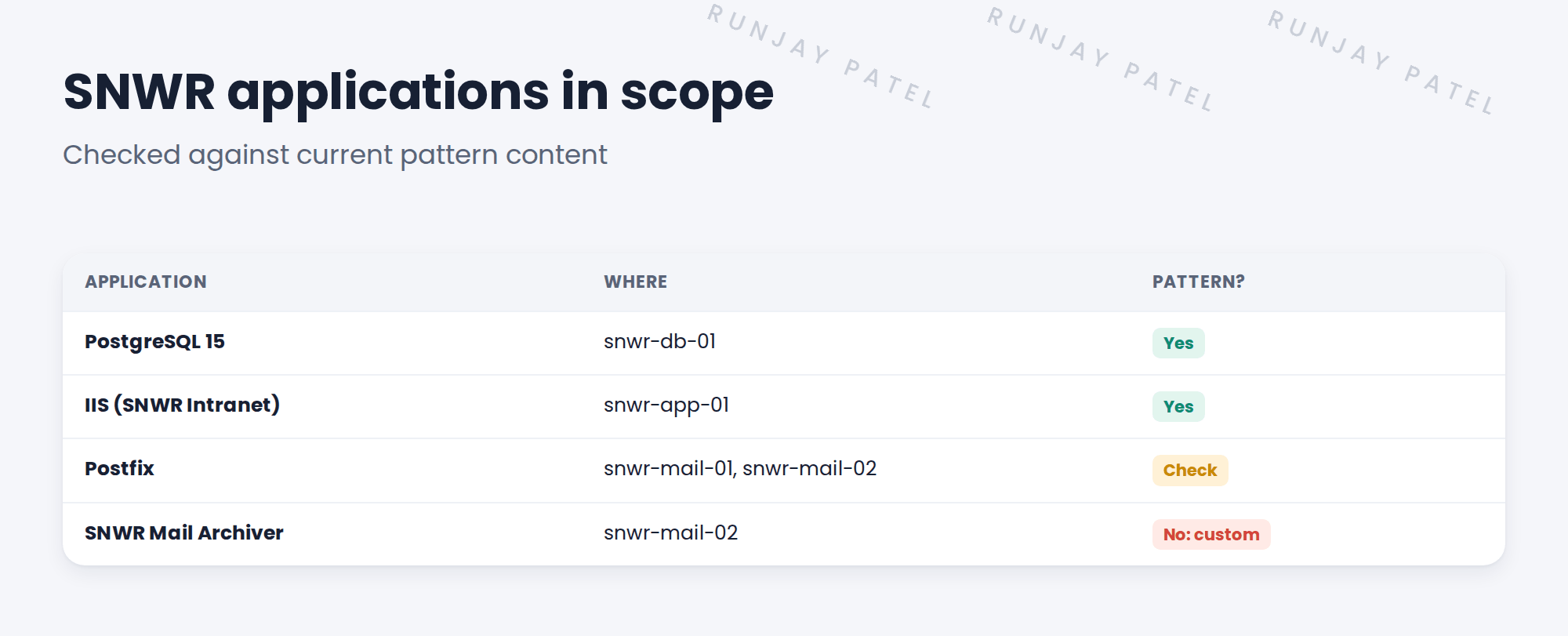
- Listed four apps with versions, servers and owners.
- Checked the current pattern content on snwrdev.
- Found PostgreSQL and IIS covered. Postfix needs a check in the pilot.
- Flagged SNWR Mail Archiver as needing custom work.
✅ What we verified:
- Arjun confirmed the archiver runs only on snwr-mail-02.
- Hana agreed to decide on the archiver during design.
📁 Evidence: The applications section of the requirements, with one custom item.
5 Quick recap
- Capture app name, version, servers, owner and why it matters.
- Check current pattern content for each app.
- In-house apps often need custom work.
- Record custom work now, decide during design.
6 Check yourself
Think of your answer first. Then tap to check.
1 Why check pattern content for each app? Show answer
To know which apps Discovery will find without extra work.
2 What are the three choices for an app with no pattern? Show answer
Build a custom pattern, extend a baseline one, or leave it out.
3 Which SNWR app needs custom work? Show answer
SNWR Mail Archiver on snwr-mail-02.
Nice work! SNWR’s key applications are captured. 🎉
Next up: Restricted Zones and What Must Never Be Scanned
Was this lesson helpful?
Please log in to share lesson feedback.
Have a question or doubt?
Ask here and get help from instructors and fellow learners.
Only logged-in learners can post.





