


Timing, Run Limits and Scan Windows
On this page
In this lesson, you will learn:
- How schedule time zones work
- What max run time does
- How SNWR fitted scans into windows
🔁 Quick look back: Last time: Quick Discovery for One Device. You learned how Quick Discovery scans one address on demand.
1 The Problem: A Scan Could Spill Into Monday Morning
SNWR Network Weekly starts Sunday 02:30 IST. If something slows it down:
- It could still be running on Monday morning.
- That breaks Farah’s scan window.
👉 The fix: Set the right time zone and a maximum run time on every schedule.
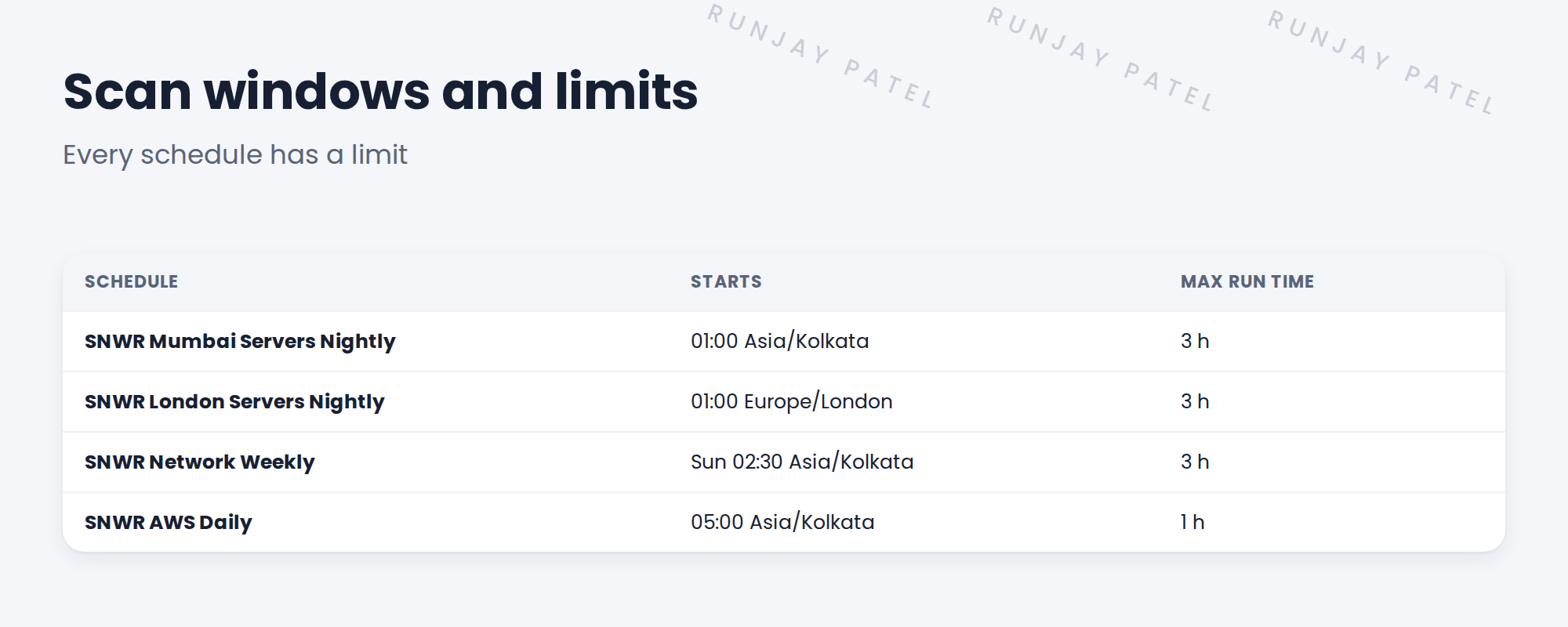
2 Time and time zones
A schedule runs at a time in a time zone. Set it to the site’s zone, so 01:00 means 01:00 for that site.
💡 Good to know: London changes clocks for summer time. Using the Europe/London zone handles that.
3 Max run time
Key term: Max run time
The longest a scan may run. When reached, Discovery stops the scan.
Set it inside the window with room to spare. If scans hit the limit, fix the cause instead of raising it.
4 Project Clear View: How We Implemented It
📍 Situation: Farah’s window is 22:00 to 06:00 local time.
🧭 Decision: Set each schedule’s time zone and a run limit that ends inside the window.
🛠️ Steps we took:
- Set Mumbai schedules to Asia/Kolkata and London to Europe/London.
- Put the network scan in SNWR Sunday maintenance at 02:30.
- Set a 3-hour limit on the big schedules.
- Checked each ends before 06:00.
✅ What we verified:
- Every schedule ends inside its window.
- Farah reviewed the times.
📁 Evidence: Times and limits recorded with the schedules. See ITSM Implementation › Change Risk › Maintenance Windows and Blackout Schedules for SNWR Sunday maintenance.
5 Quick recap
- Set each schedule to its site’s time zone.
- Max run time stops scans that run too long.
- Keep limits inside the window.
- If a scan hits its limit, fix the cause.
6 Check yourself
Think of your answer first. Then tap to check.
1 Why set London’s schedule to Europe/London? Show answer
So 01:00 is London time, including summer time changes.
2 What does max run time do? Show answer
Stops the scan when it runs too long.
3 A scan keeps hitting its limit. What do you do? Show answer
Find and fix the cause, rather than just raising the limit.
Nice work! SNWR’s scans stay in their windows. 🎉
Next up: Change Control for Schedules
Was this lesson helpful?
Please log in to share lesson feedback.
Have a question or doubt?
Ask here and get help from instructors and fellow learners.
Only logged-in learners can post.





