


Sites, Network Zones and Subnets
On this page
In this lesson, you will learn:
- Why the IP plan is the base of Discovery
- What to record for each zone and subnet
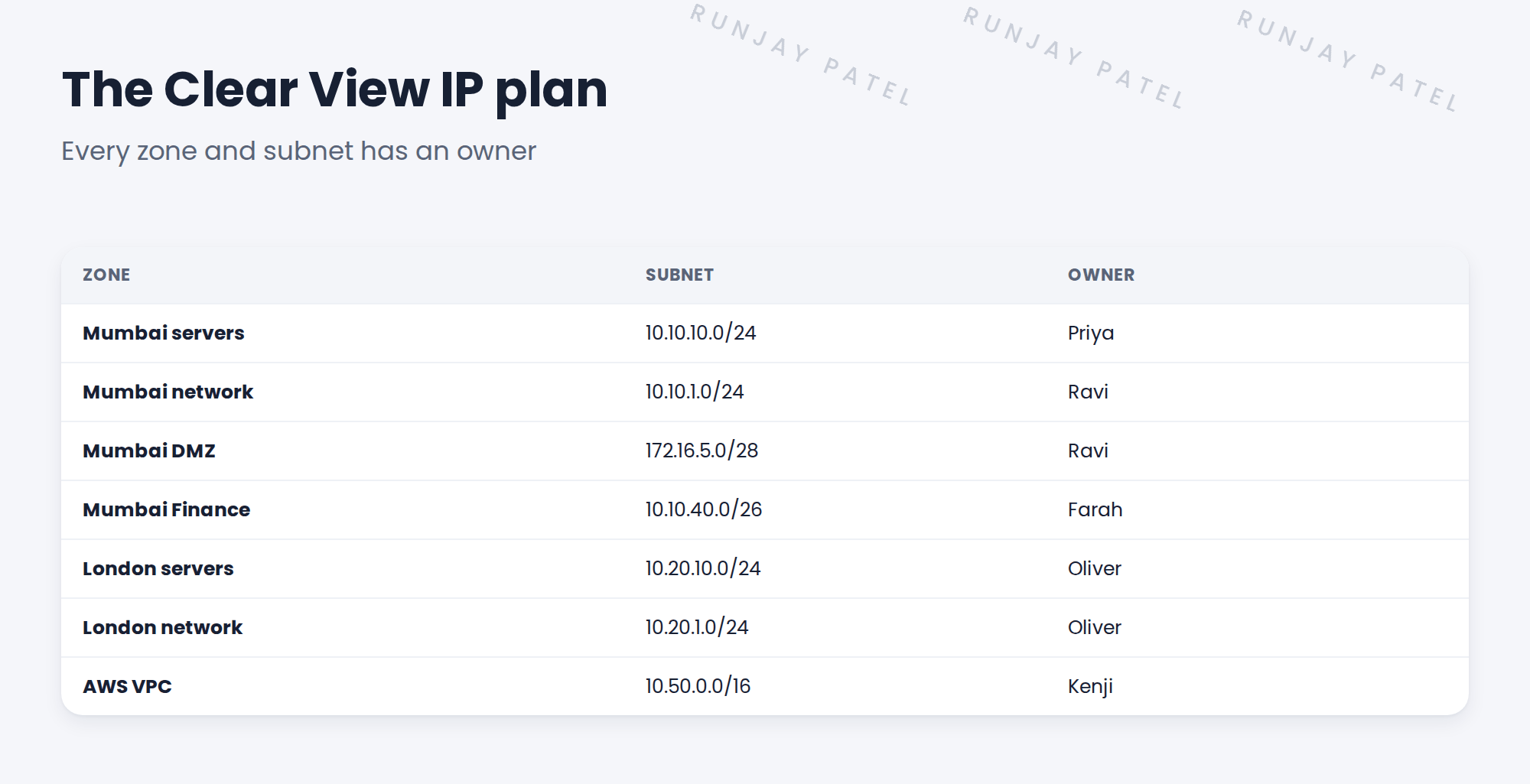
- SNWR’s seven zones
🔁 Quick look back: Last time: The Discovery Questionnaire: Questions to Ask. You learned the 40 Discovery questions in eight groups, and why each matters.
1 The Problem: Nobody Has One Network List
Ravi has subnets in a diagram. Oliver has London in a spreadsheet. Kenji has AWS in the console. So:
- Nobody has one complete list.
- Two lists disagree about the DMZ.
- Owners aren’t written anywhere.
👉 The fix: Build one IP plan: every zone and subnet, with its owner and purpose.
2 What to record
- Zone name and site.
- Subnet (for example 10.10.10.0/24).
- Owner who can answer questions.
- What lives there (servers, network, users).
- Whether firewalls sit between it and other zones.
Key term: IP plan
The list of all zones and subnets you may scan, with owners.
Key term: Owner
The person who answers for a subnet and approves scans of it.
3 Checking the plan
Two lists disagreeing is normal. Resolve it before it becomes a scan range.
⚠️ Heads up: Never turn a subnet into a scan range until its owner has confirmed it.
4 Project Clear View: How We Implemented It
📍 Situation: Ravi’s diagram and Oliver’s spreadsheet disagreed about the DMZ.
🧭 Decision: Merge everything into one IP plan and get each owner to confirm their rows.
🛠️ Steps we took:
- Combined Ravi’s diagram, Oliver’s spreadsheet and Kenji’s AWS details.
- Found the DMZ difference: Ravi’s /28 was right.
- Added an owner for each zone.
- Asked each owner to confirm their rows in writing.
✅ What we verified:
- All seven zones are confirmed by their owners.
- The DMZ subnet is 172.16.5.0/28.
📁 Evidence: The Clear View IP plan. It becomes the ranges in Discovery Schedules › IP Ranges, Range Sets and Exclusions.
5 Quick recap
- The IP plan lists every zone and subnet you may scan.
- Each subnet needs an owner.
- Resolve disagreements before they become ranges.
- Never scan a subnet its owner hasn’t confirmed.
6 Check yourself
Think of your answer first. Then tap to check.
1 What is an IP plan? Show answer
The list of all zones and subnets you may scan, each with an owner.
2 Two lists disagree about a subnet. What do you do? Show answer
Ask the owner to confirm the right one before it becomes a range.
3 Who owns the Mumbai Finance zone? Show answer
Farah Siddiqui, the security lead.
Nice work! SNWR has one confirmed IP plan. 🎉
Next up: Servers and Operating Systems
Was this lesson helpful?
Please log in to share lesson feedback.
Have a question or doubt?
Ask here and get help from instructors and fellow learners.
Only logged-in learners can post.





