


Reading Errors and Discovery Logs
On this page
In this lesson, you will learn:
- Where Discovery errors appear
- How to read a log line
- How to sort failures
🔁 Quick look back: Last time: A Troubleshooting Method. You learned a four-question method for any Discovery failure.
1 The Problem: Errors Are Spread Across Many Records
After the pilot, errors appear in several places:
- The status record shows counts.
- Device history shows each IP.
- The log holds the details.
👉 The fix: Start from the status record, drill into each device, and read its log lines.
2 Where to look
- Open the Discovery status record.
- Open the Devices list and find failed IPs.
- Open the device history for one IP.
- Read its log lines in order.
💡 Good to know: Need a refresher? See Fundamentals › System Maintenance › System Logs for system logs in general.
3 Reading a log line
- When it happened.
- Which step: scanning, classification, pattern, IRE.
- The message: what failed.
- Which MID Server ran it.
💡 Good to know: Search the log for the IP address to see only that device’s lines.
4 Project Clear View: How We Implemented It
📍 Situation: Three pilot devices failed.
🧭 Decision: Read each device’s history and log, and sort the failures.
🛠️ Steps we took:
- Opened the pilot status record.
- Found the three failed IPs in the Devices list.
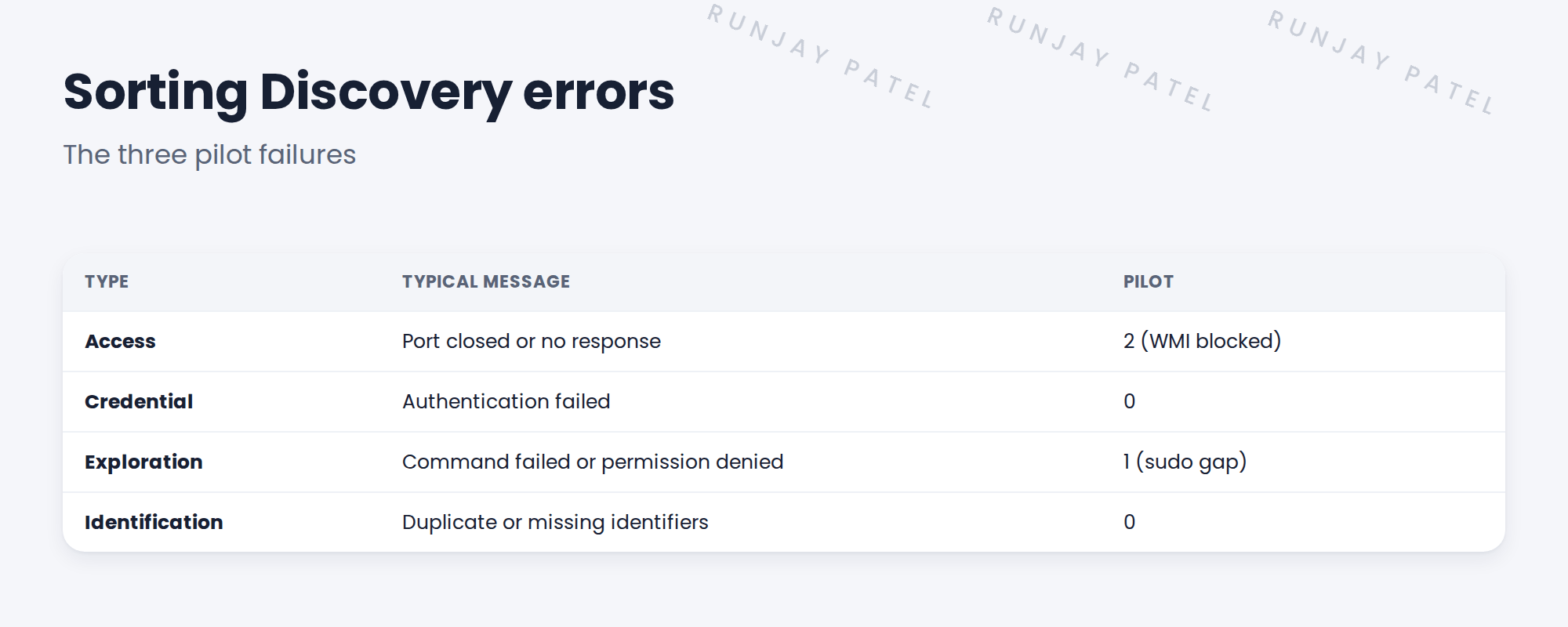
- Read each log: two ‘no response’ on WMI, one ‘permission denied’ on a command.
- Sorted them as access and exploration problems.
✅ What we verified:
- Each failure has a type and a log line as evidence.
- Hana could see why each failed.
📁 Evidence: Log evidence added to the troubleshooting log.
5 Quick recap
- Start from the status record, then device history, then the log.
- Read time, step, message and MID Server.
- Sort into access, credential, exploration and identification.
- Search the log by IP.
6 Check yourself
Think of your answer first. Then tap to check.
1 Where do you start when a scan has failures? Show answer
The Discovery status record.
2 What type is ‘permission denied’ on a command? Show answer
An exploration problem: the account lacks rights for that command.
3 How can you see only one device’s lines? Show answer
Search the log for its IP address.
Nice work! You can read Discovery errors. 🎉
Next up: Fixing Access and Port Failures
Was this lesson helpful?
Please log in to share lesson feedback.
Have a question or doubt?
Ask here and get help from instructors and fellow learners.
Only logged-in learners can post.





