


Fixing MID Server Problems
On this page
In this lesson, you will learn:
- Common MID Server problems
- Where to look
- How SNWR fixed snwr-mid-lon-01
🔁 Quick look back: Last time: Fixing Classification Failures. You learned why devices or apps go unclassified, and how to fix it.
1 The Problem: London’s MID Server Is Down
After Windows patching, snwr-mid-lon-01 showed Down. London’s nightly scan didn’t run. The instance only said:
- Status: Down.
- Last contact: 8 hours ago.
👉 The fix: Check the host, the service and the MID logs, in that order.
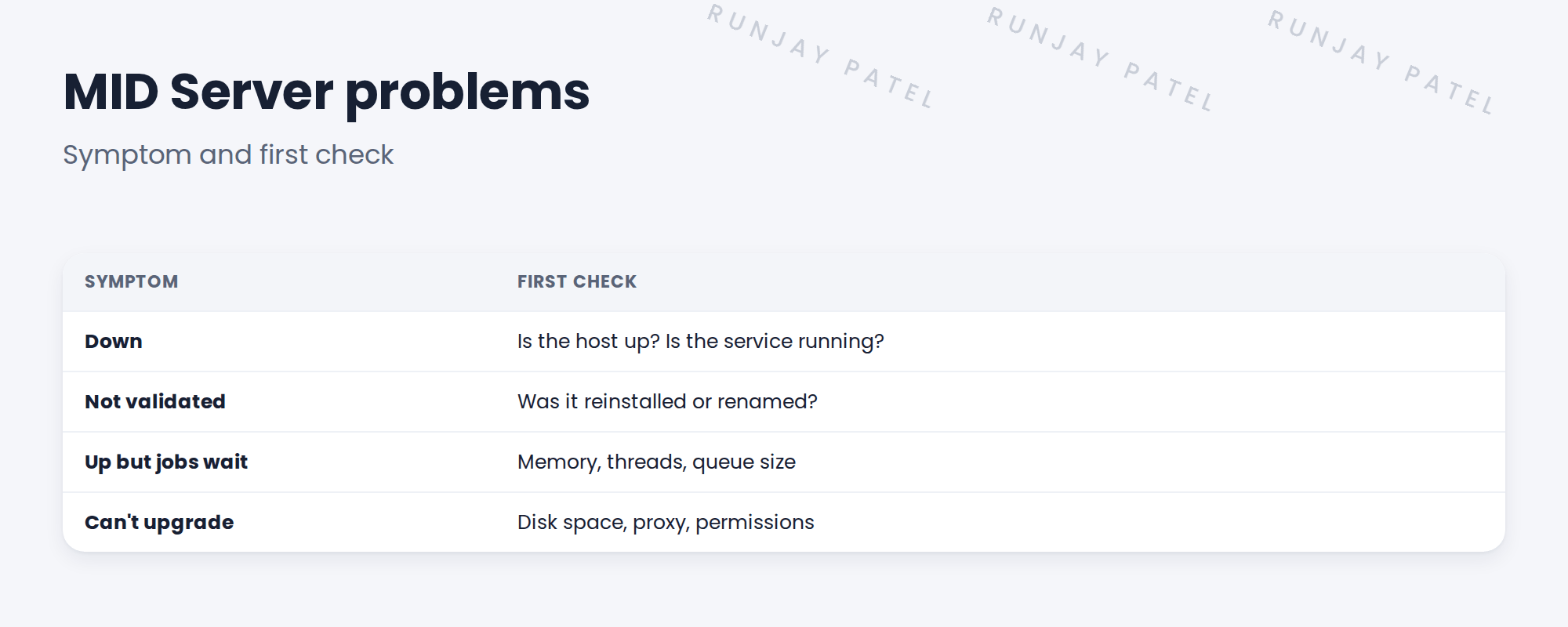
2 Where to look
- Is the host running?
- Is the MID service running?
- Read the MID agent log on the host.
- Check the MID record on the instance.
Key term: Agent log
The MID Server’s own log file on the host. It shows connection errors and startup problems.
3 Common fixes
- Start the service, and set it to start automatically.
- Fix the proxy or network path.
- Free disk space.
- Re-validate after a reinstall.
4 Project Clear View: How We Implemented It
📍 Situation: snwr-mid-lon-01 was Down after patching.
🧭 Decision: Check host, service and log with Oliver.
🛠️ Steps we took:
- Oliver confirmed the host was up.
- The MID service was stopped: its startup type had changed to manual.
- Set it to automatic and started it.
- Checked the agent log, then ran a London Quick Discovery.
✅ What we verified:
- The MID is Up and validated.
- The alert for Down MID Servers was added (see MID Servers › MID Server Health, Upgrades and Operations).
📁 Evidence: Troubleshooting log entry and a runbook step: check MID services after patching.
5 Quick recap
- Check host, service, agent log, then the MID record.
- Down usually means the host or service isn’t running.
- Reinstalls need re-validation.
- Check MID Servers after patching.
6 Check yourself
Think of your answer first. Then tap to check.
1 What was wrong with snwr-mid-lon-01? Show answer
The MID service was stopped because its startup type changed to manual.
2 What is the agent log? Show answer
The MID Server’s own log on the host, showing connection and startup errors.
3 What’s the first check for a Down MID Server? Show answer
Is the host running, and is the MID service running?
Nice work! You can bring a MID Server back. 🎉
Next up: Using Workspace Diagnostics
Was this lesson helpful?
Please log in to share lesson feedback.
Have a question or doubt?
Ask here and get help from instructors and fellow learners.
Only logged-in learners can post.





