


UAT Test Scripts with Process Owners
On this page
In this lesson, you will learn:
- What a UAT script is
- The parts of a good script
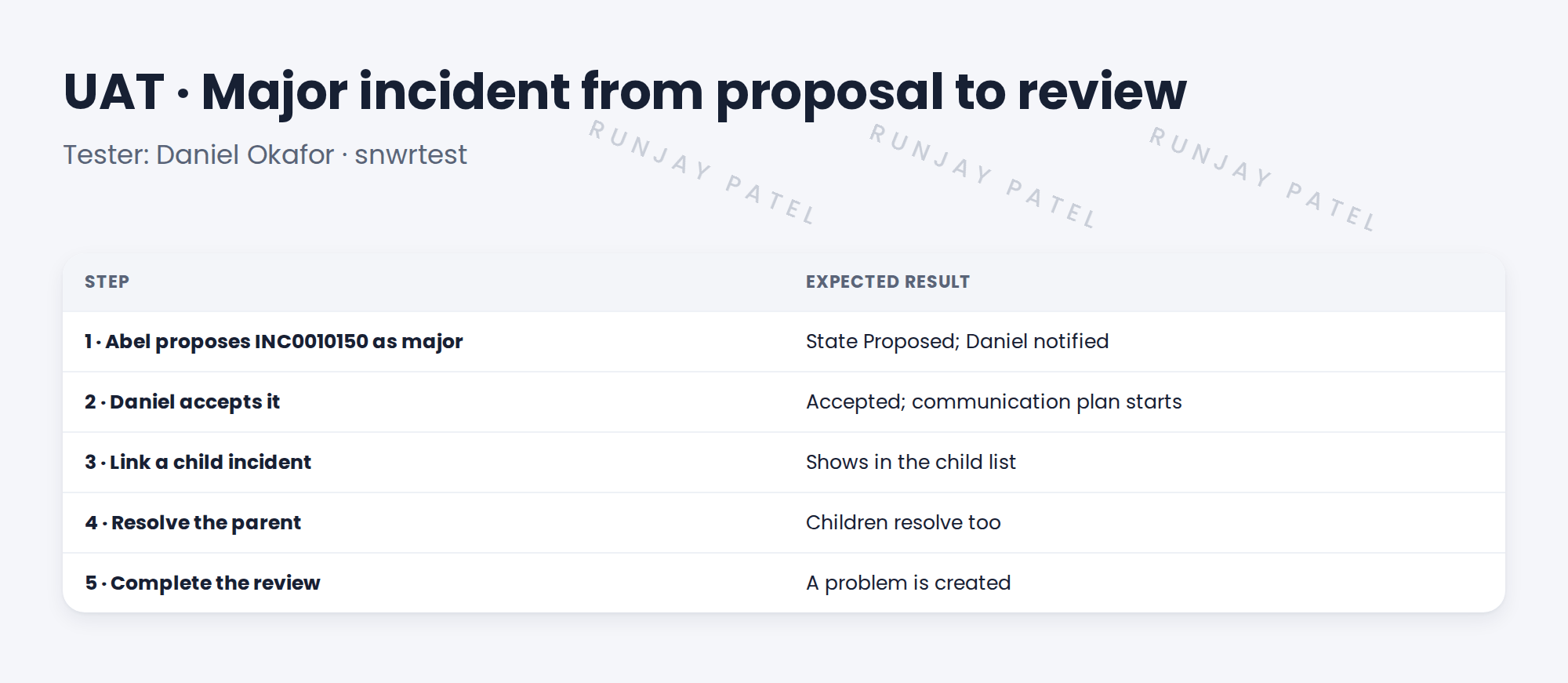
- SNWR’s major incident script
- How to run it with Daniel
🔁 Quick look back: Last time: Test Strategy for an ITSM Rollout. You learned SNWR’s four kinds of testing, and who tests what on which instance.
1 “Just have a play with it”
Daniel is asked to “test the major incident process”.
- He clicks around for 20 minutes.
- He says it “looks fine”.
- Nobody knows what he checked.
👉 The fix: write a script with steps and expected results, and run it together.
2 A UAT script
Key term: UAT script
A list of steps for a real scenario, each with what should happen.
Key term: Expected result
What should happen after a step. If it doesn’t, it’s a defect.
3 Running it
- Book an hour with Daniel on snwrtest.
- He does the steps. You watch and take notes.
- For each step, mark Pass or Fail.
- Log each Fail as a defect, with a screenshot.
- When all steps pass, Daniel signs off.
💡 Good to know: Use real SNWR names and records. Daniel will spot things a made-up example would hide.
4 Let’s try it: write and run a UAT script
- Copy the five steps above into a document or a test management tool.
- Add a column for Pass/Fail and a column for notes.
- On your instance, run each step yourself as Abel and Daniel (impersonate).
- Mark each step. Log any Fail as a defect with steps to repeat it.
- Add a sign-off line: tester, date, result.
5 Quick recap
- A UAT script lists steps for a real scenario
- Each step has an expected result
- Process owners run it; you watch
- Every Fail becomes a defect
- Daniel signs off when all steps pass
6 Check yourself
Think of your answer first. Then tap to check.
1 What makes a step pass? Show answer
The expected result happens.
2 Who runs the major incident UAT script? Show answer
Daniel, the process owner.
3 A step fails. What do you do? Show answer
Log a defect, with steps and a screenshot.
4 Why use real SNWR names? Show answer
Process owners spot problems a made-up example would hide.
Nice work! You can run UAT with a process owner. 🎉
Next up: An ITSM Regression Pack with ATF
Was this lesson helpful?
Please log in to share lesson feedback.
Have a question or doubt?
Ask here and get help from instructors and fellow learners.
Only logged-in learners can post.





