


Incident Notifications at SNWR
On this page
In this lesson, you will learn:
- Which incident emails the baseline sends
- How to decide who gets what
- How to turn off an email safely
- SNWR’s notification plan
🔁 Quick look back: Last time: Incident Tasks and Parent/Child Incidents. You learned how incident tasks split work across teams, and how a parent incident fixes many child incidents at once.
1 “I get 200 emails a day!”
During testing, Ravi’s inbox fills up.
- He gets an email for every incident assigned to his group, even ones already taken.
- Callers get an email for every tiny update.
- Soon, people stop reading ServiceNow emails, even important ones.
👉 The fix: review the baseline emails, keep the ones people need, and turn off the rest.
2 The baseline incident emails
ServiceNow already sends incident emails, such as:
| Goes to | |
|---|---|
| Incident opened for me | The caller |
| Incident assigned to my group | Group members |
| Incident assigned to me | The assigned agent |
| Incident commented | The caller, when an agent adds a comment |
| Incident resolved | The caller |
💡 Good to know: Need a refresher? See Fundamentals › Email Notifications.
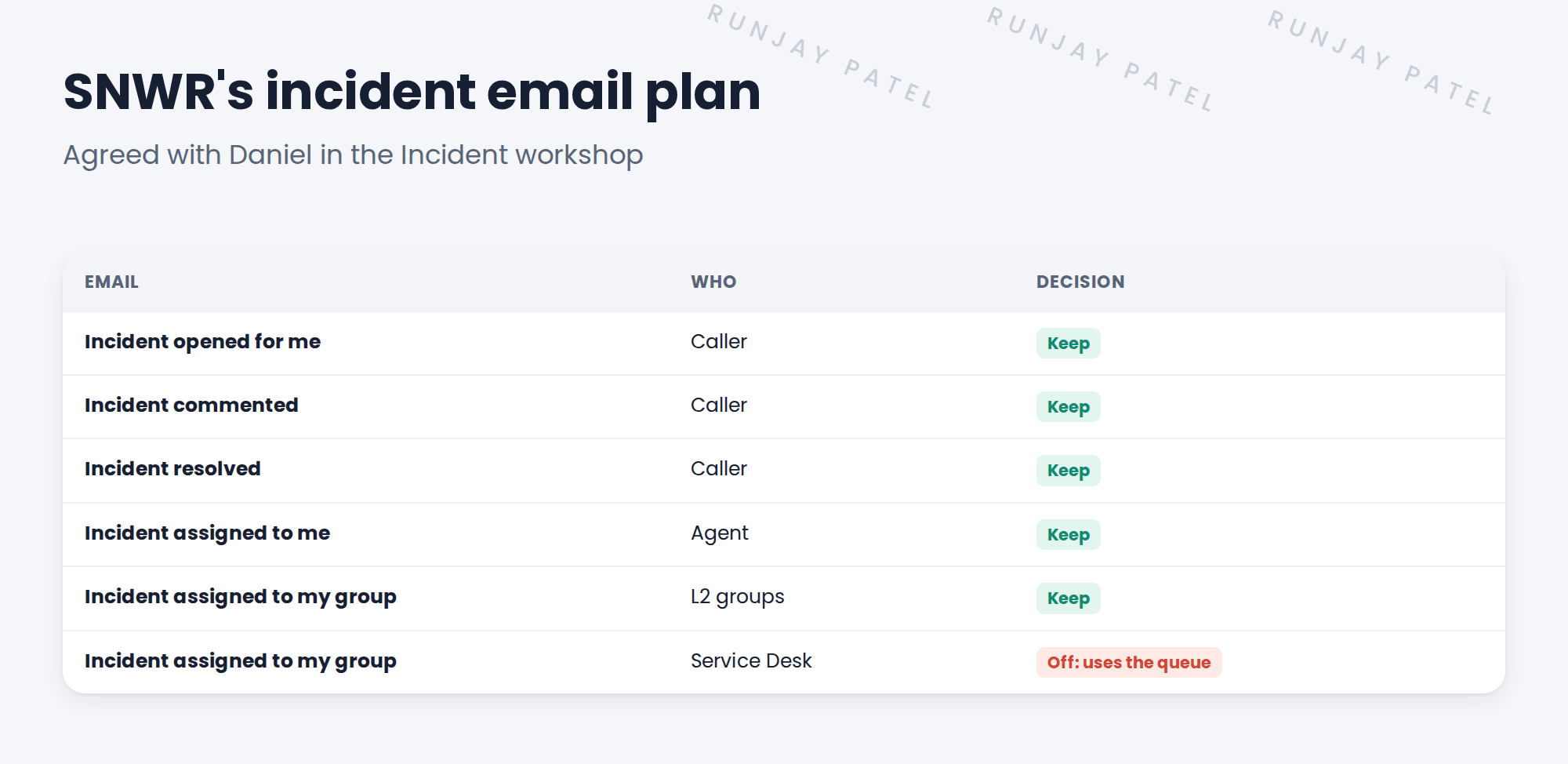
3 SNWR’s who-gets-what plan
4 Turn off, don’t delete
- Set Active to false on a notification you don’t want. Don’t delete it.
- Add a condition if only some groups should get it.
- Record the change in the design decisions log.
⚠️ Heads up: Deleting a baseline notification causes problems at upgrade time. Turning it off is safe.
💡 Good to know: People can also switch off some emails for themselves, in their notification preferences.
5 Let’s try it: review the incident emails
- Go to All › System Notification › Email › Notifications.
- Filter where Table is Incident. How many are there?
- Open Incident resolved. Look at the When to send, Who will receive and What it will contain tabs.
- Pick one email you don’t want. Set Active to false, then save.
- Write the change in your design decisions log.
6 Quick recap
- ServiceNow already sends several incident emails
- Build a who-gets-what plan with the process owner
- Keep emails people act on; turn off the noise
- Turn off with Active = false. Don’t delete
- Record every change in the decisions log
7 Check yourself
Think of your answer first. Then tap to check.
1 Why is too many emails a problem? Show answer
People start ignoring them, even the important ones.
2 How do you stop a baseline notification? Show answer
Set Active to false. Don’t delete it.
3 Why does the Service Desk not get “assigned to my group” emails? Show answer
It watches its queue in the workspace instead.
4 Which email tells the caller their incident is fixed? Show answer
Incident resolved.
Nice work! SNWR’s incident emails are useful, not noisy. 🎉
Next up: Working an Incident in Service Operations Workspace
Was this lesson helpful?
Please log in to share lesson feedback.
Have a question or doubt?
Ask here and get help from instructors and fellow learners.
Only logged-in learners can post.





