


The SNWR Rollout Plan: snwrdev to snwr
On this page
In this lesson, you will learn:
- What goes wrong when a rollout has no plan
- The job of each SNWR instance
- What moves between instances, and what doesn’t
- The sign-off gates between the phases
- Why you plan around ServiceNow upgrades
🔁 Quick look back: In ITSM Packages, Entitlements and Feature Availability, you learned that SNWR bought ITSM Advanced. You check the contract before you promise a feature, because installed isn’t the same as entitled.
1 “But it worked on my instance!”
Here’s a story from another company’s go-live. It could happen at SNWR too. 😬
- A consultant fixed a bug straight on the test instance. Nobody copied the fix back to dev.
- On go-live day, the new priority rules were missing in production. They only lived in dev.
- Testers used fake users like “Test User 1”, so nobody noticed the real groups were wrong.
- A ServiceNow upgrade landed in the middle of testing. Half the tests had to be run again.
👉 The fix: give each instance one clear job. Move work in one direction only. Add a sign-off gate before each new phase. That’s the SNWR rollout plan.
2 Words to know
Key term: Instance plan
Which instance is used for what, and who may work in it.
Key term: Promote
To move tested work forward to the next instance, like from snwrdev to snwrtest.
Key term: Gate
A check at the end of a phase. Someone must sign off before the project moves on.
3 Each instance has one job
SNWR has four instances. You met them in the last two lessons. Now let’s see the rules for each one.
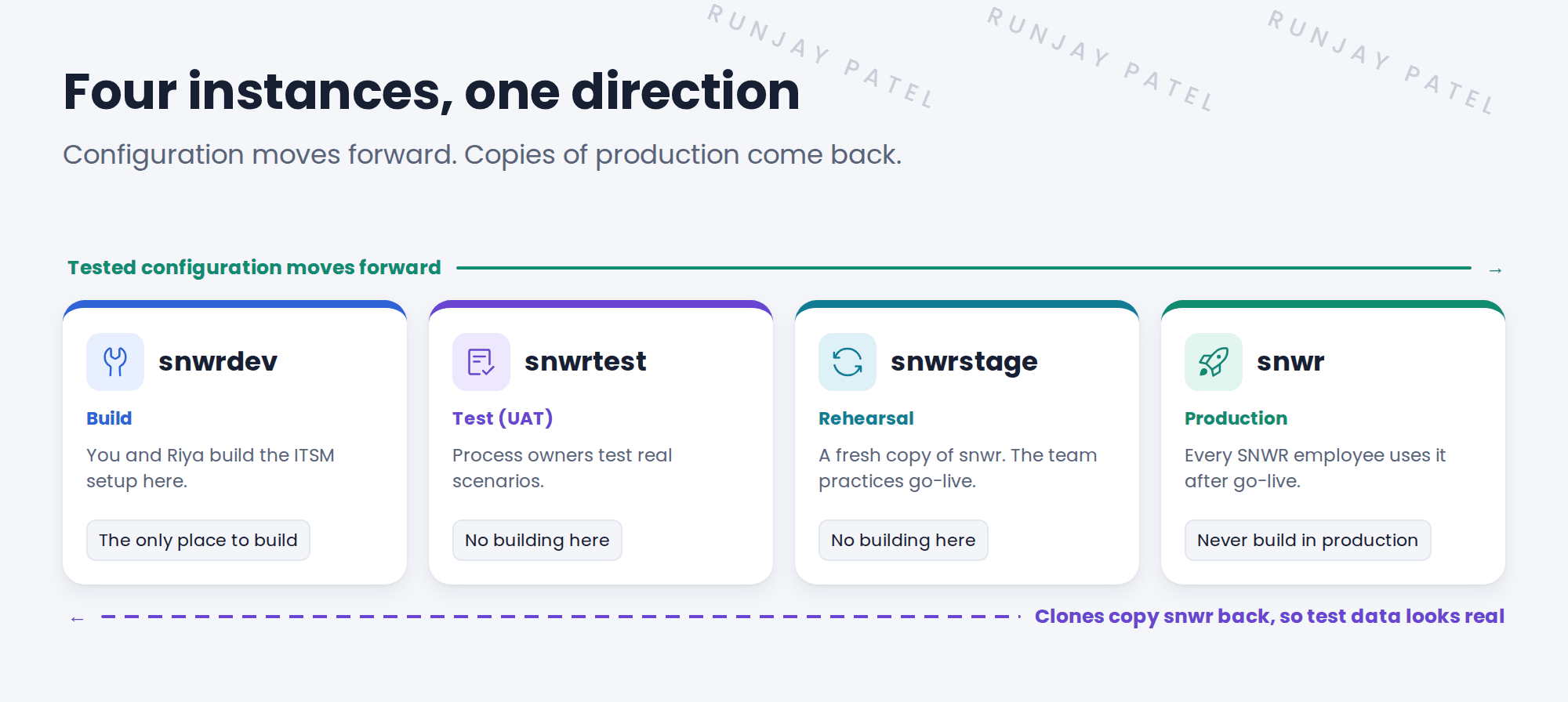
| Instance | Who works there, and the rule |
|---|---|
snwrdev |
You and Riya. The only place where you build. |
snwrtest |
Daniel, Grace, Mei, Lucas and Hana test here. If they find a bug, you fix it in snwrdev, then promote it again. |
snwrstage |
The go-live team practices the cutover here. It’s a fresh copy of snwr. |
snwr |
Everyone at SNWR. Only tested work arrives here. |
⚠️ Golden rule: Never fix things straight in test or production. Fix them in snwrdev, then promote the fix. Otherwise, the next promotion can undo your fix.
4 What moves, and what doesn’t
Not everything travels the same way. This surprises many new implementers.
| Kind of thing | How it gets to the next instance |
|---|---|
| Configuration Categories, SLAs, flows, form layouts |
Captured in update sets and promoted forward |
| Foundation data Users, groups, locations, schedules |
Loaded on each instance, often by import. Many of these are data, so update sets may not carry them. |
| Tickets Incidents, requests, changes |
Never promoted. Test tickets stay on test instances. |
💡 Good to know: Need a refresher on update sets? See Fundamentals › Update Sets. You’ll plan SNWR’s update sets in the ITSM Deployment chapter.
Key term: Clone
A full copy of one instance onto another. SNWR clones snwr to snwrstage, so the rehearsal uses real users and groups. See Fundamentals › System Maintenance › Instance Cloning.
⚠️ Heads up: A clone overwrites the target instance. Promote or back up any unfinished work first, or it’s gone.
5 Gates between the phases
A gate stops the project from rushing ahead. At each gate, one person answers one question, and signs off.
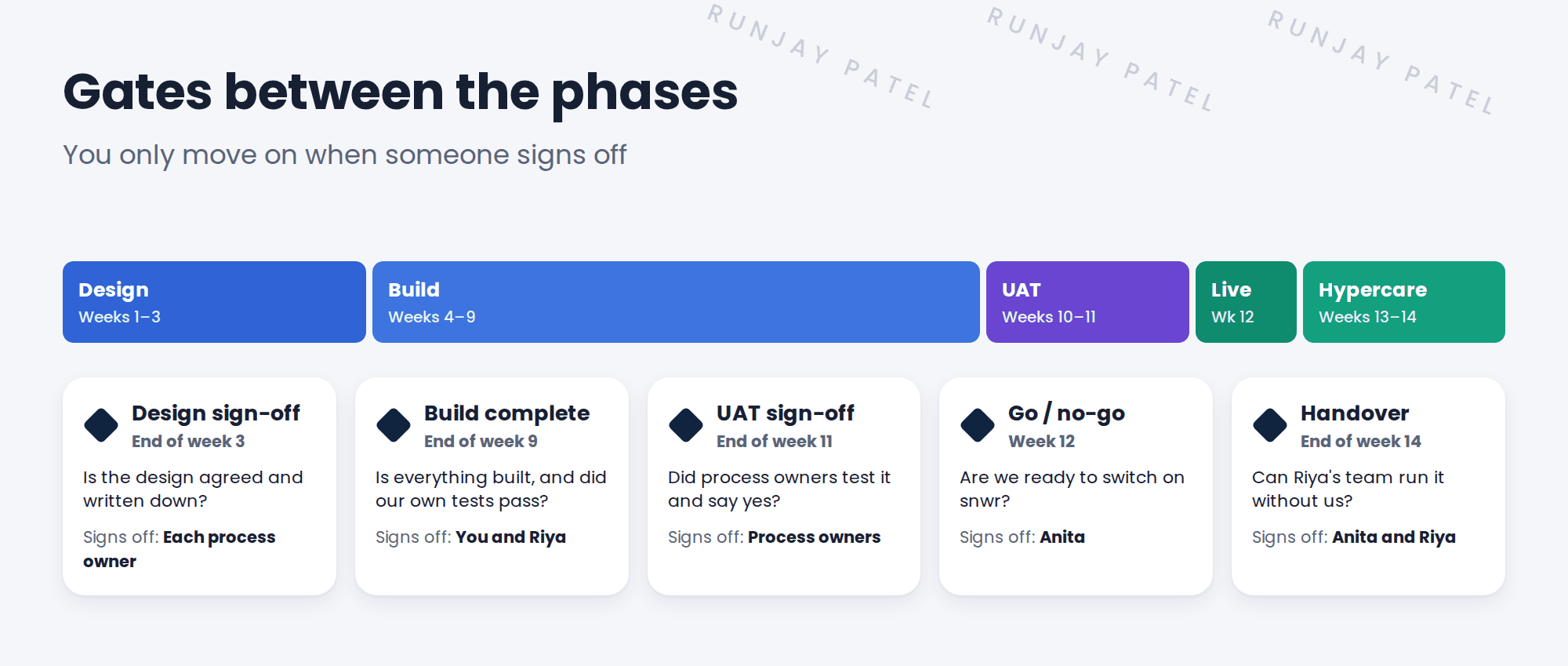
- Design sign-off. Each process owner agrees their design is right, and it’s written down.
- Build complete. You and Riya check that everything is built and your own tests pass.
- UAT sign-off. The process owners test on snwrtest and say “yes, this works for us”.
- Go / no-go. Anita decides if SNWR is ready to switch on snwr.
- Handover. Riya’s team agrees they can run ITSM without the project team.
📝 Note: A “no” at a gate isn’t a failure. It’s the gate doing its job. It’s much cheaper to fix a problem before go-live than after.
6 Plan around ServiceNow upgrades
ServiceNow ships two big releases a year. Each one arrives as an upgrade to your instances. Right now, Australia is the current release. The next one, Brazil, is expected in early November 2026.
- Find out when SNWR’s instances will be upgraded, before you set the project dates.
- Don’t let an upgrade land in the middle of UAT.
- Upgrade snwrdev and snwrtest first, test there, and upgrade snwr last.
💡 Good to know: Release names and how upgrades work: see Fundamentals › ServiceNow Instance › Instance Types & Release Names.
7 What this means for you in this course
You’ll do the hands-on work on your PDI. Think of it as your personal snwrdev. Some lessons talk about snwrtest, snwrstage or snwr. You’ll learn what happens there, but you won’t need extra instances.
⭐ Remember: Build in one place. Move forward only. Pass each gate before you go on.
8 Quick recap
- Each SNWR instance has one job: build, test, rehearse or run
- Build only in snwrdev, and promote tested work forward
- Configuration moves in update sets. Foundation data is loaded. Tickets never move.
- A clone copies snwr back to a lower instance, and overwrites it
- Five gates, each with one question and one owner, keep the project on track
- Plan the dates around ServiceNow upgrades
9 Check yourself
Think of your answer first. Then tap to check.
1 Mei finds a bug during UAT on snwrtest. Where do you fix it? Show answer
In snwrdev. Then you promote the fix to snwrtest again.
2 Do test incidents from snwrtest get promoted to snwr? Show answer
No. Tickets never move between instances. Only configuration is promoted.
3 Why does SNWR clone snwr to snwrstage before the rehearsal? Show answer
So the rehearsal uses real users, groups and data, just like go-live day.
4 Who makes the go / no-go decision for One Front Door? Show answer
Anita Rao, the project sponsor.
5 A ServiceNow upgrade is planned for week 10. What’s the risk? Show answer
It lands in the middle of UAT, so tests may need to be run again. Move the upgrade or the UAT dates.
Nice work! You know how SNWR’s rollout moves safely to go-live. 🎉
Next up: The CIS-ITSM Exam and How This Path Maps to It
Was this lesson helpful?
Please log in to share lesson feedback.
Have a question or doubt?
Ask here and get help from instructors and fellow learners.
Only logged-in learners can post.





