


Problem Tasks: Root Cause Analysis
On this page
In this lesson, you will learn:
- What a problem task is
- The two problem task types
- A simple way to find the root cause
- How Ravi found the VPN cause
🔁 Quick look back: Last time: Creating Problems from Incidents and Linking Them. You learned how to create a problem from an incident, link related incidents, and set them to Awaiting Problem.
1 “Who’s actually investigating?”
PRB0040012 is in Root Cause Analysis. A week goes by.
- Grace owns the problem, but she isn’t a network engineer.
- Network Support thinks Grace is looking into it.
- Nothing happens.
👉 The fix: create a problem task for root cause analysis, and assign it to the team that can do it.
2 Problem tasks
Key term: Problem task
A piece of work under a problem, assigned to a team or person.
Key term: Root cause
The real reason something keeps breaking.
Key term: Root cause analysis (RCA)
The work of finding the root cause.
| Problem task type | Use it for |
|---|---|
| Root cause analysis | Investigating why it happens |
| General | Any other work, like collecting logs or talking to a vendor |
3 Asking “why” five times
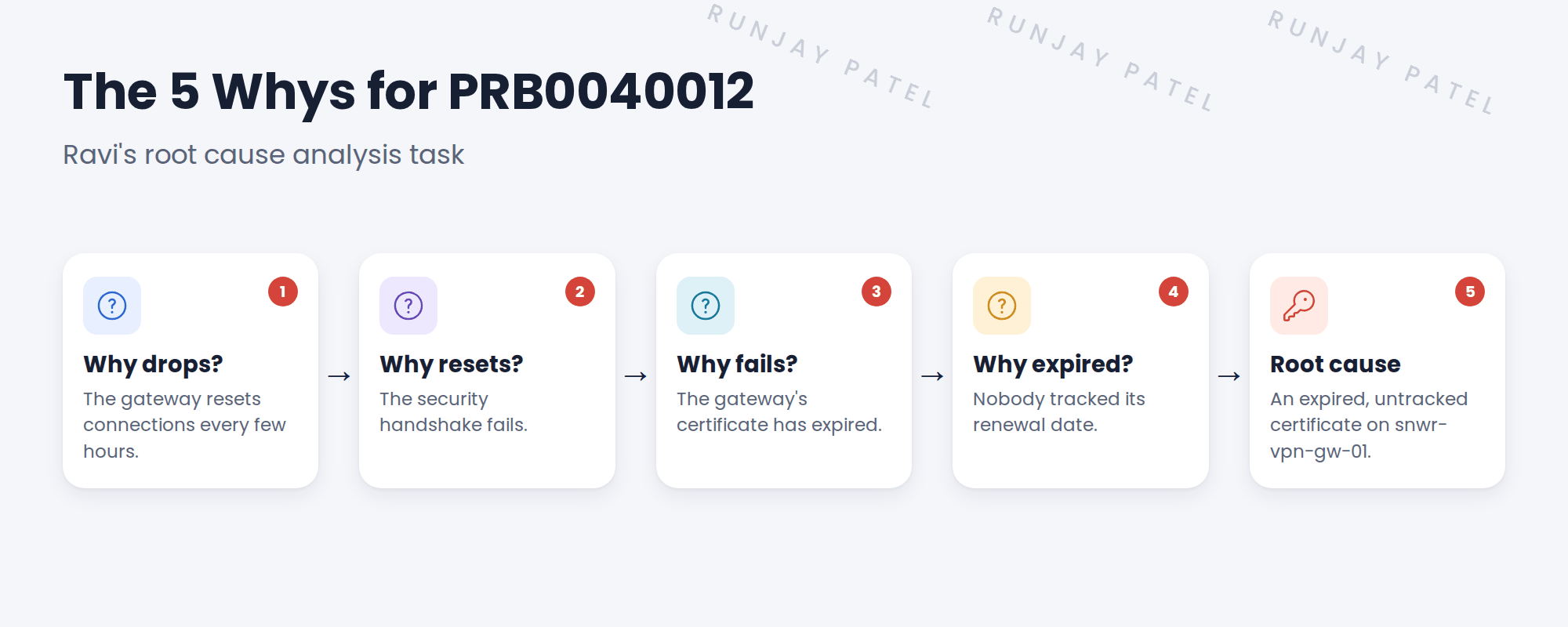
💡 Good to know: Stop when you reach something you can fix, and that would stop the problem coming back.
📝 Note: The cause has two parts: the expired certificate, and the fact that nobody tracked it. A good fix handles both.
4 Recording what was found
- Ravi writes the findings in his RCA task and closes it.
- Grace copies the cause into the problem’s Cause notes.
- The problem is ready for a workaround, and a fix.
⭐ Remember: Assign the RCA as a task. Ask why until you can fix it.
5 Let’s try it: assign a root cause analysis task
- Open your problem. Move it to the Root Cause Analysis state.
- In the Problem Tasks related list, click New.
- Type: Root cause analysis. Assignment group: SNWR Network Support. Assigned to: Ravi Iyer.
- Write the 5 Whys in the task’s notes, then close the task.
- Add the root cause to the problem’s cause notes.
6 Quick recap
- A problem task gives investigation work to a team
- Two types: root cause analysis and general
- Ask why until you reach a cause you can fix
- The VPN root cause: an expired, untracked certificate
- Record the cause on the problem
7 Check yourself
Think of your answer first. Then tap to check.
1 Grace isn’t a network engineer. How does the RCA get done? Show answer
She creates a root cause analysis task and assigns it to SNWR Network Support.
2 What are the two problem task types? Show answer
Root cause analysis and general.
3 When do you stop asking why? Show answer
When you reach a cause you can fix that stops the problem coming back.
4 What was the VPN root cause? Show answer
An expired, untracked certificate on snwr-vpn-gw-01.
Nice work! The VPN root cause is found. 🎉
Next up: Known Errors and Workarounds
Was this lesson helpful?
Please log in to share lesson feedback.
Have a question or doubt?
Ask here and get help from instructors and fellow learners.
Only logged-in learners can post.





