


How Employees Ask for Help: Channels
On this page
In this lesson, you will learn:
- What a channel is
- The channels SNWR offers
- Which record each channel creates
- How the Contact type field records the channel
🔁 Quick look back: Last time: Service Operations Workspace Tour. You learned the parts of Service Operations Workspace: the home page, lists, the record page and the side panel.
1 “How do I even ask?”
Before One Front Door, every SNWR employee asked for help a different way.
- Some emailed. Some phoned. Some walked over to the IT desk.
- Nobody tracked the calls and walk-ups.
- So IT had no idea how much work it really did.
👉 The fix: choose the channels SNWR offers, and make sure every one creates a record.
2 Words to know
Key term: Channel
A way to ask for help, like the portal, email or phone.
Key term: Contact type
A field on the ticket that records which channel was used.
Key term: Interaction
A record of a conversation, like a phone call or chat, before it becomes a ticket.
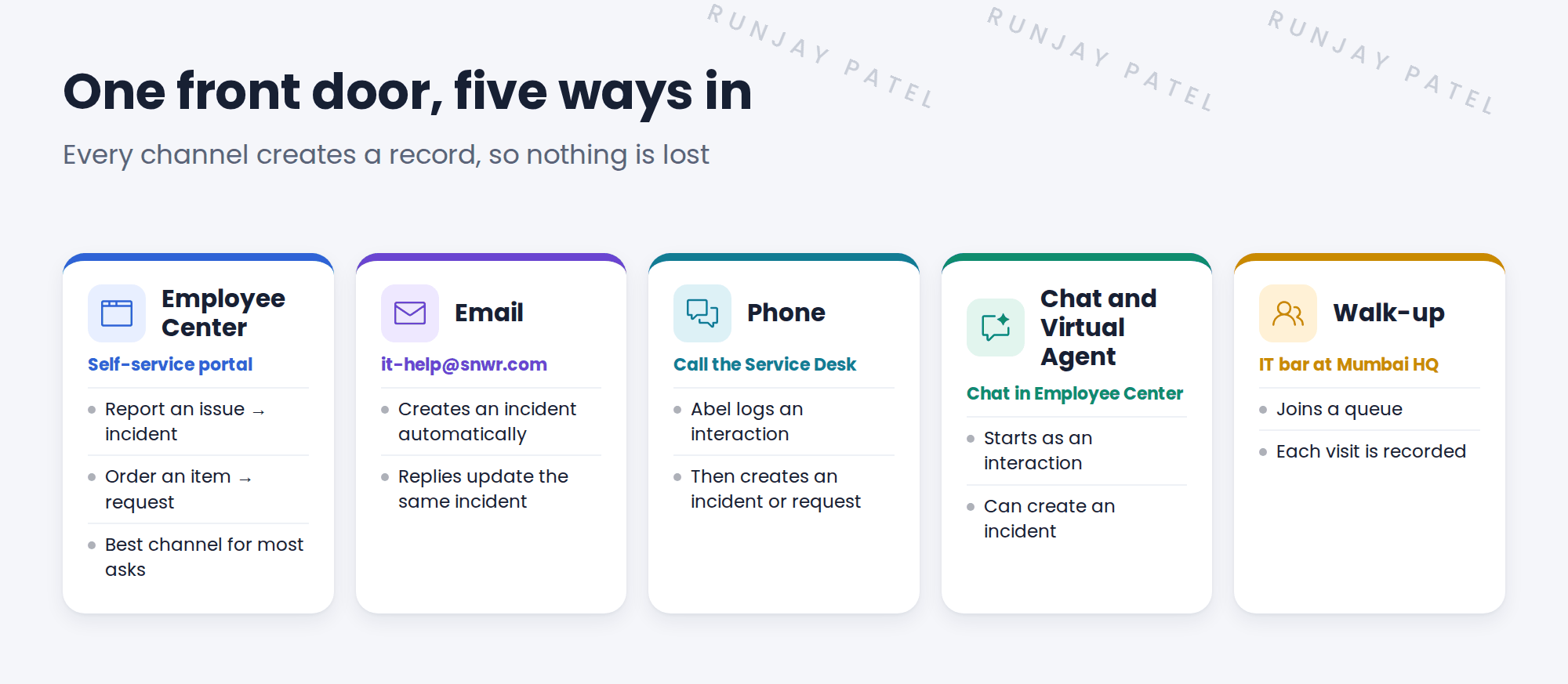
3 SNWR’s channels
💡 Good to know: Need a refresher? See Fundamentals › System Events › Inbound Email Actions.
📦 Entitlement check: Walk-up comes with the ITSM Advanced package, which SNWR has.
4 The Contact type field
Every incident has a Contact type field, such as Self-service, Email, Phone, Chat or Walk-in. It’s filled in for you when the channel is automatic.
| Channel | Contact type |
|---|---|
| Employee Center | Self-service |
| Phone | Phone |
| Chat or Virtual Agent | Chat or Virtual Agent |
| Walk-up | Walk-in |
💡 Good to know: Daniel wants more people to use Employee Center. A report by Contact type shows if that’s working.
5 SNWR’s channel plan
- Employee Center is the main door. Most asks start here.
- Email stays for now, so nobody gets stuck.
- Phone is for urgent issues.
- Chat and walk-up are added for quick questions.
⭐ Remember: Any channel is fine, as long as it ends in a record.
6 Quick recap
- A channel is a way to ask for help
- SNWR offers Employee Center, email, phone, chat and walk-up
- Every channel creates a record: incident, request or interaction
- Contact type shows which channel was used
- Employee Center is SNWR’s main front door
7 Check yourself
Think of your answer first. Then tap to check.
1 Sam emails [email protected]. What gets created? Show answer
An incident, created automatically.
2 Abel takes a phone call. What does he log first? Show answer
An interaction. Then he can create an incident or request from it.
3 Which field shows the channel on an incident? Show answer
Contact type.
4 Which channel is SNWR’s main front door? Show answer
Employee Center.
Nice work! You know every way into SNWR’s front door. 🎉
Next up: Incident Architecture: Tables and Key Fields
Was this lesson helpful?
Please log in to share lesson feedback.
Have a question or doubt?
Ask here and get help from instructors and fellow learners.
Only logged-in learners can post.





