


Operational Readiness
On this page
In this lesson, you will learn:
- What operational readiness means
- The SNWR go/no-go checklist
- Who owns each item
- How the go/no-go meeting works
🔁 Quick look back: Last time: Migrating Open Tickets at Cutover. You learned how SNWR loads open tickets with import sets, keeps the old number and builds a mapping.
1 “The system is ready. Are we?”
All tests pass. Go-live is Monday.
- Half the agents haven’t seen the workspace.
- Nobody told staff to stop emailing the old mailbox.
- The on-call roster has old phone numbers.
👉 The fix: check readiness with a go/no-go checklist, and decide together.
2 The checklist
Key term: Operational readiness
The business, not just the system, is ready to run on the new tool.
Key term: Go/no-go
A meeting where owners decide, from the checklist, if go-live goes ahead.
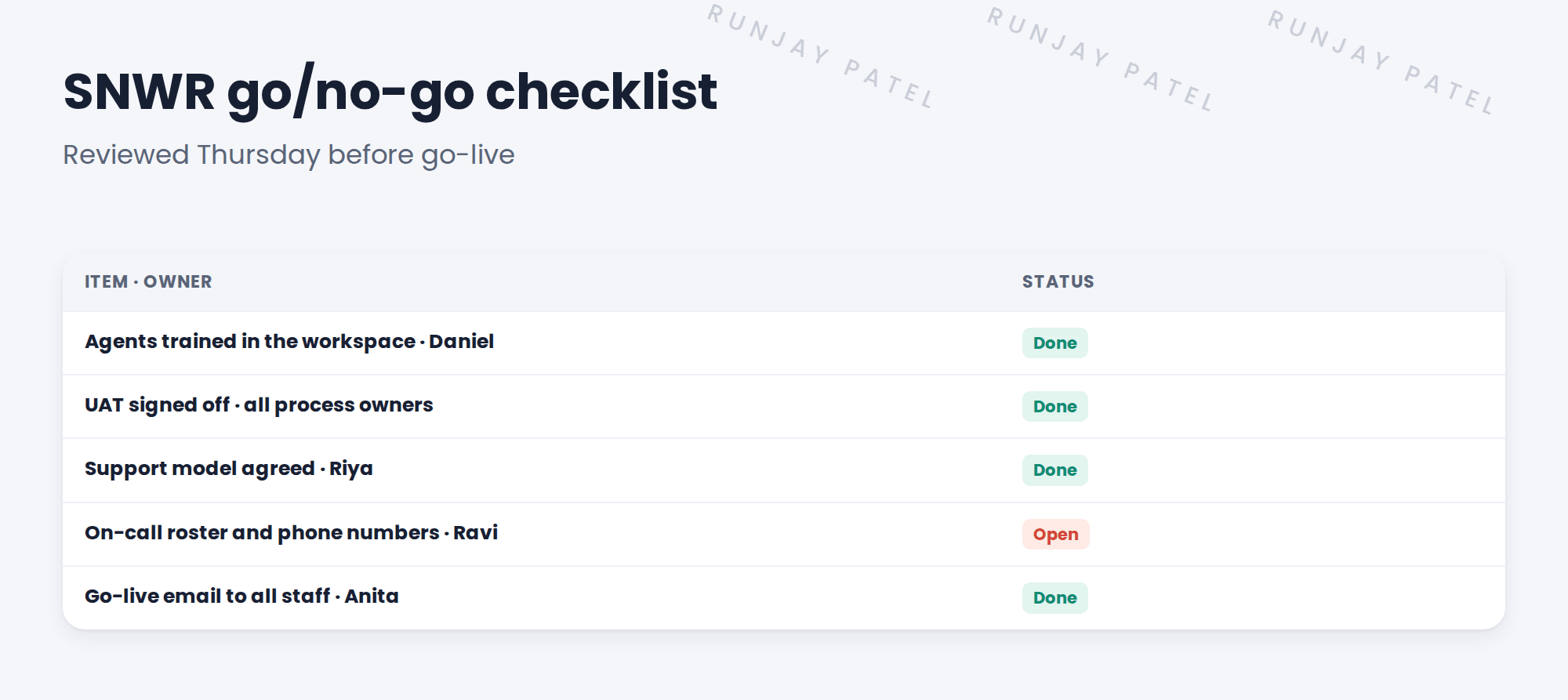
3 The go/no-go meeting
- Two working days before go-live, Anita chairs.
- Each owner reports their items.
- Open items need a plan and a date.
- Anita decides: Go, or No-go with a new date.
- The decision is recorded.
⭐ Remember: No-go is not a failure. Going live unready is.
4 Let’s try it: build the checklist
- Create a list or task set named SNWR go/no-go checklist.
- Add the five items above, each with an owner and a due date.
- Add two of your own, such as “knowledge articles published” and “old mailbox auto-reply ready”.
- Mark the status of each item for your PDI build.
- Write the go-live email to all staff: what changes, where to go, and who to call.
5 Quick recap
- Operational readiness: people and support, not just the system
- The checklist covers training, sign-offs, support, on-call and comms
- Every item has an owner
- Anita chairs the go/no-go meeting
- No-go is not a failure
6 Check yourself
Think of your answer first. Then tap to check.
1 Who decides go or no-go at SNWR? Show answer
Anita, the CIO.
2 An item is still open. Can SNWR go live? Show answer
Only with an agreed plan and date for it.
3 Name one item on the checklist. Show answer
Agents trained, UAT signed off, support model, on-call roster, or go-live email.
4 When is the meeting held? Show answer
Two working days before go-live.
Nice work! SNWR checks it’s ready before going live. 🎉
Next up: Cutover Plan and Go-Live Checklist
Was this lesson helpful?
Please log in to share lesson feedback.
Have a question or doubt?
Ask here and get help from instructors and fellow learners.
Only logged-in learners can post.





