


Incident Properties and Resolution Rules
On this page
In this lesson, you will learn:
- Where incident properties live
- How auto-close works
- Why resolution codes and notes matter
- How reopen counts help Daniel
🔁 Quick look back: Last time: Assignment Strategy. You learned how SNWR routes incidents: Service Desk first, then L2, with one simple assignment rule.
1 “Why are 900 incidents still open?”
SNWR’s old tracker never closed anything.
- Hundreds of fixed tickets were still “open”.
- Many said “fixed” and nothing else.
- Nobody could tell how issues were solved, or which ones came back.
👉 The fix: set the incident properties, and require a resolution code and notes on every fix.
2 Incident properties
Key term: Incident properties
A settings page just for Incident. Find it at All › Incident › Administration › Incident Properties.
Key term: Auto-close
A resolved incident closes by itself after a set number of days.
| Setting | SNWR value | Why |
|---|---|---|
Days before a resolved incident closes (glide.ui.autoclose.time) |
7 | Gives the caller a week to say it’s still broken |
| Resolution code and notes on resolve | Required (baseline) | Every fix says how it was solved |
💡 Good to know: Need a refresher? See Fundamentals › System Properties › Viewing & Editing Properties.
3 Resolution codes and notes
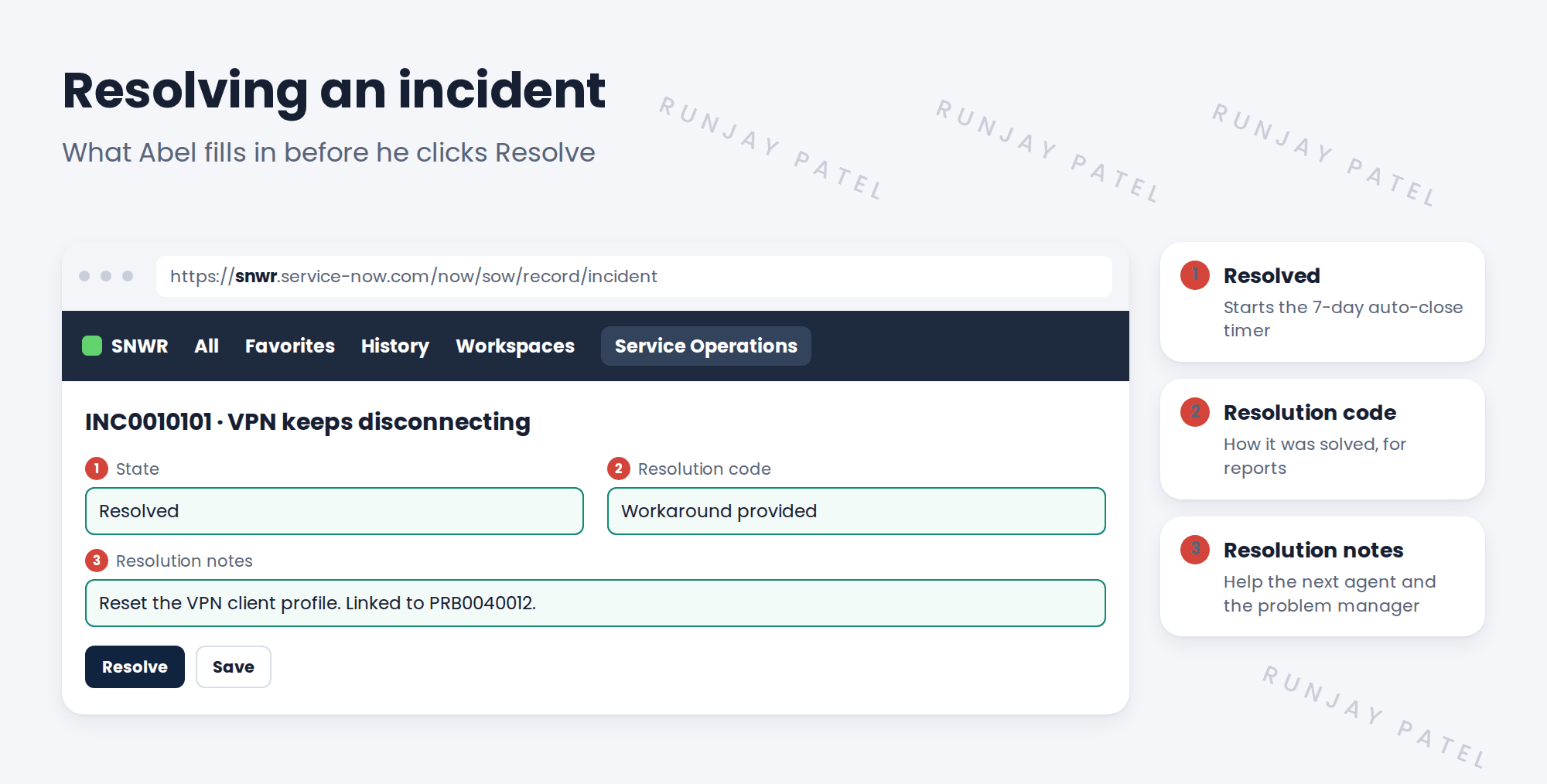
Resolution codes like Solution provided, Workaround provided or Resolved by problem let Grace find patterns later.
💡 Good to know: Good notes say what was done, not just “fixed”. Write them for the next agent.
4 Reopens tell a story
When a caller reopens an incident, ServiceNow counts it in the Reopen count field. Daniel watches this number: a high reopen rate means fixes aren’t sticking.
⭐ Remember: Auto-close after 7 days. A code and notes on every fix. Watch the reopen count.
5 Let’s try it: set auto-close to 7 days
- Go to All › Incident › Administration › Incident Properties.
- Find the setting for the number of days before resolved incidents close automatically.
- Set it to 7 and click Save.
- Open an incident and try to resolve it without a resolution code. What happens?
- Add a code and notes, and resolve it.
6 Quick recap
- Incident settings live in Incident Properties
- Resolved incidents auto-close after 7 days at SNWR
- Every fix needs a resolution code and notes
- Codes help Grace find patterns
- The reopen count shows if fixes stick
7 Check yourself
Think of your answer first. Then tap to check.
1 Where do you set the auto-close days? Show answer
In Incident Properties (All › Incident › Administration).
2 Why wait 7 days before closing? Show answer
To give the caller time to say it’s still broken.
3 Why does a resolution code matter? Show answer
It shows how issues are solved, so patterns can be found.
4 What does a high reopen count tell Daniel? Show answer
Fixes aren’t sticking.
Nice work! SNWR’s incidents now close cleanly, with details. 🎉
Next up: Incident Tasks and Parent/Child Incidents
Was this lesson helpful?
Please log in to share lesson feedback.
Have a question or doubt?
Ask here and get help from instructors and fellow learners.
Only logged-in learners can post.





