


Categories and Subcategories
On this page
In this lesson, you will learn:
- Why categories matter
- How to check the baseline first
- How dependent subcategories work
- How to add one missing subcategory
🔁 Quick look back: Last time: The Incident Lifecycle and On Hold Reasons. You learned the incident states, and how the On Hold reasons cover every kind of waiting.
1 “We need 40 categories!”
SNWR’s old spreadsheet had a category column. People typed anything they liked.
- There were 40 categories, like “VPN”, “vpn issue” and “Network – VPN”.
- Reports were useless.
- Routing by category was impossible.
👉 The fix: start from the baseline list, keep it short, and add only what SNWR really needs.
2 Words to know
Key term: Category
The main kind of issue, like Network or Hardware.
Key term: Subcategory
A more exact kind, like VPN under Network.
Key term: Dependent field
A field whose choices depend on another field. Subcategory depends on Category.
💡 Good to know: Need a refresher? See Fundamentals › Field Configuration › Choice Lists & Dependent Fields.
3 Check the baseline first
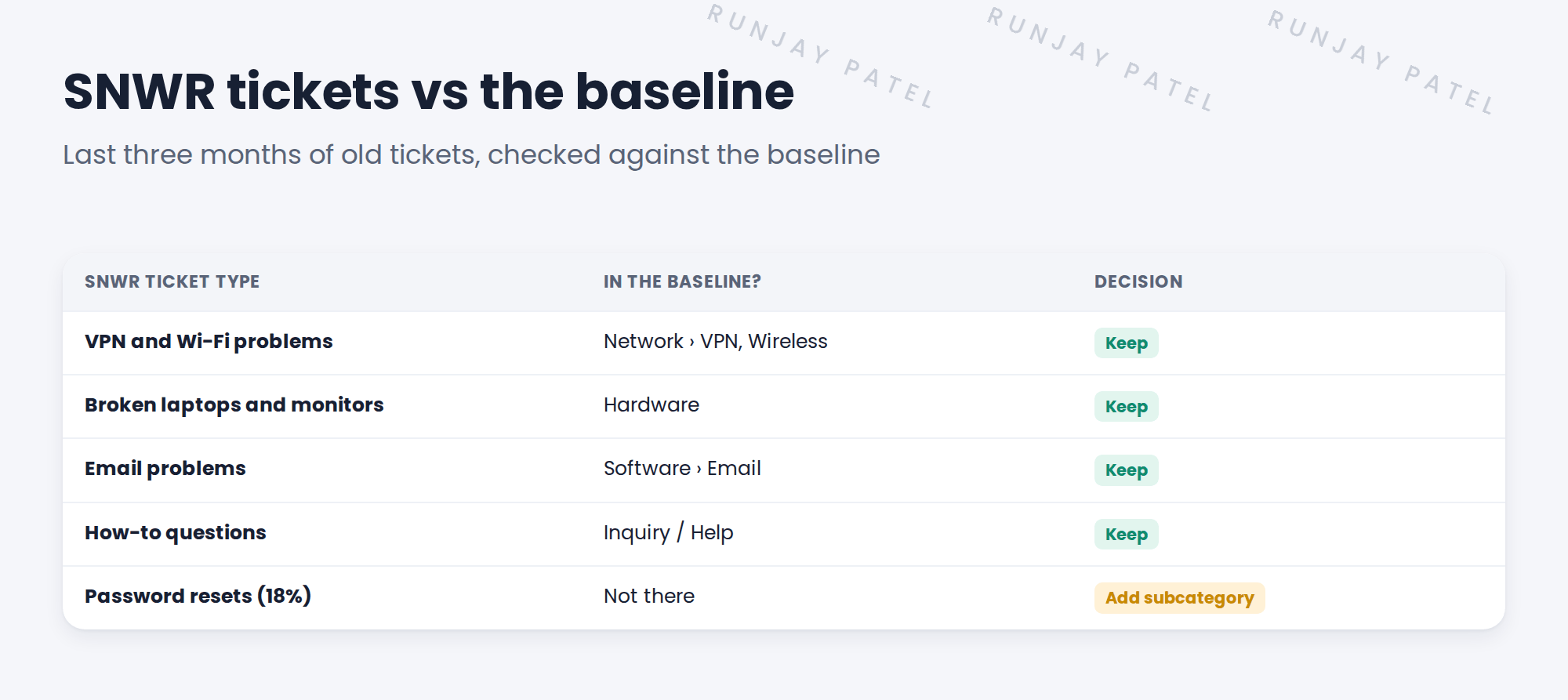
You compare SNWR’s last three months of tickets with the baseline choices. The result surprises Daniel:
💡 Good to know: Keep the category list to about 5 to 8 choices. People pick faster, and reports stay clear.
4 Add only what’s missing
Password resets are almost one in five SNWR tickets. They need their own subcategory, so SNWR can track them, and later automate them.
| Category | New subcategory | Why |
|---|---|---|
| Inquiry / Help | Password reset | 18% of tickets; a target for self-service later |
⚠️ Heads up: Don’t rename or delete baseline choices that are already in use. Reports and rules may depend on them.
5 Let’s try it: add the Password reset subcategory
- Open any incident. Right-click the Subcategory label and choose Show Choice List.
- Click New. Set Table to incident, Element to subcategory, Label to Password reset, Value to password_reset.
- Set Dependent value to the value of the Inquiry / Help category, inquiry. Save.
- Open a new incident. Pick Category Inquiry / Help.
- Check that Password reset now appears in Subcategory.
6 Quick recap
- Categories drive routing and reports
- Check SNWR’s real tickets against the baseline first
- Subcategory depends on Category
- Keep the list short: about 5 to 8 categories
- SNWR added only one subcategory: Password reset
7 Check yourself
Think of your answer first. Then tap to check.
1 Does the baseline already have a VPN subcategory? Show answer
Yes, under Network.
2 How does Subcategory know which choices to show? Show answer
It’s a dependent field. Each choice has a dependent value that matches a category.
3 Why add Password reset? Show answer
It’s 18% of SNWR’s tickets, so SNWR wants to track it and later automate it.
4 Should you delete baseline categories you don’t use? Show answer
No. Leave baseline choices that may be in use; just don’t promote them.
Nice work! SNWR’s categories are clean and short. 🎉
Next up: Priority Design: Impact and Urgency
Was this lesson helpful?
Please log in to share lesson feedback.
Have a question or doubt?
Ask here and get help from instructors and fellow learners.
Only logged-in learners can post.





