


Configuring Risk Assessments
On this page
In this lesson, you will learn:
- What makes a good risk question
- SNWR’s risk questions
- How answers are scored
- How to check the assessment on a change
🔁 Quick look back: Last time: How ServiceNow Works Out Change Risk. You learned how risk assessment answers and risk conditions combine into a change’s risk.
1 “The questions are confusing”
The first risk questionnaire has 25 questions.
- Change owners click random answers to finish quickly.
- Some questions use words nobody understands.
- The results are worthless.
👉 The fix: ask a few clear questions that really predict risk.
2 SNWR’s risk questions
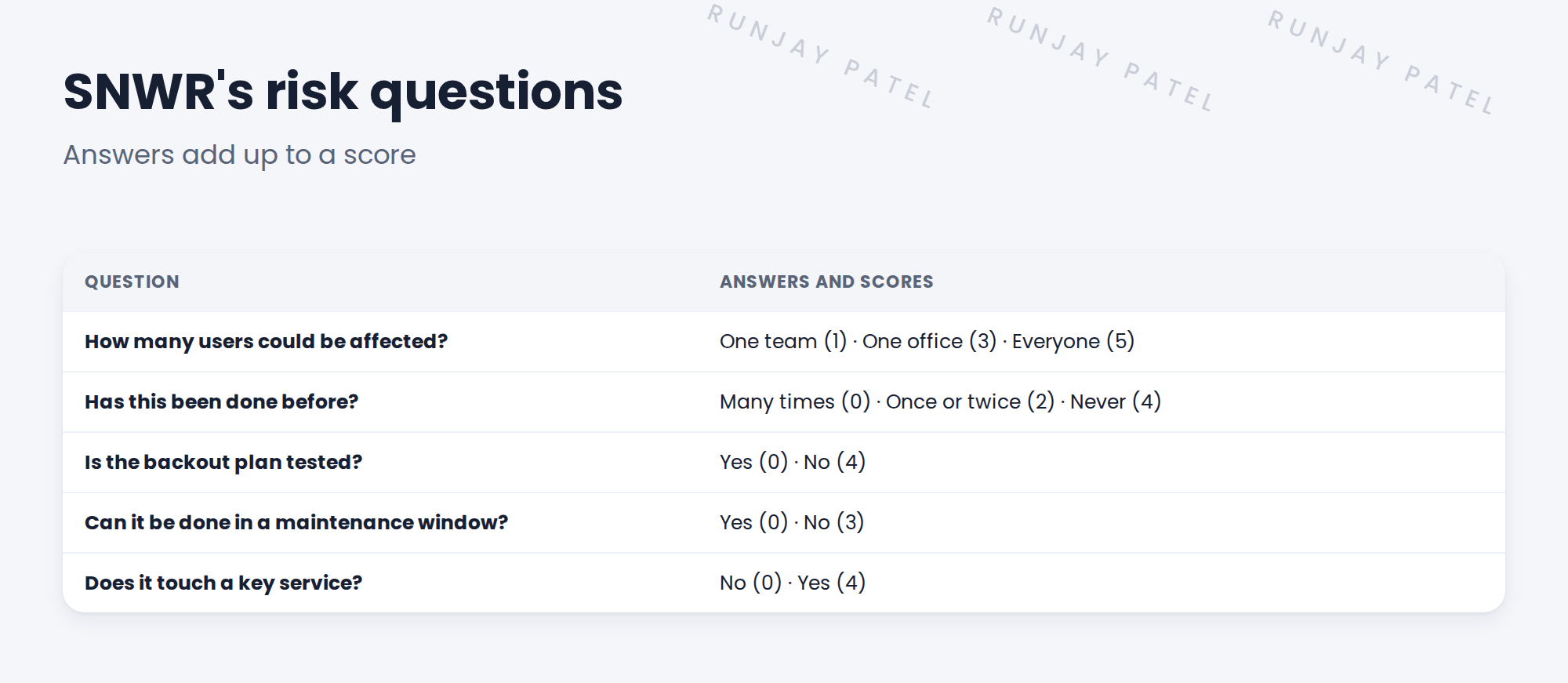
💡 Good to know: Five questions is enough. Every extra question makes people rush the others.
3 Good questions
- Short and plain: “Is the backout plan tested?”, not “Has remediation been validated?”
- Easy to check: the answer can be proven later.
- Really about risk: each one changes the score.
📝 Note: Mei agreed the questions and scores as decision DD-024. She reviews them after three months of real changes.
4 Let’s try it: look at the risk assessment
- Search Risk Assessment in the All menu and open the change risk assessment setup.
- Open the baseline assessment. Read its questions and answer weights.
- Open a normal change. Use the option to fill out the risk assessment.
- Answer the questions, then use Calculate Risk.
- Check the change’s Risk field. Try different answers and compare.
5 Quick recap
- Few, clear questions give honest answers
- SNWR asks five questions
- Each answer has a score; higher means riskier
- Questions should be plain, checkable and really about risk
- Review the questions after real use
6 Check yourself
Think of your answer first. Then tap to check.
1 Why not ask 25 questions? Show answer
People rush and click random answers.
2 Which answer scores higher: backout tested, or not tested? Show answer
Not tested (4).
3 How many risk questions does SNWR use? Show answer
Five.
4 When does Mei review the questions? Show answer
After three months of real changes.
Nice work! SNWR’s risk questions are clear and useful. 🎉
Next up: Risk Conditions and Change Success Score
Was this lesson helpful?
Please log in to share lesson feedback.
Have a question or doubt?
Ask here and get help from instructors and fellow learners.
Only logged-in learners can post.





