


Priority Design: Impact and Urgency
On this page
In this lesson, you will learn:
- How impact and urgency set priority
- The baseline priority matrix
- SNWR’s meanings for impact and urgency
- How to handle VIP callers
🔁 Quick look back: Last time: Categories and Subcategories. You learned how to check the baseline categories first, and only add the few choices that are missing.
1 “Everything is P1!”
In the old tool, callers set their own priority.
- Half the tickets were marked “Urgent”.
- Agents couldn’t tell what really mattered.
- A real outage waited behind a font problem.
👉 The fix: keep the baseline matrix, and write down exactly what impact and urgency mean at SNWR.
2 How priority is set
Key term: Impact
How much of the business is affected.
Key term: Urgency
How fast it will hurt the business.
Key term: Priority
Worked out from impact and urgency. You don’t type it in.
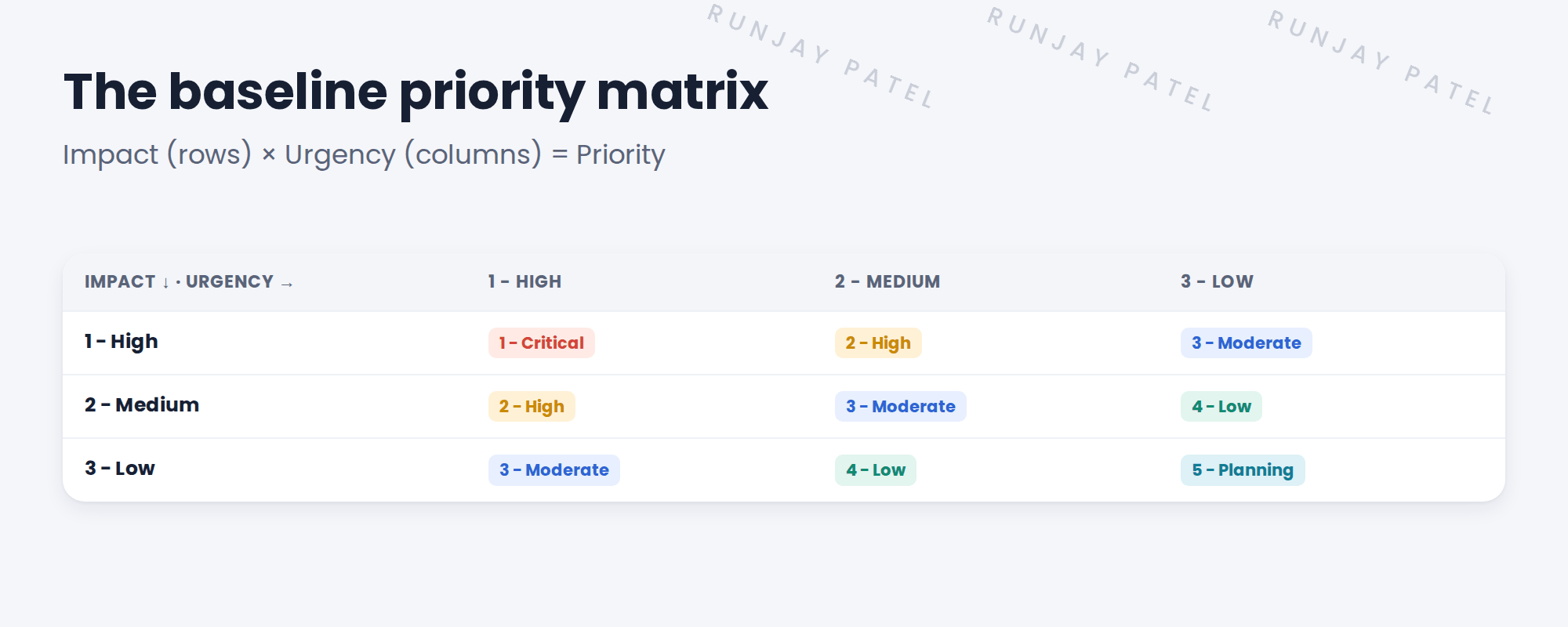
💡 Good to know: Need a refresher? See Fundamentals › Task Management › Assignment Rules & Data Lookup.
3 SNWR’s meanings
| Level | Impact means | Urgency means |
|---|---|---|
| 1 High | A whole office, or a key service like SNWR Email | Work has stopped now |
| 2 Medium | One team or department | Work is slowed down |
| 3 Low | One person | It can wait |
📝 Note: Daniel signed these off as decision DD-007. They go into agent training.
Sam’s VPN drops a few times a day. It affects one person (impact Low), and slows his work (urgency Medium). That’s priority 4… unless many people are hit.
💡 Good to know: Agents should ask “how many people?” and “can you still work?”. Those two questions set impact and urgency.
4 What about VIPs?
The CIO’s laptop broke. Is that High impact? No. It still affects one person.
- Impact always means how much of the business is hit.
- For VIPs, raise the urgency if their work has stopped.
- Use a VIP notification or escalation, so the right people know.
⚠️ Heads up: Don’t make VIP mean High impact. It breaks the matrix, and real outages lose their place in the queue.
⭐ Remember: Impact = how big. Urgency = how fast. Priority = the matrix. VIP is handled separately.
5 Let’s try it: check the matrix
- Go to All › System Policy › Rules › Priority Data Lookup Rules (or search “Priority Data Lookup”).
- Find the row for impact 1 and urgency 1. Check the priority is 1.
- Open a new incident. Set impact 2 and urgency 2. Check priority changes to 3.
- Set impact 1 and urgency 3. What priority do you get?
- Don’t change the rules. SNWR keeps the baseline.
6 Quick recap
- Impact = how much of the business; urgency = how fast
- Priority comes from the matrix, not from typing
- SNWR keeps the baseline matrix and writes clear meanings
- Agents ask: how many people, and can you still work?
- VIPs don’t get higher impact. Use urgency and escalation
7 Check yourself
Think of your answer first. Then tap to check.
1 Email is down for all of Mumbai HQ, and nobody can work. Impact and urgency? Show answer
Impact High, urgency High. Priority 1.
2 One person’s monitor flickers, but they can still work normally. Impact and urgency? Show answer
Impact Low and urgency Low, so priority 5.
3 Does SNWR change the baseline matrix? Show answer
No. It keeps it and adds clear meanings.
4 The CIO’s laptop broke. Is that High impact? Show answer
No. It’s one person. Raise urgency if needed, and use escalation.
Nice work! SNWR’s priorities now mean the same thing to everyone. 🎉
Next up: Assignment Strategy
Was this lesson helpful?
Please log in to share lesson feedback.
Have a question or doubt?
Ask here and get help from instructors and fellow learners.
Only logged-in learners can post.





