


Catalog Item Design Standards
On this page
In this lesson, you will learn:
- Why items need a standard
- SNWR’s rules for names and questions
- What a variable set is
- How to build SNWR Requested for
🔁 Quick look back: Last time: Catalog Taxonomy for SNWR. You learned how to build the SNWR IT catalog with four simple categories.
1 “Every item looks different”
Three people built the first catalog items.
- One asks “Requested for”, another asks “User”, another asks nothing.
- One form has 18 questions.
- Names mix “Req.”, “Order” and “Get”.
👉 The fix: agree one standard, and reuse the same questions through a variable set.
2 SNWR’s item standard
| Part | SNWR rule |
|---|---|
| Name | Starts with SNWR, then a plain verb: “SNWR Request a monitor” |
| Short description | One sentence: what you get and how long it takes |
| Questions | Ask only what the fulfiller needs. Aim for 6 or fewer |
| Requested for | Every item uses the SNWR Requested for variable set |
| Picture | A simple icon, not a product photo |
Key term: Variable
One question on a catalog form, like Monitor size.
Key term: Variable set
A group of questions you build once and reuse on many items.
3 The shared variable set
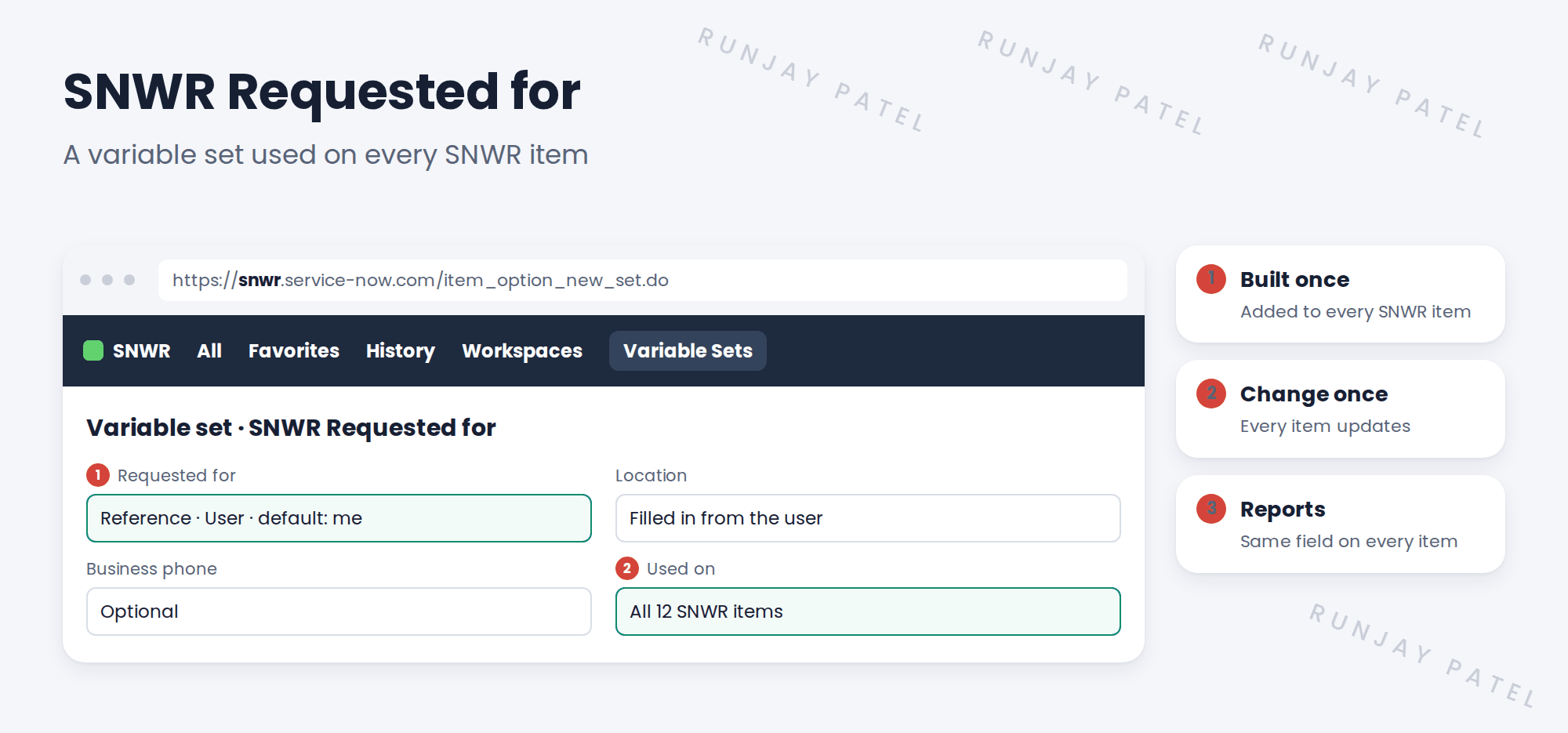
💡 Good to know: Need a refresher? See Fundamentals › Service Catalog › Variables & Variable Sets.
4 Let’s try it: build the variable set
- Open Service Catalog › Catalog Variables › Variable Sets. Create a single-row set named SNWR Requested for.
- Add a Reference variable Requested for to the User table, with the default value set to the current user.
- Add a Location variable that fills from the user (use a catalog client script or the auto-populate option on your release).
- Add the set to SNWR Request a monitor. Remove any old “User” question.
- Order the monitor for Sam, and check Requested for shows on the RITM.
5 Quick recap
- A standard makes every item look and work the same
- Names start with SNWR and a plain verb
- Ask 6 or fewer questions
- A variable set is built once and reused
- Every SNWR item uses SNWR Requested for
6 Check yourself
Think of your answer first. Then tap to check.
1 What is a variable set? Show answer
A group of questions built once and reused on many items.
2 How many questions should an SNWR item aim for? Show answer
6 or fewer.
3 You add a Business phone question to the set. What happens? Show answer
It shows on every item that uses the set.
4 Which name follows SNWR’s standard: “Req. Monitor” or “SNWR Request a monitor”? Show answer
SNWR Request a monitor.
Nice work! SNWR’s items now follow one standard. 🎉
Next up: Catalog Item or Record Producer?
Was this lesson helpful?
Please log in to share lesson feedback.
Have a question or doubt?
Ask here and get help from instructors and fellow learners.
Only logged-in learners can post.





