


Problem Properties and Configuration
On this page
In this lesson, you will learn:
- Who should create and own problems
- What each state should require
- Where problem settings live
- How problems show in the workspace
🔁 Quick look back: Last time: Known Errors and Workarounds. You learned how a known error and a workaround help the desk until the real fix is ready.
1 “Half the problems have no cause”
After a month of testing, Grace checks the problem list.
- Some problems were closed with no root cause.
- Some were created by users who can’t work them.
- Nobody can tell which are known errors.
👉 The fix: set who can create problems, and what must be filled in before each state change.
2 SNWR’s problem rules
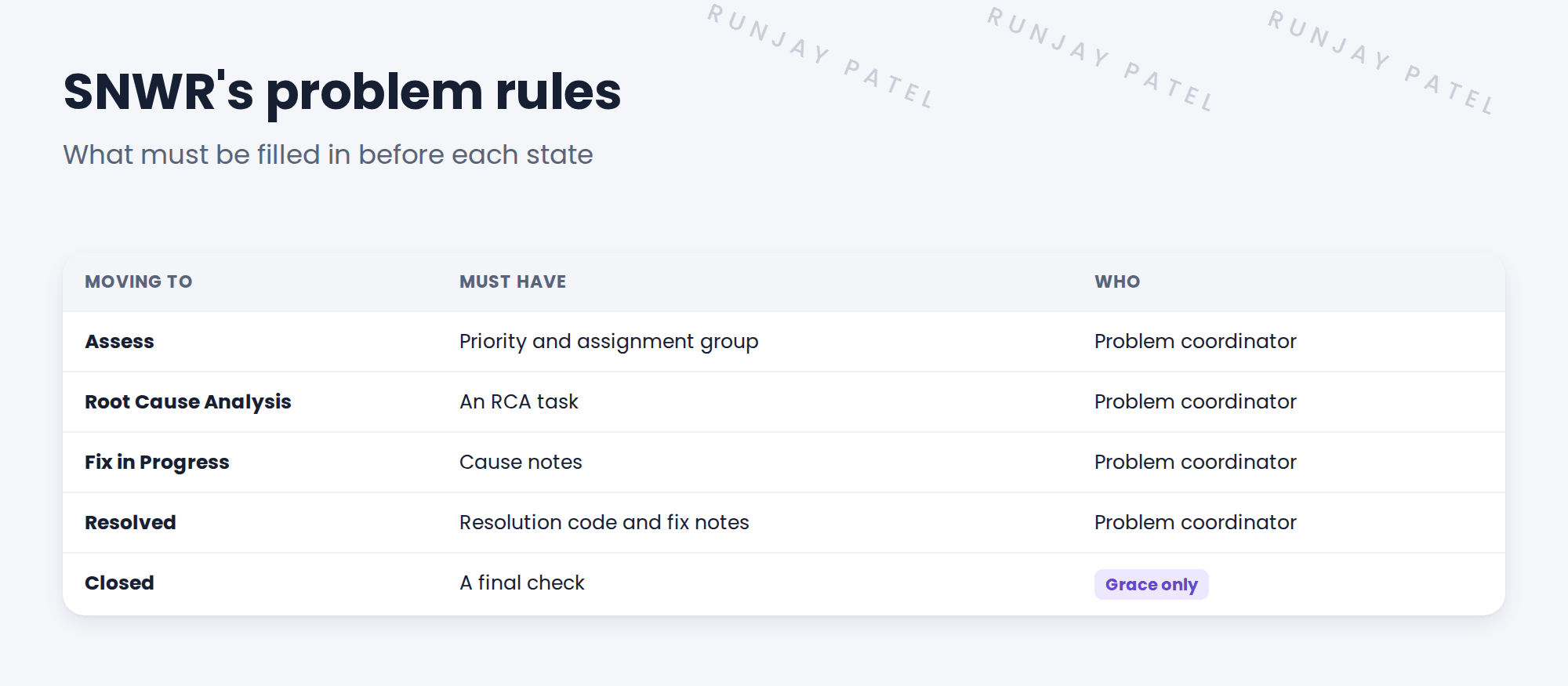
📝 Note: Many of these rules are already in the baseline. Check first, then add only what’s missing, like any other change.
3 Where the settings live
| Setting | Where |
|---|---|
| Problem Management properties | All › Problem › Administration (search “Problem properties”) |
| Who can create or move states | Roles on the SNWR groups |
| Required fields per state | Baseline UI policies, checked and adjusted if needed |
💡 Good to know: Agents should be able to create problems from incidents. Moving states is for the problem coordinator.
4 Problems in the workspace
Grace and the L2 teams work problems in Service Operations Workspace too, just like incidents. Add a list for them, such as “Open problems for my groups”.
⭐ Remember: Clear rules per state stop problems being closed without a cause.
5 Let’s try it: check the problem settings
- Search Problem in the All menu and open the problem properties page.
- Read each property. Note any you’d change for SNWR, and why.
- Open a problem and try to move it straight to Resolved without cause notes. What happens?
- In Service Operations Workspace, find the problem lists.
- Record your findings in the design decisions log.
6 Quick recap
- Agents can create problems; the coordinator moves them
- Each state has required fields
- Only Grace closes problems at SNWR
- Many rules are already in the baseline
- Problems are worked in the workspace too
7 Check yourself
Think of your answer first. Then tap to check.
1 Who can create problems at SNWR? Show answer
Agents with itil.
2 What must a problem have before Fix in Progress? Show answer
Cause notes.
3 Who closes problems at SNWR? Show answer
Grace, the problem manager.
4 Before adding a new rule, what do you check? Show answer
Whether the baseline already has it.
Nice work! SNWR’s problem rules are set. 🎉
Next up: From Root Cause to Fix: Problem to Change
Was this lesson helpful?
Please log in to share lesson feedback.
Have a question or doubt?
Ask here and get help from instructors and fellow learners.
Only logged-in learners can post.





