


Incident Architecture: Tables and Key Fields
On this page
In this lesson, you will learn:
- How the incident table is built
- What it gets from the Task table
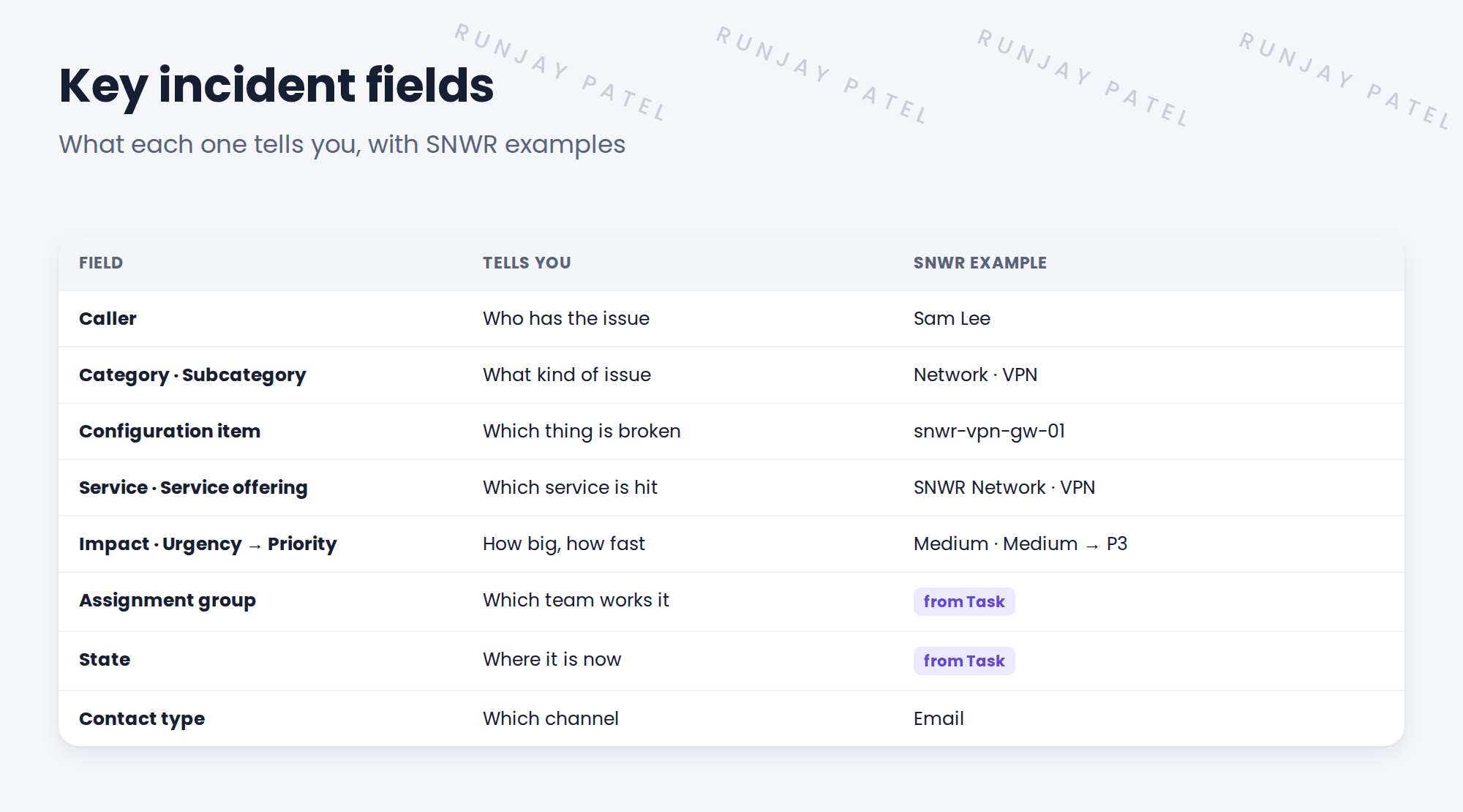
- The key fields SNWR will configure
- Which fields feed routing, SLAs and reports
🔁 Quick look back: Last time: How Employees Ask for Help: Channels. You learned the channels employees use to ask for help, and which record each channel creates.
1 “Which field do we change?”
In the first build sprint, Daniel asks for three things.
- “Show which office is affected.”
- “Make urgent things jump the queue.”
- “Tell us which service broke.”
👉 The fix: learn the incident table first. Most of what Daniel wants is already there.
2 Incident extends Task
Key term: Incident table
The table incident. Each record is one incident, like INC0010101.
Key term: Task table
The parent table task. Incident, Problem, Change and Request all extend it.
Because Incident extends Task, it gets the Task fields for free: number, state, assignment group, assigned to, work notes, comments and SLAs.
💡 Good to know: Need a refresher? See Fundamentals › Task Management › The Task Table.
3 The key fields
4 Which fields drive what
| Fields | Drive |
|---|---|
| Category, subcategory, CI | Routing to the right team |
| Impact, urgency, priority | SLAs and the order of work |
| Service, service offering | Reports on which services break most |
| State, assignment group | Queues and dashboards |
💡 Good to know: Before you add a new field, check the form’s field list. Incident already has many fields that aren’t on the form yet.
⭐ Remember: Incident extends Task. Learn the existing fields before you add new ones.
5 Quick recap
- Each incident is a record in the incident table
- Incident extends Task, so it gets state, assignment and SLAs
- Key fields: caller, category, CI, service, impact, urgency, priority
- Category and CI drive routing; priority drives SLAs
- Check existing fields before adding new ones
6 Check yourself
Think of your answer first. Then tap to check.
1 Which table does Incident extend? Show answer
Task.
2 Which two fields set the priority? Show answer
Impact and urgency.
3 Daniel wants to know which service broke. Which fields help? Show answer
Service and Service offering.
4 Where do Assignment group and State come from? Show answer
From the Task table.
Nice work! You know how the incident table is built. 🎉
Next up: The Incident Lifecycle and On Hold Reasons
Was this lesson helpful?
Please log in to share lesson feedback.
Have a question or doubt?
Ask here and get help from instructors and fellow learners.
Only logged-in learners can post.





