


ITSM Roles and Personas
On this page
In this lesson, you will learn:
- What a persona is
- The main baseline ITSM roles
- Which role each SNWR person needs
- How to give roles and check them
🔁 Quick look back: Last time: Schedules, Time Zones and Holidays. You learned how to build business-hours, 24×7 and holiday schedules, each with its own time zone.
1 “Why can’t Mei approve changes?”
It’s the first UAT day. Things go wrong fast.
- Mei can’t see the CAB Workbench.
- Lucas can’t edit the catalog he owns.
- Sam, an employee, can see every incident in the company.
👉 The fix: list each persona, pick the baseline role that fits, and give it through a group.
2 Personas and roles
Key term: Persona
A type of user, like “agent”, “approver” or “employee”. Each persona needs different access.
Key term: Role
A set of permissions. Roles decide what a user can see and do.
💡 Good to know: Need a refresher? See Fundamentals › User Administration › Roles & Role Inheritance.
3 The main ITSM roles
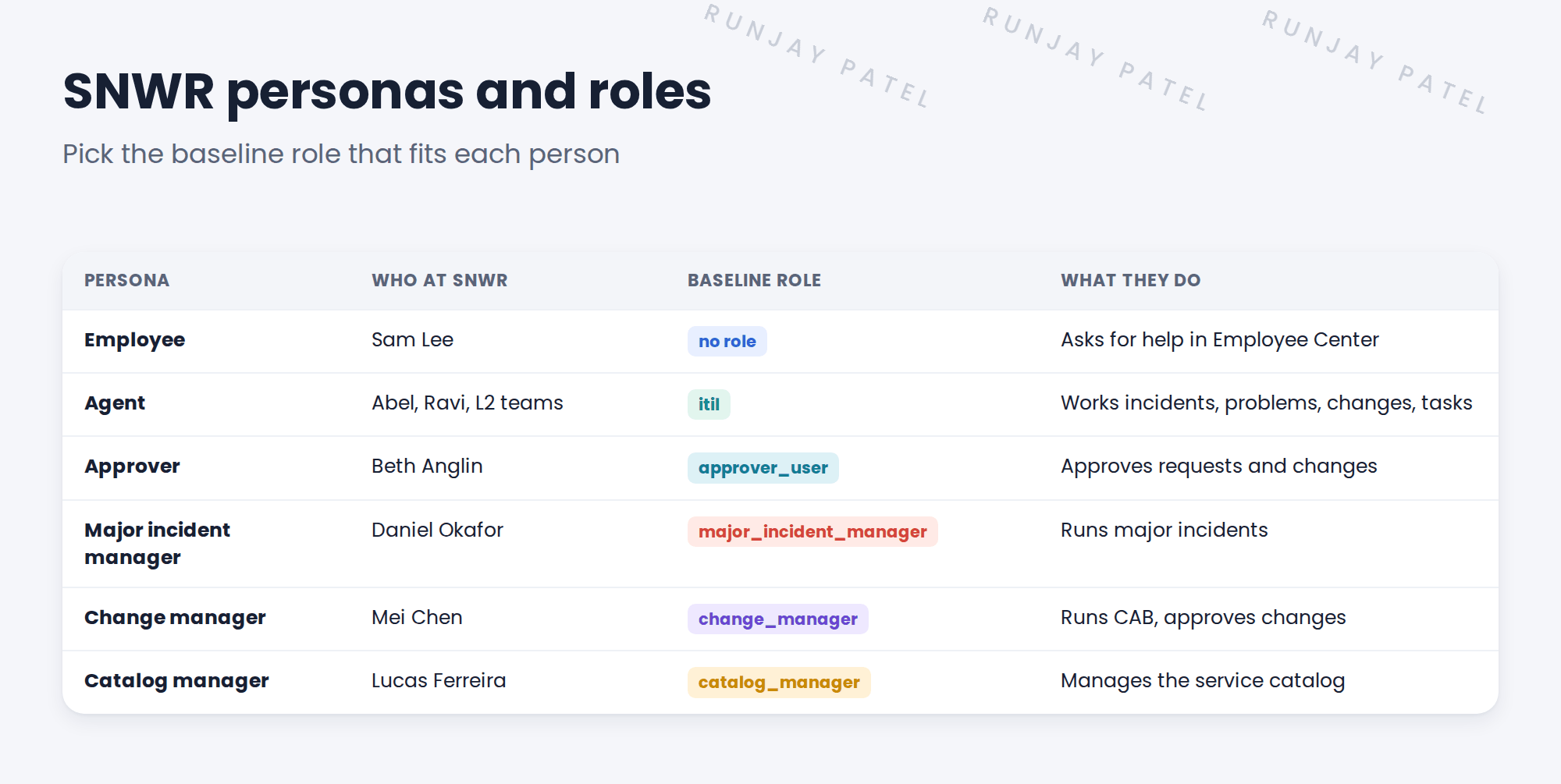
💡 Good to know: Some processes also have narrower roles, for example roles that allow incident work only. Check the docs for your release before you design.
4 Give roles through groups
You learned this with assignment groups: roles go on groups. For a role only one or two people need, make a small group for it.
| Group | Role and members |
|---|---|
| SNWR Service Desk | itil Abel and the desk agents |
| SNWR Major Incident Managers | major_incident_manager Daniel |
| SNWR CAB | change_manager for the chair, Mei Other CAB members get itil |
| SNWR Catalog Managers | catalog_manager Lucas |
⚠️ Golden rule: Never give admin just to “make it work”. Find the right role instead.
5 Let’s try it: give and check roles
- Create the group SNWR Major Incident Managers. Add the role major_incident_manager and the member Daniel Okafor.
- Create SNWR Catalog Managers with role catalog_manager and member Lucas Ferreira.
- Impersonate Abel Tuter. Check he can open the Incident list.
- Impersonate Sam Lee. Check he can’t open the Incident list, but can use the portal.
- End impersonation.
6 Quick recap
- A persona is a type of user, like agent or approver
- Agents need itil. Employees need no role
- Special jobs have special roles: major_incident_manager, change_manager, catalog_manager
- Give roles through groups, even small ones
- Test by impersonating each persona
7 Check yourself
Think of your answer first. Then tap to check.
1 Which role does a Service Desk agent need? Show answer
itil.
2 Does Sam, an employee, need a role to log an incident in the portal? Show answer
No.
3 Which role lets Daniel run major incidents? Show answer
major_incident_manager.
4 How do you check that roles work? Show answer
Impersonate each persona and try their tasks.
Nice work! Each SNWR persona has the right role. 🎉
Next up: ITSM Guided Setup
Was this lesson helpful?
Please log in to share lesson feedback.
Have a question or doubt?
Ask here and get help from instructors and fellow learners.
Only logged-in learners can post.





