


Fulfillment Design
On this page
In this lesson, you will learn:
- Why you design before you build
- The steps of a fulfillment
- Who does each step
- SNWR’s monitor design
🔁 Quick look back: Last time: Catalog Properties and Checkout. You learned how to hide quantity, use two-step checkout and let the Service Desk order on behalf of others.
1 “Who delivers the monitor?”
Sam’s first monitor order goes nowhere.
- Nobody was asked to approve it.
- Desktop Support never got a task.
- The request sat open for two weeks.
👉 The fix: draw every step, from order to close, and agree it with Lucas before building.
2 The fulfillment steps
Key term: Fulfillment
All the work to deliver what was ordered, from approval to close.
Key term: Fulfillment design
A simple drawing of each step, who does it and what happens next.
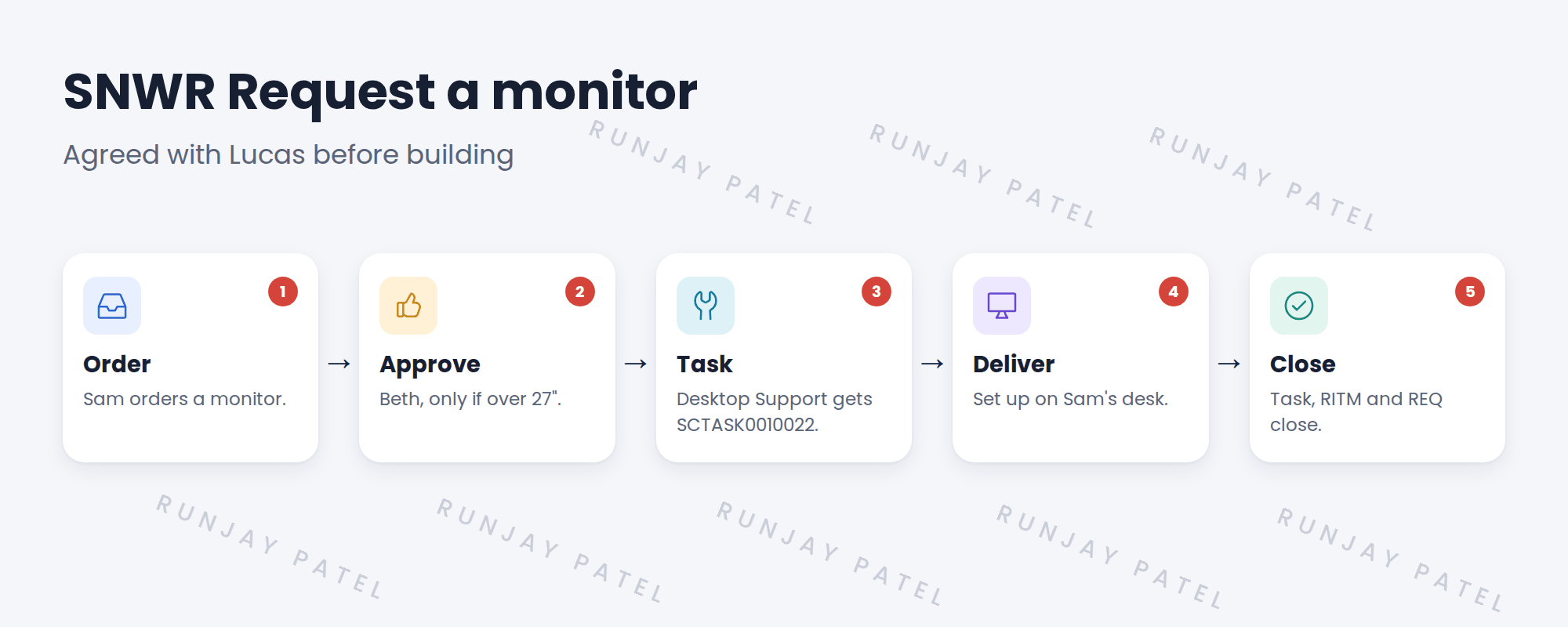
3 Questions to ask for each item
- Who must approve, and when?
- Which team does the work? One task or several?
- Can tasks run at the same time, or one after another?
- What does the requester see at each step?
- How long should it take?
💡 Good to know: Write the answers on one page per item. Lucas signs it off before you build.
⭐ Remember: Design first. Then build the flow.
4 Quick recap
- Fulfillment is all the work to deliver an order
- Design every step before building
- Ask: who approves, who works, in what order, how long
- SNWR’s monitor: order, approve, task, deliver, close
- Lucas signs off each design
5 Check yourself
Think of your answer first. Then tap to check.
1 When does Beth approve a monitor? Show answer
Only when it’s over 27 inches.
2 Which team gets the monitor task? Show answer
SNWR Desktop Support.
3 What should you do before building a flow? Show answer
Draw the fulfillment design and get it signed off.
4 Name one question to ask for each item. Show answer
Who approves? Which team works? How long should it take?
Nice work! You can design how an order gets delivered. 🎉
Next up: Fulfillment Flows for Catalog Items
Was this lesson helpful?
Please log in to share lesson feedback.
Have a question or doubt?
Ask here and get help from instructors and fellow learners.
Only logged-in learners can post.





