


Request SLAs and Fulfillment Targets
On this page
In this lesson, you will learn:
- What SNWR promises for a monitor
- The SLA on the RITM
- The OLA on the task
- Why the SLA pauses for approval
🔁 Quick look back: Last time: Stages and Request Status for Requesters. You learned how stages show requesters where their order is.
1 “How long does a monitor take?”
Sam asks how long his monitor will take.
- Abel guesses “about a week”.
- Desktop Support thinks “when we can”.
- Nobody measures it.
👉 The fix: set a delivery SLA on the RITM, and a shorter target on the team’s task.
2 SNWR’s two targets
Key term: Request SLA
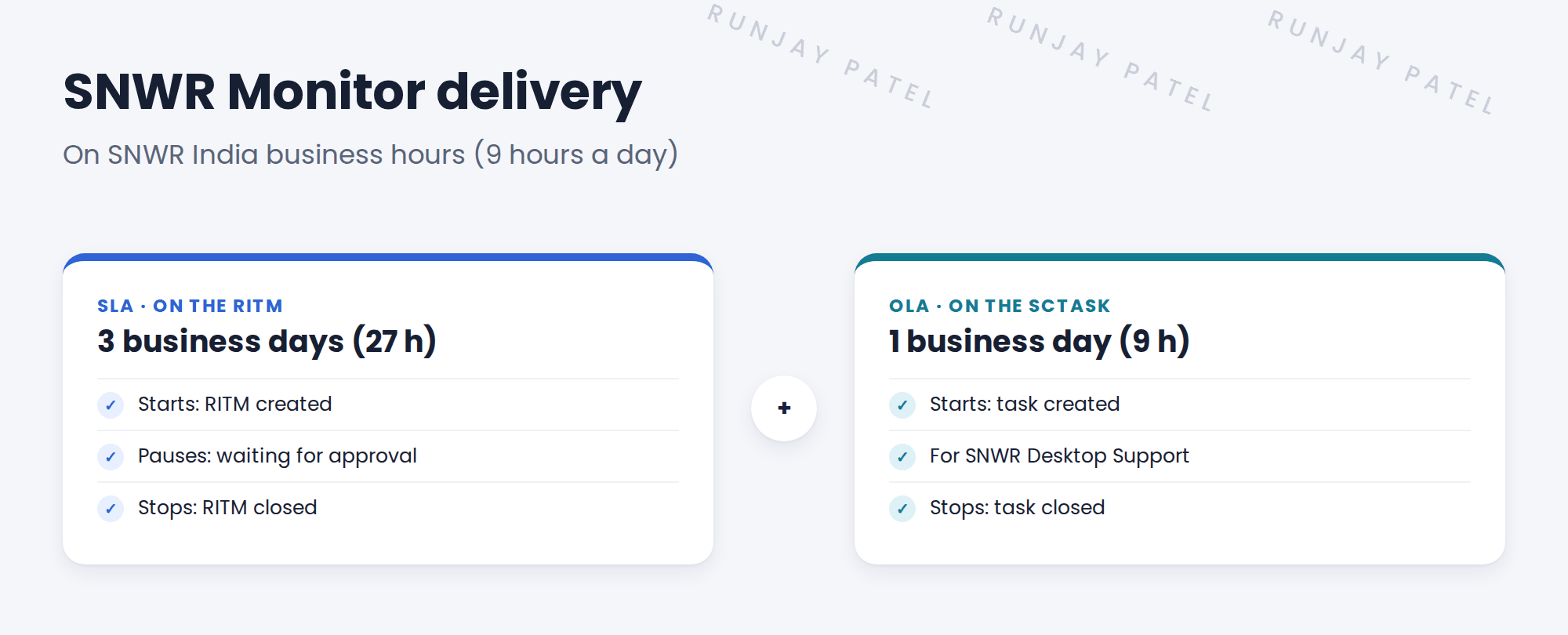
A promise to the requester, like “your monitor in 3 business days”.
Key term: OLA
An inside target between teams, like “Desktop Support finishes its task in 1 day”.
3 Why pause for approval?
While Beth thinks it over, Desktop Support can’t do anything. So the clock pauses. This keeps the target fair for the team.
⚠️ Heads up: On a business-hours schedule, 3 days is 27 hours, not 72. The clock only counts working time.
💡 Good to know: Need a refresher? See Fundamentals › SLA Management › SLA Definitions (Start, Pause, Stop).
4 Let’s try it: set the request targets
- Open Service Level Management › SLA Definitions. Create SNWR Monitor delivery, type SLA, table Requested Item [sc_req_item].
- Duration 27 hours. Schedule: SNWR India business hours. Start: item is SNWR Request a monitor. Pause: approval is Requested. Stop: state is Closed.
- Create SNWR Desktop Support task, type OLA, table Catalog Task [sc_task], 9 hours, for the SNWR Desktop Support group.
- Order a 32″ monitor as Sam. Check the SLA pauses until Beth approves.
- Check the OLA starts when the task is created.
5 Quick recap
- A request SLA is a promise to the requester
- An OLA is an inside target for a team
- SNWR: 3 business days on the RITM; 1 day on the task
- The SLA pauses while waiting for approval
- Business days count only working hours
6 Check yourself
Think of your answer first. Then tap to check.
1 Which table does SNWR Monitor delivery run on? Show answer
The requested item, sc_req_item.
2 Why does the SLA pause for approval? Show answer
The team can’t work until it’s approved, so it keeps the target fair.
3 3 business days on a 9-hour schedule is how many hours? Show answer
27 hours.
4 SLA or OLA: which is the team’s inside target? Show answer
OLA.
Nice work! SNWR now measures how long orders take. 🎉
Next up: Order Guides for New Joiners
Was this lesson helpful?
Please log in to share lesson feedback.
Have a question or doubt?
Ask here and get help from instructors and fellow learners.
Only logged-in learners can post.





