


Maintenance Windows and Blackout Schedules
On this page
In this lesson, you will learn:
- What a maintenance window is
- What a blackout schedule is
- How SNWR uses both
- How to build them
🔁 Quick look back: Last time: Risk Conditions and Change Success Score. You learned how a risk condition raises risk automatically, and how Change Success Score shows a team’s track record.
1 “You changed it during quarter-end?!”
Last year, someone patched the finance server on the last day of the quarter.
- The server didn’t come back for four hours.
- Finance couldn’t close the books on time.
- The CFO was not happy.
👉 The fix: set maintenance windows for when changes are welcome, and blackouts for when they’re not.
2 Two kinds of schedule
Key term: Maintenance window
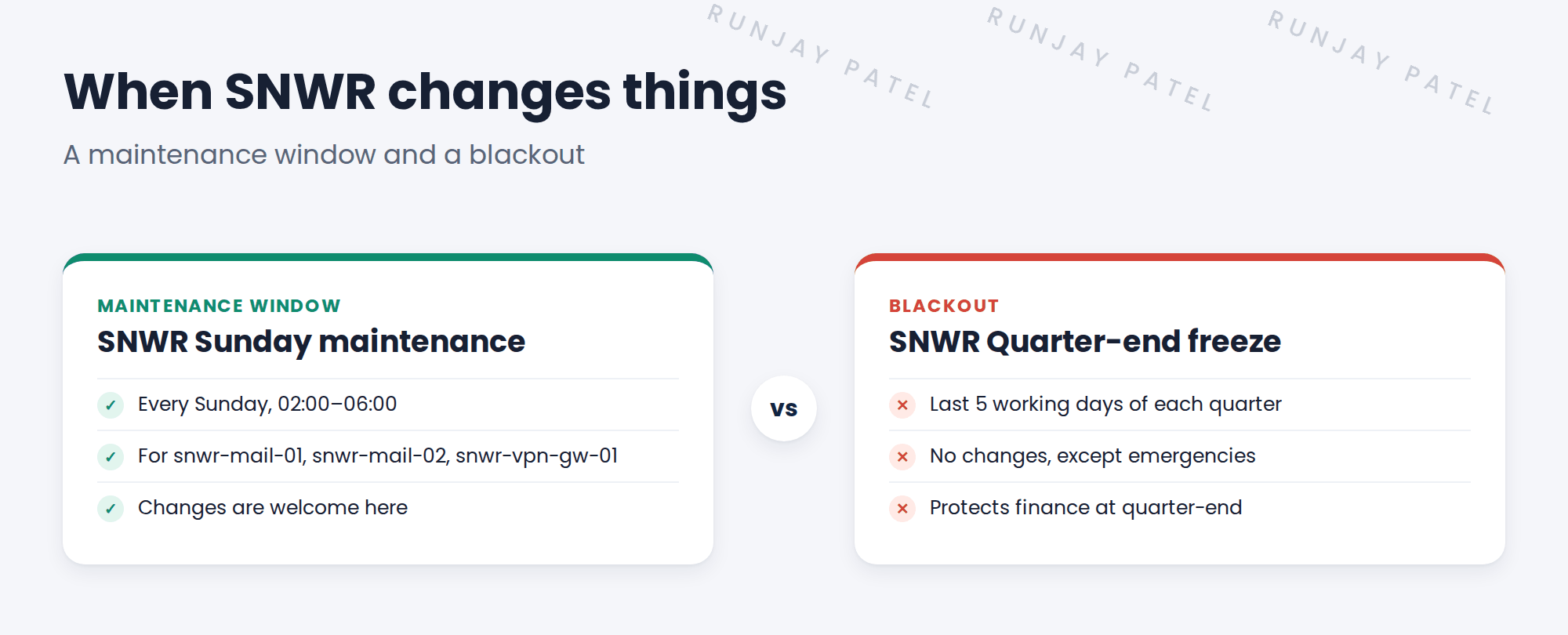
A time when changes to a CI are planned to happen, like Sunday 02:00 to 06:00.
Key term: Blackout schedule
A time when changes are not allowed, like the last week of each quarter.
3 How they’re used
- A CI’s Maintenance schedule field points to its maintenance window.
- Blackouts apply to everything, or to a group of CIs.
- Conflict detection checks both, as you’ll see next.
💡 Good to know: Pick windows when few people work. At SNWR, Sunday early morning is quiet in both India and the UK.
⚠️ Heads up: Emergency changes can still happen in a blackout, but Mei must know why.
4 Let’s try it: build the window and the blackout
- Go to All › System Scheduler › Schedules › Schedules. Create SNWR Sunday maintenance, type Maintenance, with a weekly entry Sunday 02:00 to 06:00.
- Open the CI snwr-mail-01 (or any server CI on your PDI). Set its Maintenance schedule to SNWR Sunday maintenance.
- Create SNWR Quarter-end freeze, type Blackout, with an entry for the last five working days of this quarter.
- Check both appear in the schedules list with the right type.
- You’ll use them to test conflicts in the next lesson.
5 Quick recap
- A maintenance window says when changes are welcome
- A blackout says when changes aren’t allowed
- SNWR: Sunday 02:00–06:00 window; quarter-end freeze
- A CI’s Maintenance schedule field points to its window
- Emergencies can still happen in a blackout
6 Check yourself
Think of your answer first. Then tap to check.
1 When is SNWR’s maintenance window? Show answer
Every Sunday, 02:00 to 06:00.
2 What’s the quarter-end freeze? Show answer
A blackout: no changes in the last 5 working days of each quarter, except emergencies.
3 Which field links a CI to its window? Show answer
Maintenance schedule.
4 Can an emergency change happen during a blackout? Show answer
Yes, but Mei must know why.
Nice work! SNWR’s changes now land at safe times. 🎉
Next up: Conflict Detection
Was this lesson helpful?
Please log in to share lesson feedback.
Have a question or doubt?
Ask here and get help from instructors and fellow learners.
Only logged-in learners can post.





