


The Incident Lifecycle and On Hold Reasons
On this page
In this lesson, you will learn:
- The incident states, from New to Closed
- The four On Hold reasons
- What happens when a caller replies
- How resolve and reopen work
🔁 Quick look back: Last time: Incident Architecture: Tables and Key Fields. You learned that Incident extends Task, and which key fields SNWR configures.
1 “Is anyone working on this?”
Sam’s VPN incident has had no update for three days.
- Abel is waiting for Sam to try a fix and reply.
- But the incident still says In Progress.
- The SLA clock keeps running, and Daniel thinks it’s being ignored.
👉 The fix: use the right state, and the right On Hold reason, every time.
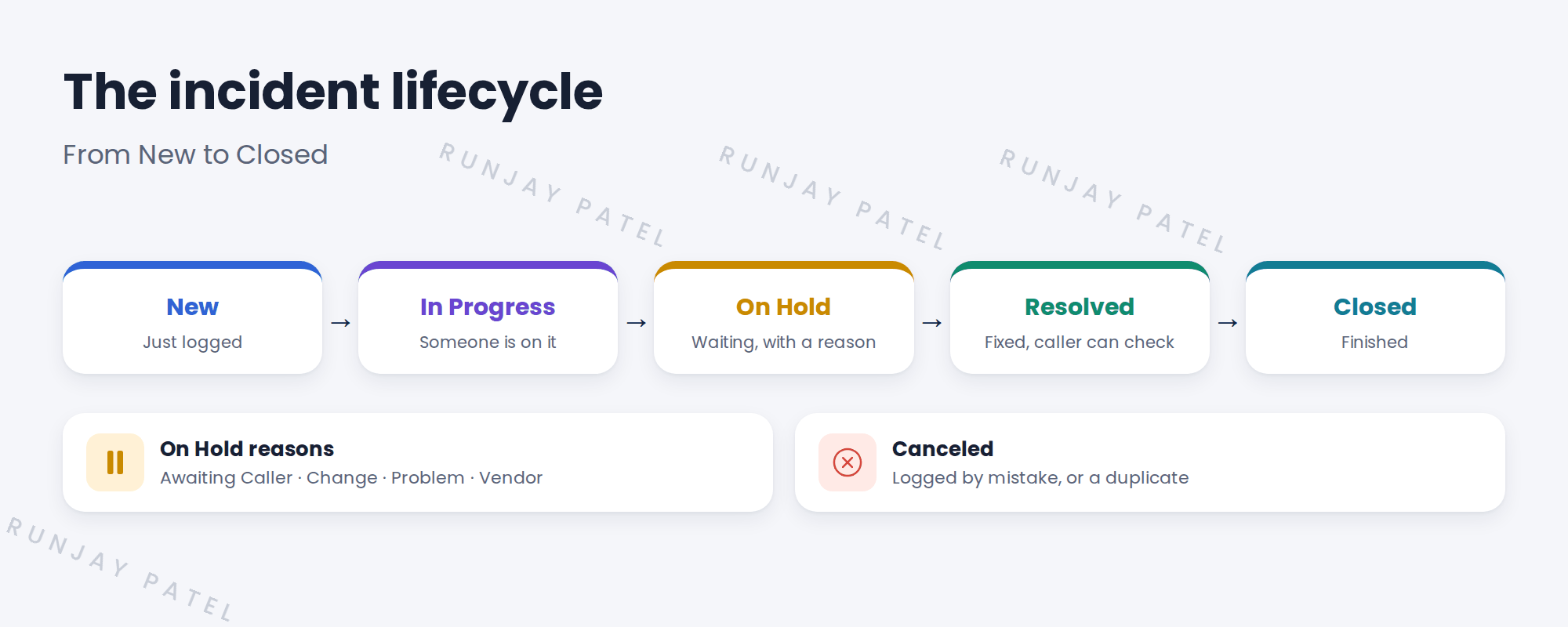
2 The incident states
💡 Good to know: Need a refresher? See Fundamentals › ITSM Essentials › Incident Management.
3 The four On Hold reasons
| On Hold reason | Use it when | SNWR example |
|---|---|---|
| Awaiting Caller | You need the caller to reply or test | Abel asks Sam to try a new VPN setting |
| Awaiting Change | A change will fix it | Waiting for CHG0030045 |
| Awaiting Problem | It’s linked to a problem being fixed | Waiting on PRB0040012 |
| Awaiting Vendor | An outside company must act | Company B is sending a part |
📝 Note: These reasons are why Daniel didn’t need a new “Waiting for Vendor” state. That was decision DD-004.
💡 Good to know: When the caller replies to an incident that is Awaiting Caller, ServiceNow moves it back to In Progress. Abel sees the reply at once.
4 Resolve, close and reopen
- Abel fixes the issue and sets the state to Resolved, with a resolution code and notes.
- Sam gets an email. If it’s really fixed, he does nothing, or confirms it.
- If it’s not fixed, Sam can reopen it. It goes back to In Progress.
- After a set number of days, a resolved incident closes by itself.
⚠️ Heads up: Don’t close incidents straight away. Resolved gives the caller time to say “it’s still broken”.
5 Let’s try it: look at the states and hold reasons
- Open any incident on your PDI and set the state to On Hold.
- Look at the On hold reason field. Check the four baseline choices are there.
- Pick Awaiting Caller and save.
- Impersonate the caller, add a comment from Employee Center, then end impersonation.
- Open the incident again. Has it moved back to In Progress?
6 Quick recap
- States: New, In Progress, On Hold, Resolved, Closed (and Canceled)
- On Hold always needs a reason
- Reasons: Awaiting Caller, Change, Problem and Vendor
- A caller reply moves Awaiting Caller back to In Progress
- Resolved gives the caller time to reopen before it closes
7 Check yourself
Think of your answer first. Then tap to check.
1 Abel is waiting for Sam to test a fix. Which state and reason? Show answer
On Hold, with reason Awaiting Caller.
2 Company B is sending a replacement part. Which reason? Show answer
Awaiting Vendor.
3 What happens when the caller replies to an Awaiting Caller incident? Show answer
It moves back to In Progress.
4 Why not go straight to Closed? Show answer
Resolved gives the caller time to say it’s still broken, and reopen it.
Nice work! You can use the incident states the right way. 🎉
Next up: Categories and Subcategories
Was this lesson helpful?
Please log in to share lesson feedback.
Have a question or doubt?
Ask here and get help from instructors and fellow learners.
Only logged-in learners can post.





