


ITSM Packages, Entitlements and Feature Availability
On this page
In this lesson, you will learn:
- What an ITSM package and an entitlement are
- What Foundation, Advanced and Prime each include
- Why you still see older names like ITSM Pro
- How to check what a company has actually paid for
- How this course handles features SNWR doesn’t have
🔁 Quick look back: In What an ITSM Implementer Does, you met Project One Front Door. SNWR’s IT help had no front door, and your job is to listen, configure and prove.
1 “Did we pay for that?”
It’s week 1 of Project One Front Door. You run your first design workshop, and the ideas fly:
- Daniel: “Can an AI agent reset passwords for us, so the desk doesn’t have to?”
- Mei: “Our app teams want changes created straight from their build pipeline.”
- Lucas: “And we need a walk-up IT bar at Mumbai HQ.”
You say “Sure, ServiceNow can do all of that!” Everyone is happy. Then Anita opens the contract. 😬
SNWR bought ITSM Advanced. The AI agent and the pipeline feature are in a higher package that SNWR didn’t buy. Now Anita has to find more budget, or tell her team “no” after you said “yes”.
👉 The fix: an implementer checks what the company is entitled to before designing anything, and writes it down. That’s what this lesson teaches.
2 Three words to know
Key term: Package
A bundle of ServiceNow features sold together, like ITSM Advanced.
Key term: Entitlement
What a company is allowed to use, because it’s in their contract.
Key term: Subscription
A package a company pays for. It’s counted by user type. For example: how many fulfillers (people who work on tickets) can use it.
3 The three ITSM packages
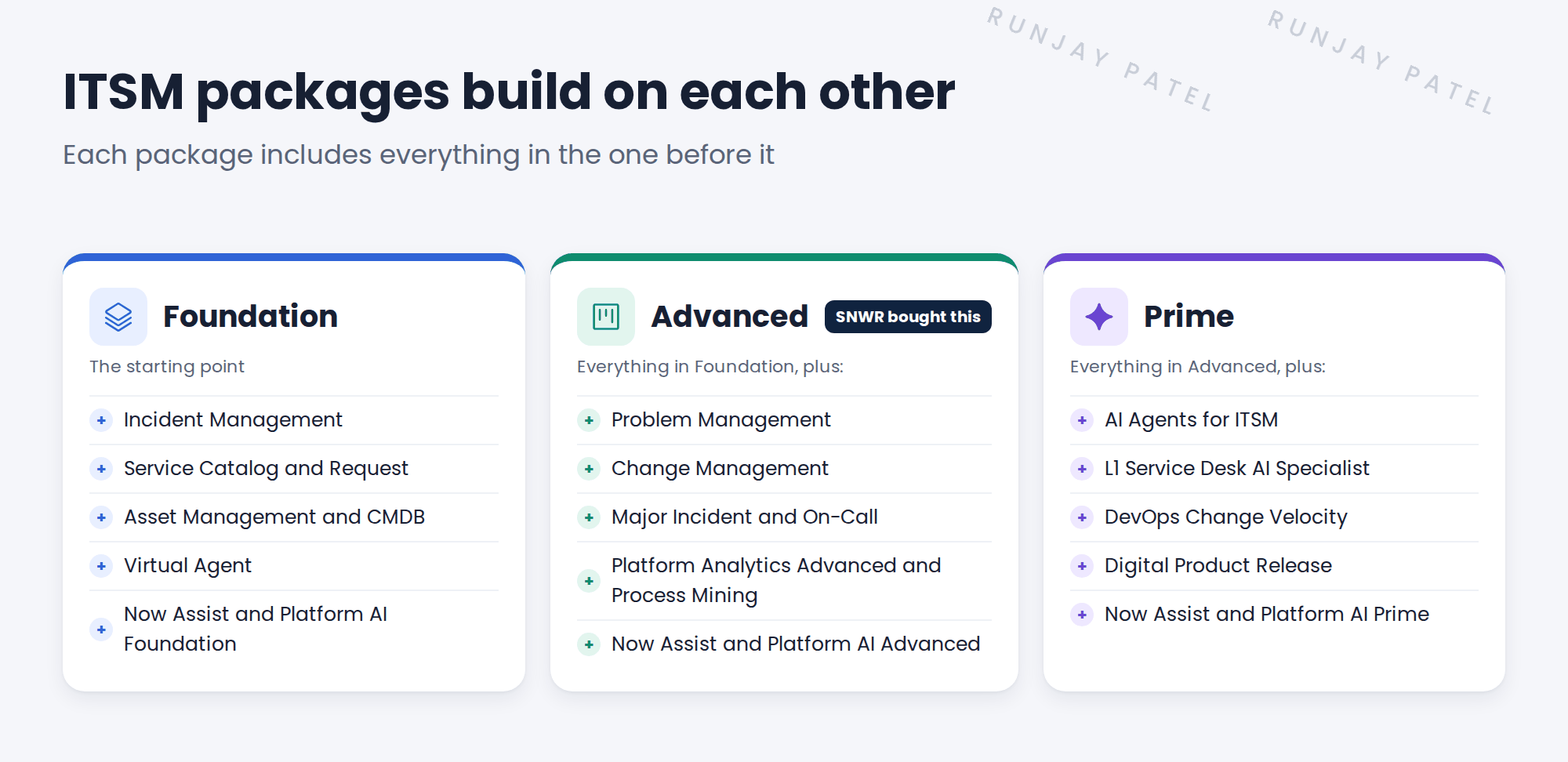
ServiceNow sells ITSM in three packages. Each one includes everything in the one before it.
| Package | In simple words |
|---|---|
| Foundation | Fix things and fulfil requests: incidents, the service catalog, the CMDB and a chat assistant. |
| Advanced | Run full IT processes: problems, changes, major incidents and on-call, with better reporting. |
| Prime | Let AI do more of the work: AI agents that handle requests on their own, and faster changes for app teams. |
💡 Good to know: Package contents change over time, and each release can move features around. Always check the current ServiceNow ITSM pricing page and the customer’s contract. Don’t rely on memory, or on this lesson!
4 Old names you’ll still see
Foundation, Advanced and Prime are new names. Many companies bought ITSM earlier, under older names, and their contracts still use them.
| Older name | What it usually meant |
|---|---|
| ITSM Standard | The core ITSM processes |
| ITSM Professional (“ITSM Pro”) | Standard, plus extras like better reports and more automation |
| ITSM Enterprise | Pro, plus more advanced features |
| Pro Plus / Enterprise Plus | Pro or Enterprise, plus Now Assist, AI that can write summaries and answers |
The old and new packages don’t match one to one. For example, DevOps Change Velocity used to be part of ITSM Pro. Today it’s in Prime.
⚠️ Heads up: ServiceNow docs sometimes still say “requires ITSM Professional”. When you see that, don’t guess. Ask the customer’s ServiceNow account team which of today’s packages covers it.
5 How to check what a company has
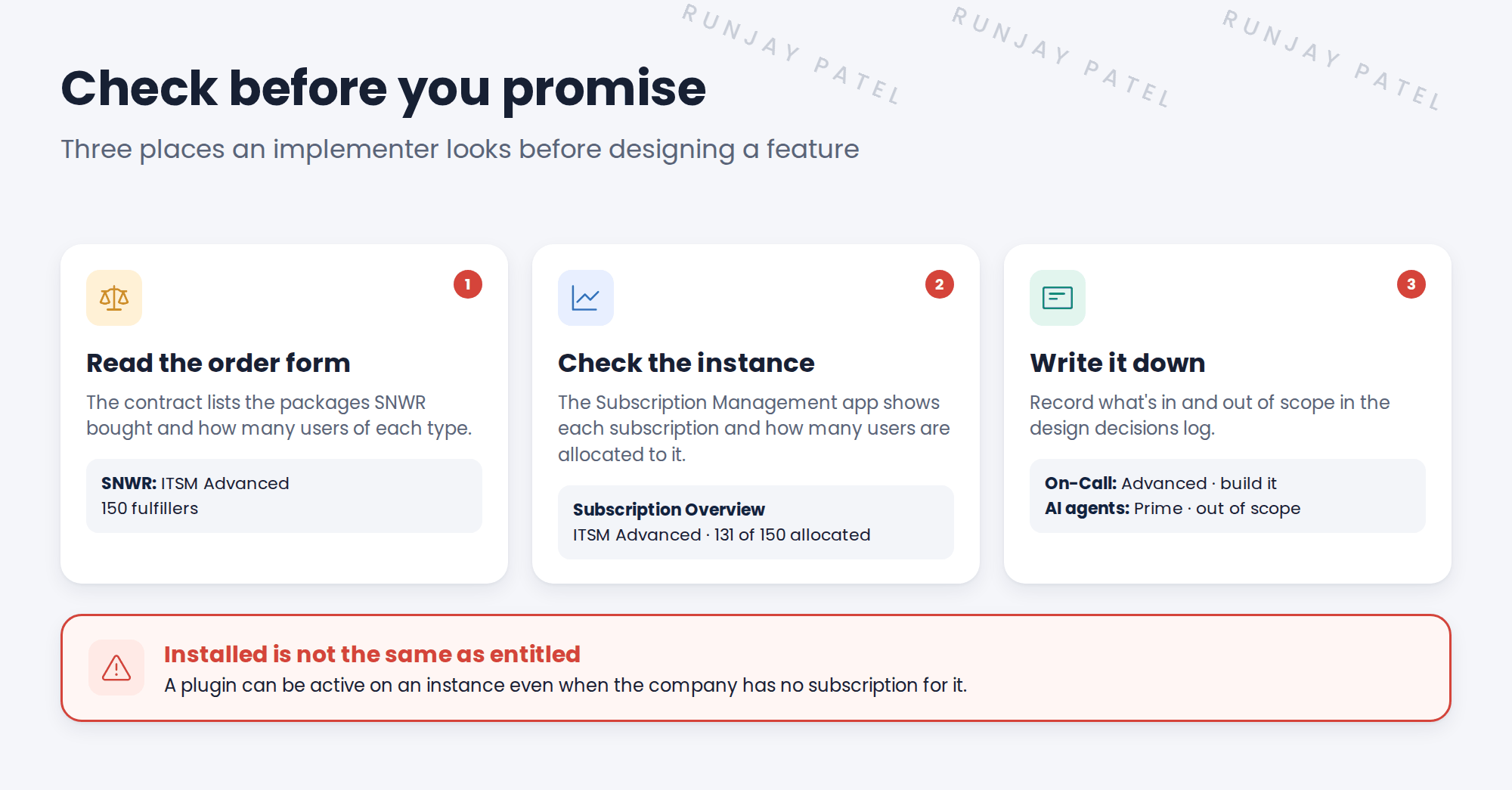
- Read the order form. The contract is the only true answer. Ask the sponsor (Anita) for the list of packages and user counts.
- Check the instance. Open the Subscription Management app (search “Subscription” in the All menu). Its Subscription Overview dashboard shows each subscription and how many users are allocated to it.
- Write it down. Add an entry to the design decisions log: which features are in scope, and which aren’t.
⚠️ Installed is not the same as entitled: A plugin can be active on an instance even if the company has no subscription for it. Using it anyway can show up as extra cost later. Always check the contract, not just the plugin list.
📝 Note: Your PDI has most ITSM apps turned on, so you can learn them. That’s a learning instance, not a license. A real customer only gets what’s on their contract.
6 People count too
Subscriptions don’t just list features. They also count users by type. The type depends on the roles a person has.
| User type | At SNWR |
|---|---|
| Fulfiller Works on tickets |
Abel on the Service Desk, Ravi in Network Support |
| Business stakeholder Approves and views |
Beth, who approves requests and changes |
| Requester Asks for help |
Sam, and every other SNWR employee |
💡 Good to know: Some roles, like itil, make a person a fulfiller. If you give itil to someone who never works on tickets, SNWR may pay for a seat it doesn’t need. Give roles to groups, and add only real fulfillers to those groups. You’ll set this up in Foundation Data.
7 What SNWR has, and how this course handles it
SNWR bought ITSM Advanced. Here’s what that means for your lessons:
| Feature | In this course |
|---|---|
| Incident, Service Catalog, CMDB, Virtual Agent | ✅ You build it. It’s in Foundation, so SNWR has it. |
| Problem, Change, Major Incident, On-Call | ✅ You build it. It’s in Advanced, which SNWR bought. |
| Now Assist features | 👀 You look at it. What’s included depends on the package and the release, and not every PDI has it. |
| AI Agents, DevOps Change Velocity | 👀 You look at it. It’s in Prime, which SNWR didn’t buy. |
Whenever a lesson depends on a package, you’ll see a box like this one:
📦 Entitlement check: DevOps Change Velocity is a Prime feature. SNWR has Advanced, so in this lesson you’ll look at how it works, not build it.
⭐ Remember: Check the contract first, design second. Never promise a feature before you know it’s included.
8 Quick recap
- A package is a bundle of features. An entitlement is what the contract lets a company use
- ITSM comes as Foundation, Advanced and Prime. Each includes the one before
- Older contracts say Standard, Pro, Enterprise or Pro Plus, and features have moved between packages
- Check the order form, then Subscription Management, then write it in the design log
- An installed plugin doesn’t mean the company is entitled to use it
- Subscriptions also count users by type, so give fulfiller roles only to real fulfillers
9 Check yourself
Think of your answer first. Then tap to check.
1 SNWR bought ITSM Advanced. Can you build Problem Management for them? Show answer
Yes. Problem Management is included in Advanced.
2 Daniel wants AI agents to reset passwords. What do you tell him? Show answer
AI agents are in Prime, and SNWR has Advanced. You record it as out of scope, and Anita can decide whether to buy more.
3 What is the only true source of what a company is entitled to? Show answer
The contract (the order form). The instance helps you check, but the contract decides.
4 A plugin is active on the instance. Does that mean the company can use it? Show answer
No. Installed is not the same as entitled. Check the contract.
5 Sam never works tickets. Should he get the itil role? Show answer
No. He’s a requester. Roles like itil make someone a fulfiller, and fulfiller seats cost money.
Nice work! You can now check what a company has before you promise it. 🎉
Next up: The SNWR Rollout Plan: snwrdev to snwr
Was this lesson helpful?
Please log in to share lesson feedback.
Have a question or doubt?
Ask here and get help from instructors and fellow learners.
Only logged-in learners can post.





