


Final Walkthrough: SNWR ITSM End to End
On this page
In this lesson, you will learn:
- How all the processes connect
- The incident to change journey
- The request journey
- How to prove it all works
🔁 Quick look back: Last time: CIS-ITSM Practice Assessment. You learned how ready you are, from a mixed practice set with answers that point to each lesson.
1 “Does it all fit together?”
You’ve built each process on its own.
- Incident works. Problem works. Change works.
- The catalog works too.
- But have you seen them all work together?
👉 The fix: run the whole SNWR story, end to end, on one instance.
2 The whole story
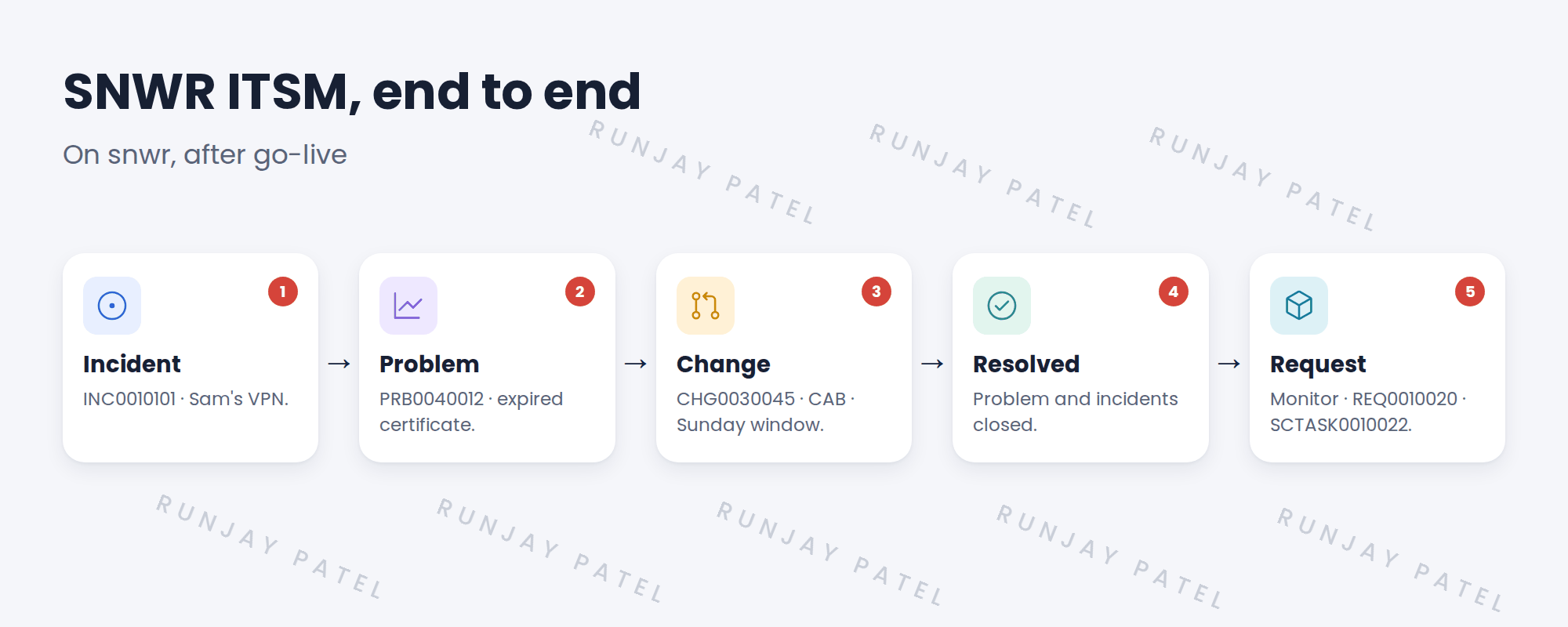
3 What to check along the way
| Step | Check |
|---|---|
| Incident | Priority, routing, SLA, comments to Sam |
| Problem | Linked incidents, known error article |
| Change | Risk, conflicts, approval, CAB, close code |
| Request | Approval, stages, task, SLA and OLA |
| Reporting | Everything shows on the dashboard |
⭐ Remember: If something breaks where two processes meet, that’s the most useful thing you’ll find all day.
4 Let’s try it: run SNWR end to end
- As Sam, report a VPN problem from Employee Center. Check priority, routing and the SLA.
- As Grace, create a problem from the incident and link two more VPN incidents. Publish a known error article.
- As Ravi, raise a normal change from the problem for snwr-vpn-gw-01. Check risk and conflicts, and get it approved at CAB as Mei.
- Implement and close the change as Successful. Resolve the problem, then the linked incidents. Check Sam gets the survey.
- As Sam, order a 32″ monitor. Approve as Beth, fulfill as Desktop Support, and check everything on the SNWR Service Desk Overview dashboard.
5 Quick recap
- Incidents lead to problems when there’s a pattern
- Problems lead to changes that fix the cause
- Requests run on their own path, through the catalog
- Check where processes meet
- The dashboard shows it all
6 Check yourself
Think of your answer first. Then tap to check.
1 Which record links Sam’s incident to the fix? Show answer
The problem, PRB0040012, which raised CHG0030045.
2 When are the linked incidents resolved? Show answer
After the change works and the problem is resolved.
3 What does Sam get when his incident is resolved? Show answer
The SNWR Incident satisfaction survey.
4 Where does Daniel see it all? Show answer
On the SNWR Service Desk Overview dashboard.
Nice work! You ran SNWR’s ITSM from start to finish, and finished the whole path. 🎉
You finished the whole path!
Was this lesson helpful?
Please log in to share lesson feedback.
Have a question or doubt?
Ask here and get help from instructors and fellow learners.
Only logged-in learners can post.





