


Incident Communication Plans
On this page
In this lesson, you will learn:
- What a communication plan is
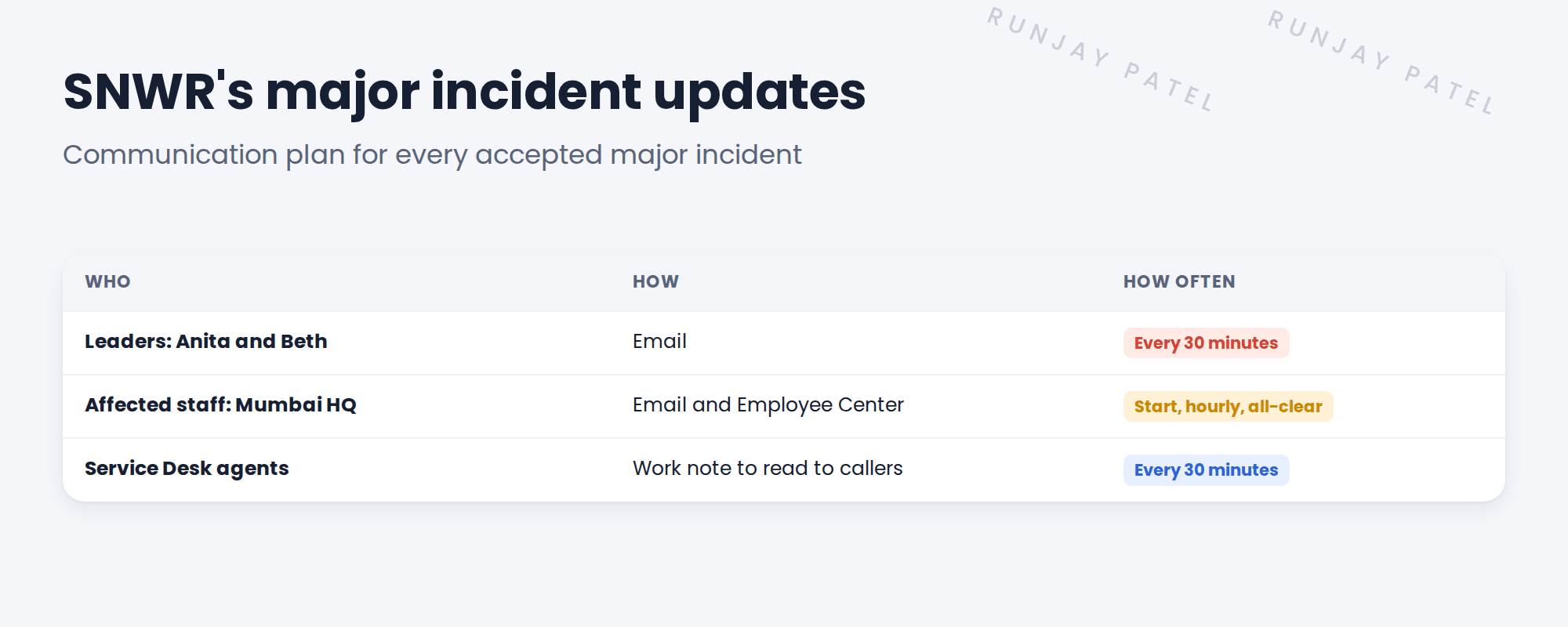
- Who SNWR updates, and how often
- How communication tasks remind the team
- How to set up SNWR’s plan
🔁 Quick look back: Last time: Running a Major Incident in the Workspace. You learned how the major incident manager runs a major incident with a timeline, a team, child incidents and tasks.
1 “Why didn’t anyone tell me?”
During the email outage, the team is busy fixing it.
- Nobody updates Anita for an hour.
- Mumbai staff keep calling the desk: “Is email back yet?”
- Beth hears about it from a customer.
👉 The fix: set up a communication plan that reminds the team who to update, and when.
2 What is a communication plan?
Key term: Communication plan
A plan attached to an incident that says who to update, how and how often.
Key term: Communication task
A reminder to send one update, like “Update leaders at 10:30”.
Key term: Contact
A person or group on the plan, like Anita or all Mumbai HQ staff.
3 A good update
- What’s broken: “SNWR Email is down at Mumbai HQ.”
- What we’re doing: “We’re moving email to a backup server.”
- What you can do: “Use Teams chat for now.”
- Next update: “By 11:00.”
💡 Good to know: Always give the time of the next update, even if nothing has changed. Silence makes people worry.
⚠️ Heads up: Keep technical details out of staff updates. Say what it means for them.
4 Let’s try it: set up SNWR’s plan
- In the All menu, search Communication Plan and open the plan definitions (part of incident communication management).
- Create a plan named SNWR Major Incident Updates, for major incidents.
- Add contacts: Anita Rao and Beth Anglin (leaders), and the Mumbai HQ staff.
- Add communication tasks: leaders every 30 minutes, staff at the start and every hour.
- Accept a test major incident and check the plan and tasks are added.
5 Quick recap
- A communication plan says who to update, how and how often
- Communication tasks remind the team when an update is due
- SNWR updates leaders every 30 minutes, staff every hour
- A good update says what’s broken, what we’re doing, what you can do and when the next update is
- Keep staff updates simple
6 Check yourself
Think of your answer first. Then tap to check.
1 How often does Anita get updates in a SNWR major incident? Show answer
Every 30 minutes.
2 What reminds the team that an update is due? Show answer
A communication task.
3 What should every update end with? Show answer
The time of the next update.
4 Should staff updates include server names? Show answer
No. Say what it means for them.
Nice work! SNWR’s leaders and staff are always kept informed. 🎉
Next up: Closing and Reviewing a Major Incident
Was this lesson helpful?
Please log in to share lesson feedback.
Have a question or doubt?
Ask here and get help from instructors and fellow learners.
Only logged-in learners can post.





