


CAB Definitions and Meetings
On this page
In this lesson, you will learn:
- What CAB is for
- What a CAB definition holds
- How the agenda is built
- How to create SNWR’s weekly CAB
🔁 Quick look back: Last time: Approvers, Approval Groups and Delegation. You learned how approval groups and delegation stop approvals getting stuck.
1 “What’s on the agenda?”
Every Monday, Mei spends an hour building the CAB agenda by hand.
- She searches for changes that need CAB.
- She emails the list to everyone.
- Late changes get added by chat, and some are missed.
👉 The fix: create a CAB definition. ServiceNow builds the meeting and its agenda for you.
2 CAB and its definition
Key term: CAB
Change Advisory Board: a group that reviews and approves risky changes.
Key term: CAB definition
The setup for a recurring CAB: chair, members, when it meets and which changes go on the agenda.
Key term: CAB meeting
One meeting, created from the definition, with its own agenda.
📦 Entitlement check: CAB Workbench is part of Change Management. Check it’s active on your instance.
3 Who’s in SNWR’s CAB
| Member | Why |
|---|---|
| Mei (chair) | Change manager |
| Beth | IT manager, approves for Network and Desktop |
| Daniel | Knows the impact on the Service Desk |
| Arjun | Owns SNWR Email |
| Change owners | Join only for their own changes |
💡 Good to know: Keep CAB small. Invite change owners just for their item, not the whole hour.
4 Let’s try it: create the CAB definition
- Open CAB Workbench from the All menu, and go to the CAB definitions.
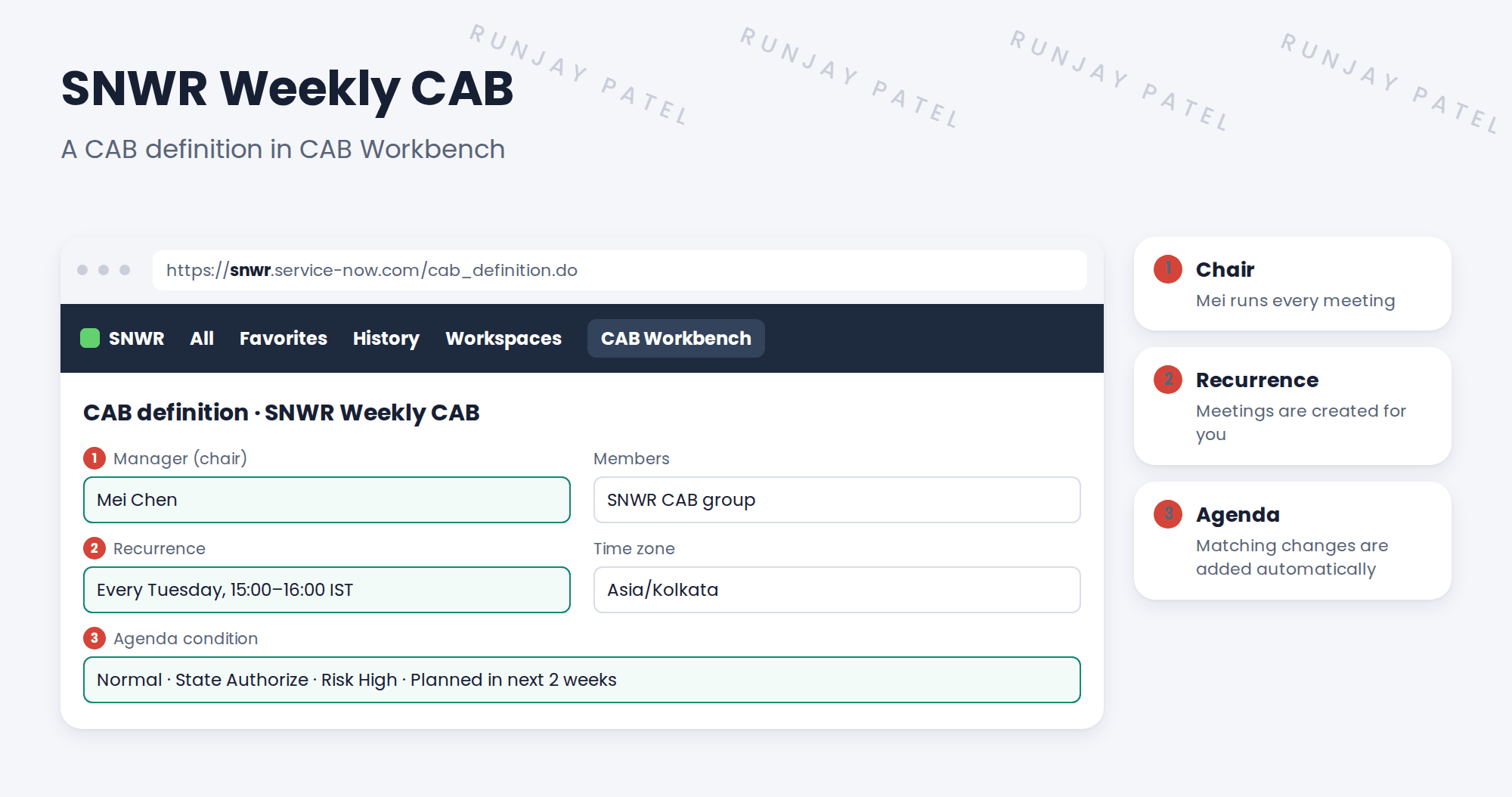
- Create SNWR Weekly CAB. Manager: Mei Chen. Add the SNWR CAB group as attendees.
- Set the recurrence: weekly, Tuesday, 15:00 to 16:00, time zone Asia/Kolkata.
- Set the agenda condition: normal changes in Authorize, risk High.
- Save, and check the next meeting is created with matching changes on its agenda.
5 Quick recap
- CAB reviews and approves risky changes
- A CAB definition sets the chair, members, schedule and agenda rules
- Meetings are created from the recurrence
- Matching changes are added to the agenda automatically
- Keep CAB small; invite owners for their own item
6 Check yourself
Think of your answer first. Then tap to check.
1 Who chairs the SNWR Weekly CAB? Show answer
Mei Chen, the change manager.
2 Which changes go on the agenda automatically? Show answer
Normal changes in Authorize with risk High, planned in the next two weeks.
3 When does SNWR’s CAB meet? Show answer
Every Tuesday, 15:00 to 16:00 IST.
4 Should change owners stay for the whole meeting? Show answer
No. They join for their own item.
Nice work! SNWR’s CAB now builds its own agenda. 🎉
Next up: Running a CAB Meeting in CAB Workbench
Was this lesson helpful?
Please log in to share lesson feedback.
Have a question or doubt?
Ask here and get help from instructors and fellow learners.
Only logged-in learners can post.





