


Change Approval Policies
On this page
In this lesson, you will learn:
- What a change approval policy is
- SNWR’s approval rules by risk
- How the policy picks approvers
- How to read and adjust a policy
🔁 Quick look back: Last time: The Change Schedule. You learned how the change schedule shows all planned changes on a calendar.
1 “Why does every change go to CAB?”
In week one, every normal change waits for Tuesday’s CAB.
- The CAB agenda has 40 changes.
- Most are low risk and take 30 seconds to approve.
- The risky ones get rushed at the end.
👉 The fix: let the change’s type and risk pick the approvers, with an approval policy.
2 What is an approval policy?
Key term: Change approval policy
A set of rules that decides who must approve a change, based on things like type and risk.
Key term: Approver
A person or group who must say yes before the change can move on.
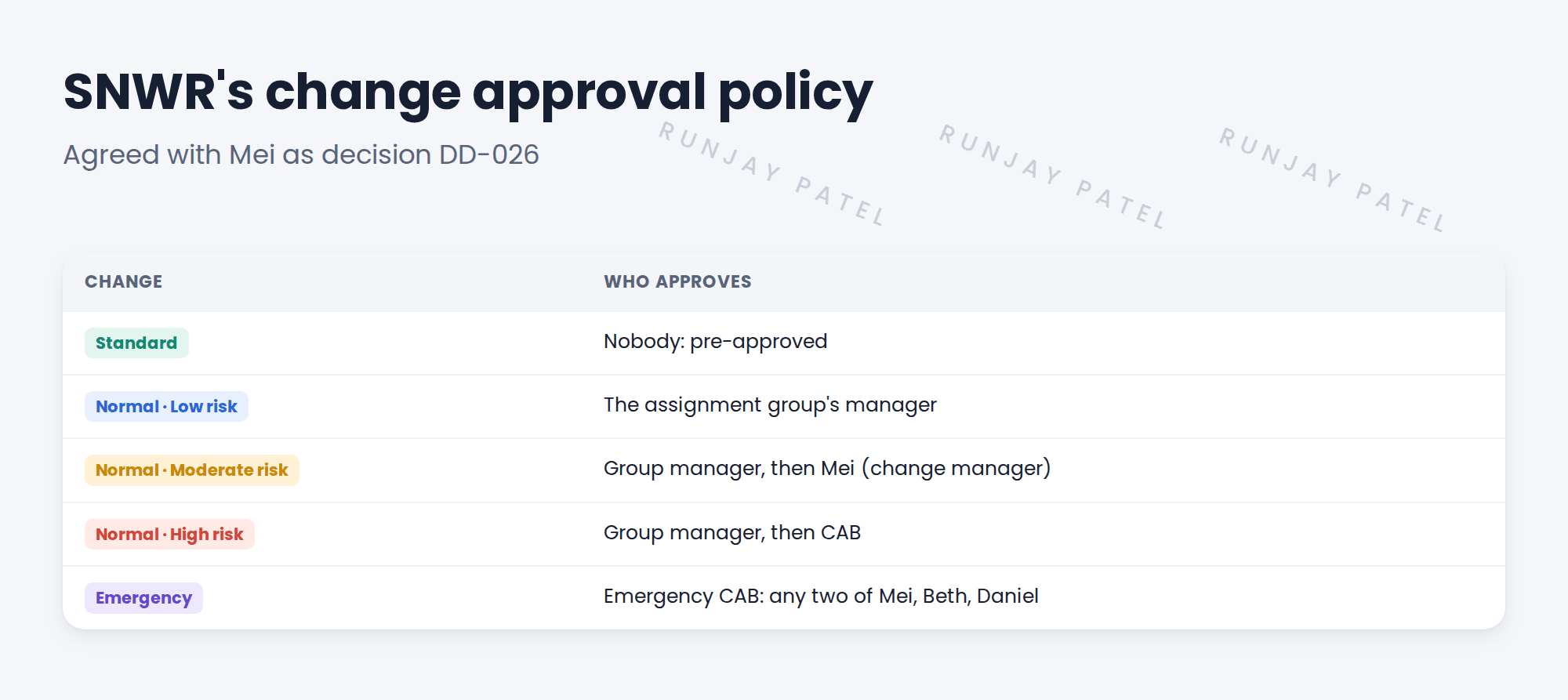
3 How it works
- The policy looks at the change when it reaches Authorize.
- It checks rules in order, like a decision table.
- The first rule that matches decides the approvers.
💡 Good to know: Keep the rules few and simple. If Mei can’t explain a rule in one sentence, it’s too complex.
📝 Note: The CI’s Change Success Score can also be used. For example, a team with a low score always needs Mei’s approval.
4 Let’s try it: read and adjust the policy
- Search Change Approval Policies in the All menu, and open the baseline policy for normal changes.
- Read its decisions. Which inputs does it use (risk, type, and so on)?
- Copy the policy, and set the Low risk rule to ask only the assignment group’s manager.
- Raise a Low risk normal change, move it to Authorize, and check who is asked to approve.
- Record the policy in the design decisions log.
5 Quick recap
- A change approval policy decides who approves
- It uses the change’s type and risk
- SNWR: low → manager; moderate → manager and Mei; high → CAB
- Emergencies go to the emergency CAB
- Keep the rules few and simple
6 Check yourself
Think of your answer first. Then tap to check.
1 A normal change is Low risk. Who approves at SNWR? Show answer
The assignment group’s manager.
2 A normal change is High risk. Who approves? Show answer
The group manager, then CAB.
3 When does the policy run? Show answer
When the change reaches Authorize.
4 Who approves a standard change? Show answer
Nobody. It’s pre-approved.
Nice work! SNWR’s changes now get the right approvers. 🎉
Next up: Approvers, Approval Groups and Delegation
Was this lesson helpful?
Please log in to share lesson feedback.
Have a question or doubt?
Ask here and get help from instructors and fellow learners.
Only logged-in learners can post.





