


Implementation Phases, from Kickoff to Hypercare
On this page
In this lesson, you will learn:
- What Now Create is
- The five phases of an implementation, and what each one produces
- How sprints work inside the Execute phase
- Which tasks people often forget, and where they belong
🔁 Quick look back: In the Getting Started chapter, you met Project One Front Door and SNWR’s ITSM Advanced package. You also learned the four instances, the five gates and the CIS-ITSM exam.
1 “Wait, what happens next?”
Imagine One Front Door without a clear method. It’s week 5. 😵
- Daniel asks: “When can I see something working?” Nobody knows.
- Lucas wants to start testing, but the catalog isn’t built yet.
- Anita asks: “Who’s training the agents?” Nobody planned it.
- In week 12, the team realizes Riya’s team doesn’t know how to run ITSM after go-live.
👉 The fix: follow a method with clear phases. Each phase has its own jobs, its own outputs, and a gate at the end.
2 Meet Now Create
Key term: Now Create
ServiceNow’s own method for running an implementation. It gives you the phases, the tasks and the templates.
Key term: Phase
One stage of the project, with a clear start, a clear end and its own jobs.
Key term: Deliverable
Something a phase must produce before it ends, like a signed-off design or a training plan.
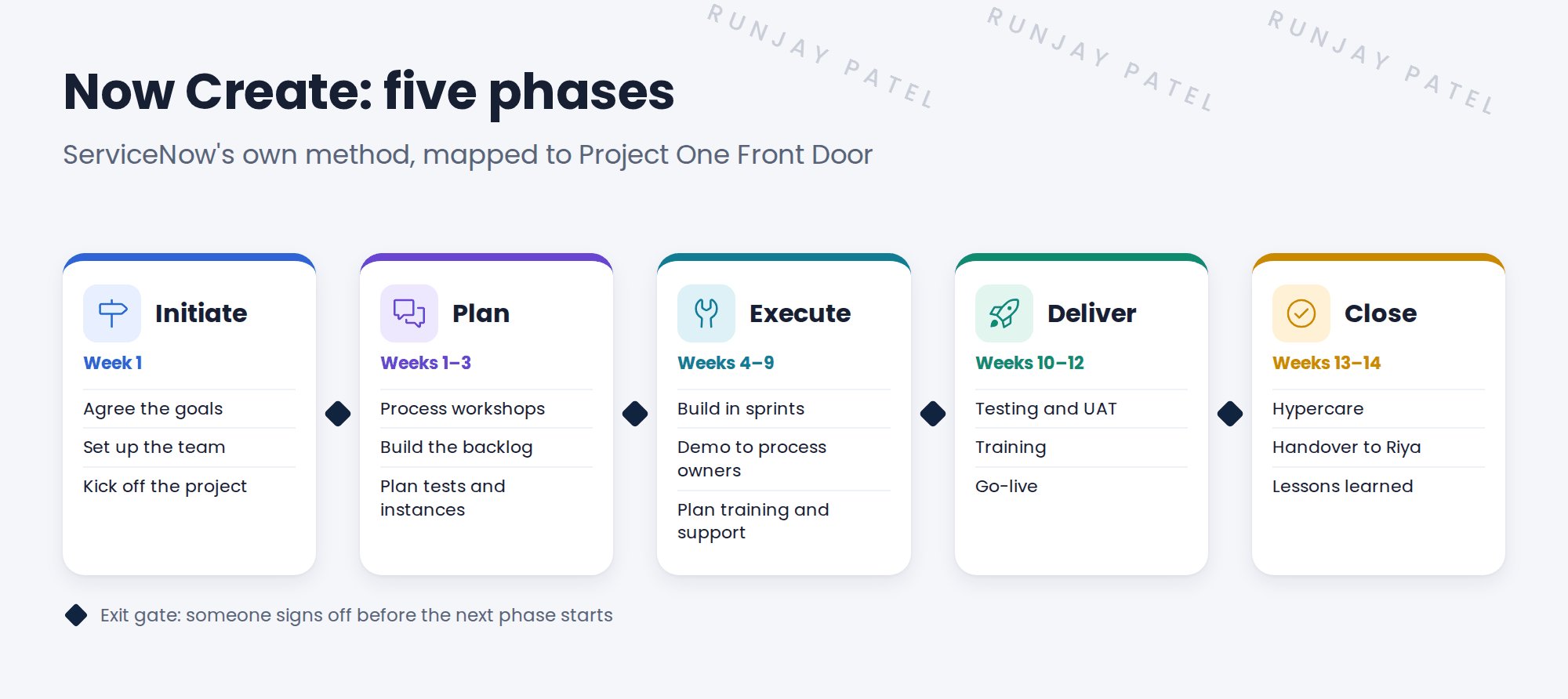
Now Create has five phases: Initiate, Plan, Execute, Deliver and Close. An exit gate sits between each one. You met gates in the rollout plan lesson.
3 What happens in each phase
| Phase | What happens at SNWR, and what it produces |
|---|---|
| Initiate Week 1 |
Anita sets the goals and the team. The team checks the licences and the instances. 📄 Project charter, team list |
| Plan Weeks 1–3 |
You run workshops with each process owner. Every need becomes a story in the backlog. 📄 Signed-off design, backlog, test plan |
| Execute Weeks 4–9 |
You build on snwrdev in short sprints, and show the process owners what you built. 📄 Working setup, training plan, support plan |
| Deliver Weeks 10–12 |
Testing, UAT on snwrtest, training for agents, the rehearsal and go-live. 📄 UAT sign-off, trained agents, live ITSM |
| Close Weeks 13–14 |
Hypercare, handover to Riya’s team, and a look back at what went well. 📄 Handover sign-off, lessons learned |
📝 Note: In the lesson “What an ITSM Implementer Does”, you saw SNWR’s plan as Design, Build, UAT, Rehearsal, Go-live and Hypercare. Those are the same weeks with everyday names. Design covers Initiate and Plan. Build is Execute. UAT, Rehearsal and Go-live are Deliver. Hypercare is Close.
4 Execute runs in sprints
You don’t build everything at once. In Execute, you build in short blocks of time called sprints. This way of working is called agile.
Key term: Sprint
A short, fixed block of time, often two weeks. The team builds a small set of stories, then shows the result.
Key term: Backlog
The list of everything still to build, with the most important items at the top.
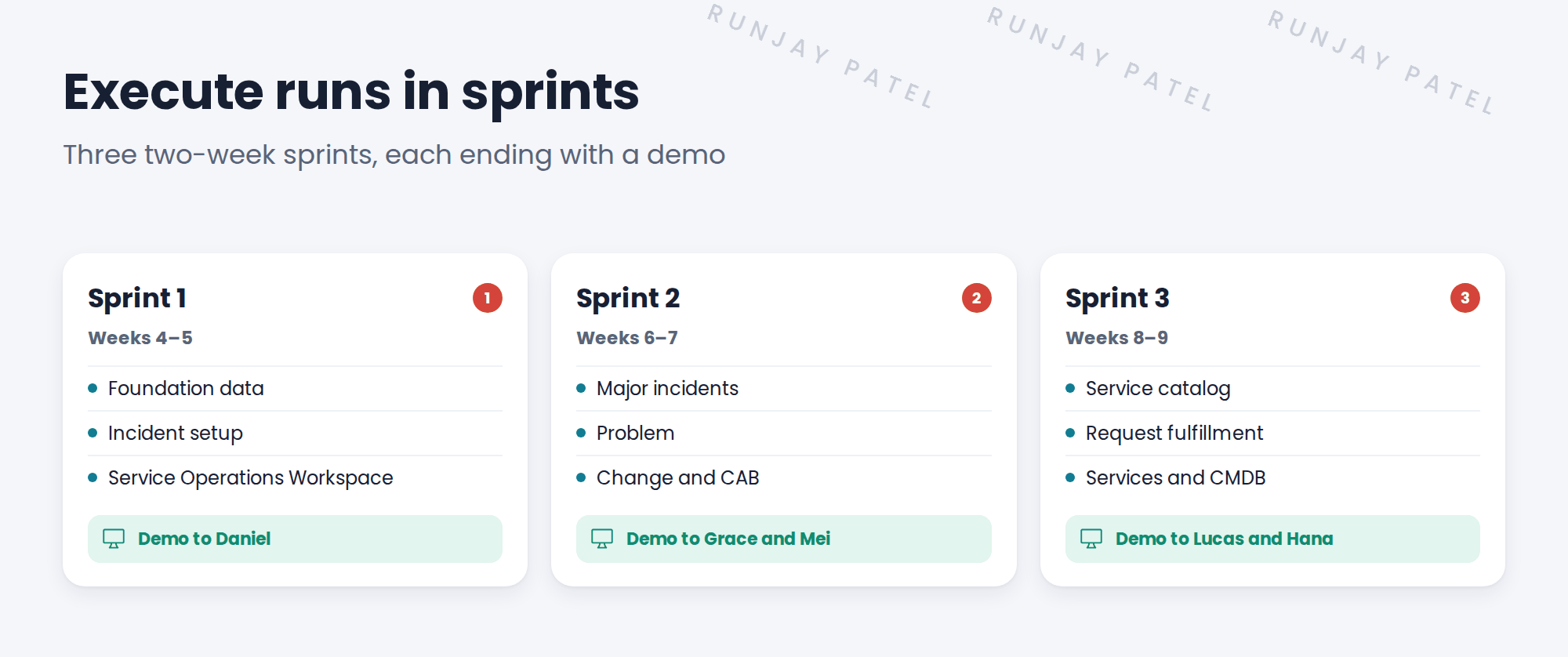
- 📋 PickChoose the top stories from the backlog
- 🛠️ BuildSet them up on snwrdev
- 🖥️ DemoShow the process owner, and get feedback
💡 Good to know: Demos catch problems early. If Daniel doesn’t like the incident form in week 5, it’s a small fix. If he sees it for the first time in UAT, it’s a big one.
5 The jobs people forget
These jobs don’t involve building anything, so they’re easy to forget. Now Create gives each one a place.
| Easy-to-forget job | Plan it in | Do it in |
|---|---|---|
| Training for agents | Execute | Deliver |
| Telling staff about the change | Execute | Deliver |
| Who supports ITSM after go-live | Execute | Close |
| Hypercare plan | Execute | Close |
⚠️ Heads up: A perfect setup still fails if agents don’t know how to use it. Plan training early, not in the last week.
⭐ Remember: Initiate, Plan, Execute, Deliver, Close. Each phase has jobs, outputs and a gate.
6 Quick recap
- Now Create is ServiceNow’s method for running an implementation
- It has five phases: Initiate, Plan, Execute, Deliver and Close
- Each phase produces deliverables, and ends with an exit gate
- Execute runs in short sprints, each ending with a demo
- Plan training, communications, support and hypercare in Execute, so they aren’t forgotten
7 Check yourself
Think of your answer first. Then tap to check.
1 Name the five Now Create phases, in order. Show answer
Initiate, Plan, Execute, Deliver, Close.
2 In which phase do you run workshops with the process owners? Show answer
Plan.
3 What happens at the end of every sprint? Show answer
A demo. The team shows the process owners what was built and gets feedback.
4 In which phase does hypercare happen? Show answer
Close.
5 When should you plan agent training? Show answer
In Execute, so it’s ready to run in Deliver, before go-live.
Nice work! You know how an implementation moves from kickoff to hypercare. 🎉
Next up: Who’s Who on an ITSM Project
Was this lesson helpful?
Please log in to share lesson feedback.
Have a question or doubt?
Ask here and get help from instructors and fellow learners.
Only logged-in learners can post.





