


Incident Tasks and Parent/Child Incidents
On this page
In this lesson, you will learn:
- When to use incident tasks
- When to use parent and child incidents
- How resolving a parent helps
- How to build both
🔁 Quick look back: Last time: Incident Properties and Resolution Rules. You learned how to set incident properties like auto-close, and why every fix needs a resolution code and notes.
1 Two messy situations
Two things happen in the same week.
- A new starter can’t log in. Desktop Support must fix the laptop, and Network Support must fix the account. Who owns the ticket?
- The VPN goes down. 20 people log 20 incidents. Abel updates them one by one.
👉 The fix: use incident tasks for many teams, and parent and child incidents for many duplicates.
2 Incident tasks
Key term: Incident task
A smaller piece of work under one incident, assigned to its own team.
Key term: Parent incident
The main incident that stands for one real issue.
Key term: Child incident
A duplicate incident, linked to the parent.
The incident stays with the Service Desk. Each team gets its own task, and the incident is resolved when all tasks are done.
| New-starter login issue | Assigned to |
|---|---|
| Incident (owner) | SNWR Service Desk |
| Task: re-image the laptop | SNWR Desktop Support |
| Task: unlock the network account | SNWR Network Support |
3 Parent and child incidents
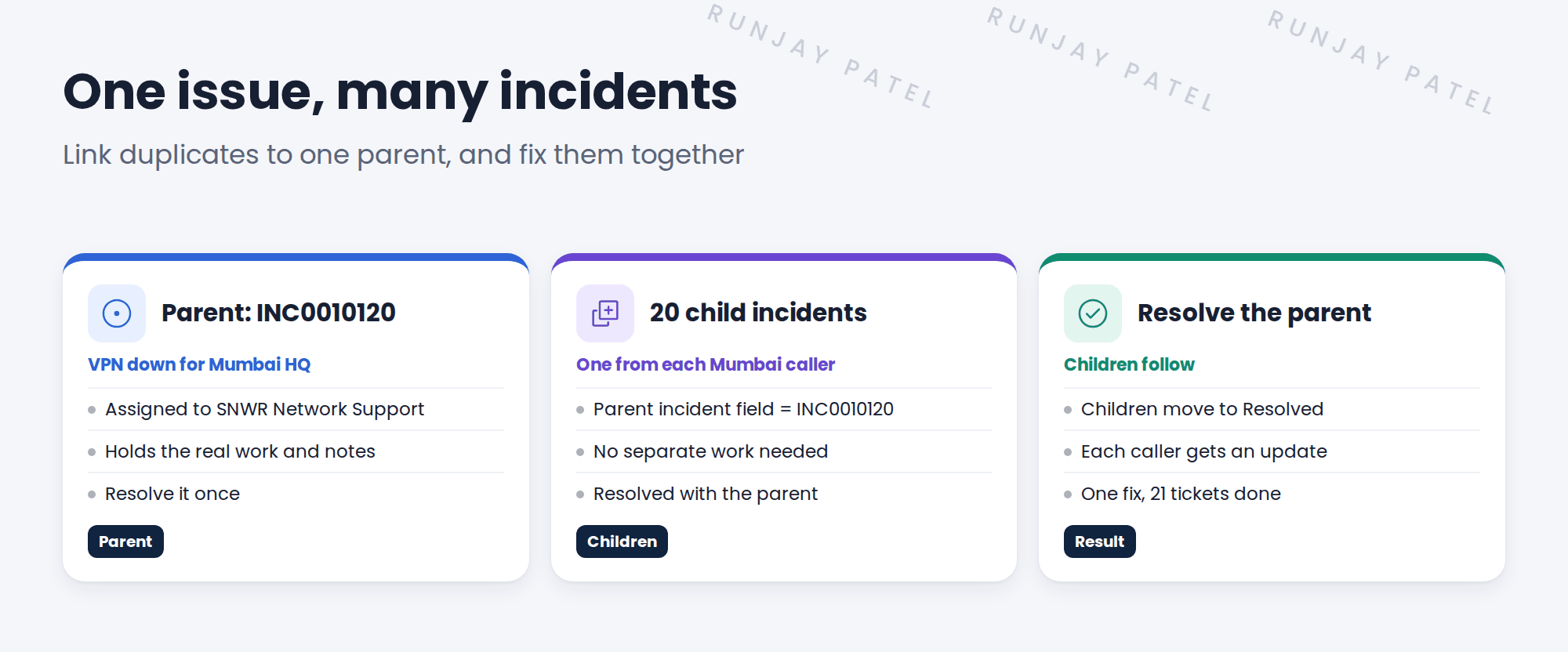
💡 Good to know: For a big outage, the parent is often a major incident. You’ll see that in the Major Incidents chapter.
4 Which one to use?
| Situation | Use |
|---|---|
| One issue, several teams must act | Incident tasks |
| Many people report the same issue | Parent and child incidents |
⭐ Remember: Many teams → tasks. Many callers → parent and children.
5 Let’s try it: build tasks and a parent
- Open an incident. In the Incident Tasks related list, click New. Assign one task to SNWR Desktop Support and one to SNWR Network Support.
- Create three incidents about “VPN down” from three different callers.
- Pick one as the parent. On the other two, set the Parent incident field to it.
- Open the parent. Check the Child Incidents related list shows both.
- Resolve the parent with a code and notes. Check what happens to the children.
6 Quick recap
- Incident tasks split one incident across several teams
- Parent and child incidents group many duplicates
- Set the Parent incident field on each child
- Resolving the parent resolves the children
- Many teams → tasks; many callers → parent and children
7 Check yourself
Think of your answer first. Then tap to check.
1 A new starter needs Desktop and Network to act. Tasks or parent/child? Show answer
Incident tasks.
2 20 people report the same VPN outage. What do you do? Show answer
Make one parent and link the rest as children.
3 Which field links a child to its parent? Show answer
Parent incident.
4 What happens to the children when the parent is resolved? Show answer
They’re resolved too, and callers are updated.
Nice work! You can handle many teams and many duplicates. 🎉
Next up: Incident Notifications at SNWR
Was this lesson helpful?
Please log in to share lesson feedback.
Have a question or doubt?
Ask here and get help from instructors and fellow learners.
Only logged-in learners can post.





