


Schedules, Time Zones and Holidays
On this page
In this lesson, you will learn:
- What a schedule is, and what uses it
- Why every schedule needs a time zone
- How to exclude holidays
- How to build SNWR’s schedules
🔁 Quick look back: Last time: Designing Assignment Groups. You learned how to design assignment groups around real teams, with a manager and roles on each group.
1 “The SLA breached on a holiday!”
A London user logs a P3 incident on Christmas Eve.
- The SLA clock keeps running over Christmas Day.
- It also counts time in India’s working hours, not London’s.
- The SLA breaches, even though nobody was meant to be working.
👉 The fix: build schedules with the right time zone, and exclude holidays.
2 Words to know
Key term: Schedule
A set of working times, like Monday to Friday, 09:00 to 18:00.
Key term: Time zone
The clock a schedule uses, like Asia/Kolkata or Europe/London.
Key term: Holiday schedule
A list of days off, added to a schedule to exclude them.
SLAs use schedules to decide when the clock runs. On-call uses them to know when a team is working.
💡 Good to know: Need a refresher? See Fundamentals › SLA Management › Schedules & Task SLAs.
3 SNWR’s schedules
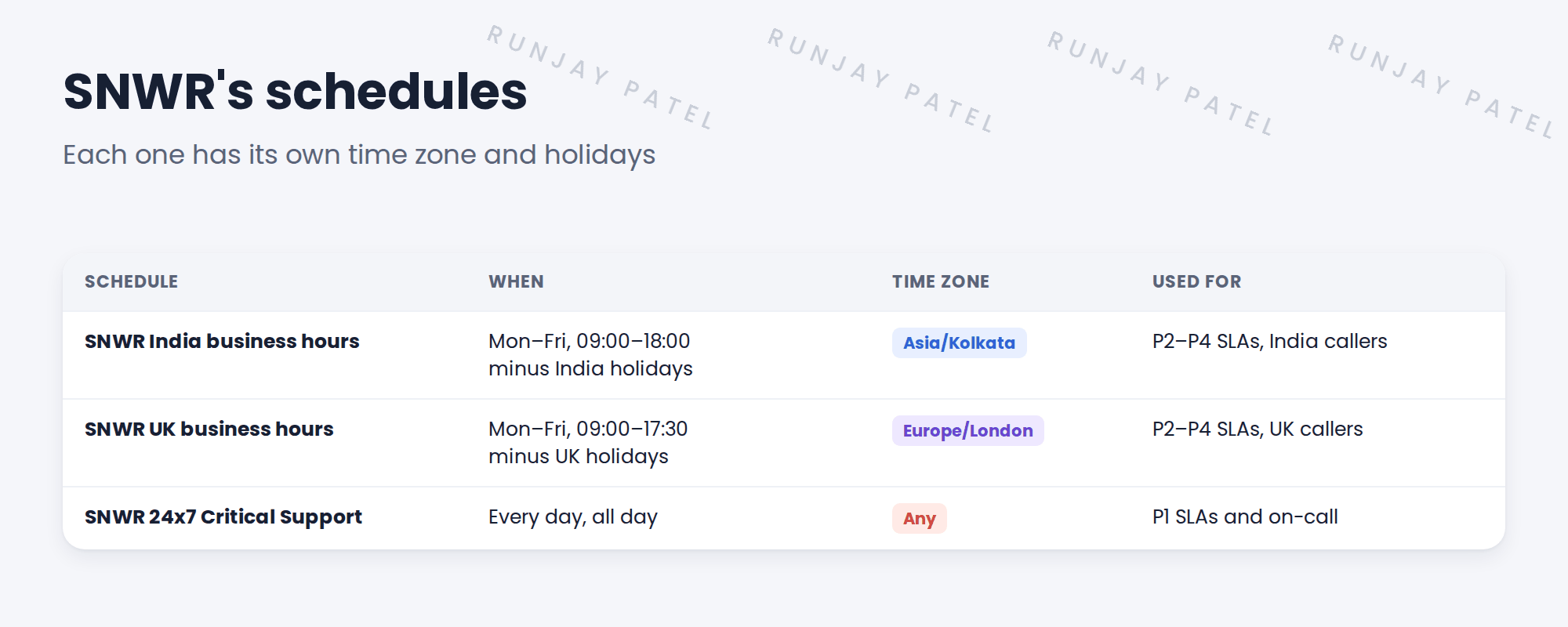
💡 Good to know: A 24×7 schedule doesn’t need holidays. P1 outages don’t wait for Christmas.
4 How holidays work
- Create a schedule with just the holiday dates, like SNWR India holidays.
- Open the business-hours schedule.
- Add the holiday schedule as a child schedule with type Exclude.
- Now those days don’t count as working time.
⚠️ Heads up: Holidays change every year. Put a yearly reminder in the support plan to add next year’s dates.
5 Let’s try it: build SNWR’s schedules
- Go to All › System Scheduler › Schedules › Schedules. Click New.
- Create SNWR India business hours with time zone Asia/Kolkata. Add an entry: Monday to Friday, 09:00 to 18:00, repeating weekly.
- Create SNWR India holidays with two all-day entries, for example Republic Day and Diwali.
- Open SNWR India business hours. Add SNWR India holidays as a child schedule of type Exclude.
- Create SNWR 24×7 Critical Support with one entry that covers every day, all day. Repeat for the UK schedule if you have time.
6 Quick recap
- A schedule sets working times for SLAs and on-call
- Every schedule needs the right time zone
- Holidays go in their own schedule, added as an Exclude child
- SNWR has India hours, UK hours and a 24×7 Critical Support schedule
- Update holidays every year
7 Check yourself
Think of your answer first. Then tap to check.
1 Why does the UK schedule need its own time zone? Show answer
So working hours count in UK time, not India time.
2 How do you stop a holiday counting as working time? Show answer
Add a holiday schedule as a child schedule with type Exclude.
3 Which SNWR schedule do P1 SLAs use? Show answer
SNWR 24×7 Critical Support.
4 Name two things that use schedules. Show answer
SLAs and on-call.
Nice work! SNWR’s schedules are ready for SLAs and on-call. 🎉
Next up: ITSM Roles and Personas
Was this lesson helpful?
Please log in to share lesson feedback.
Have a question or doubt?
Ask here and get help from instructors and fellow learners.
Only logged-in learners can post.





