


Cutover Plan and Go-Live Checklist
On this page
In this lesson, you will learn:
- What a cutover plan is
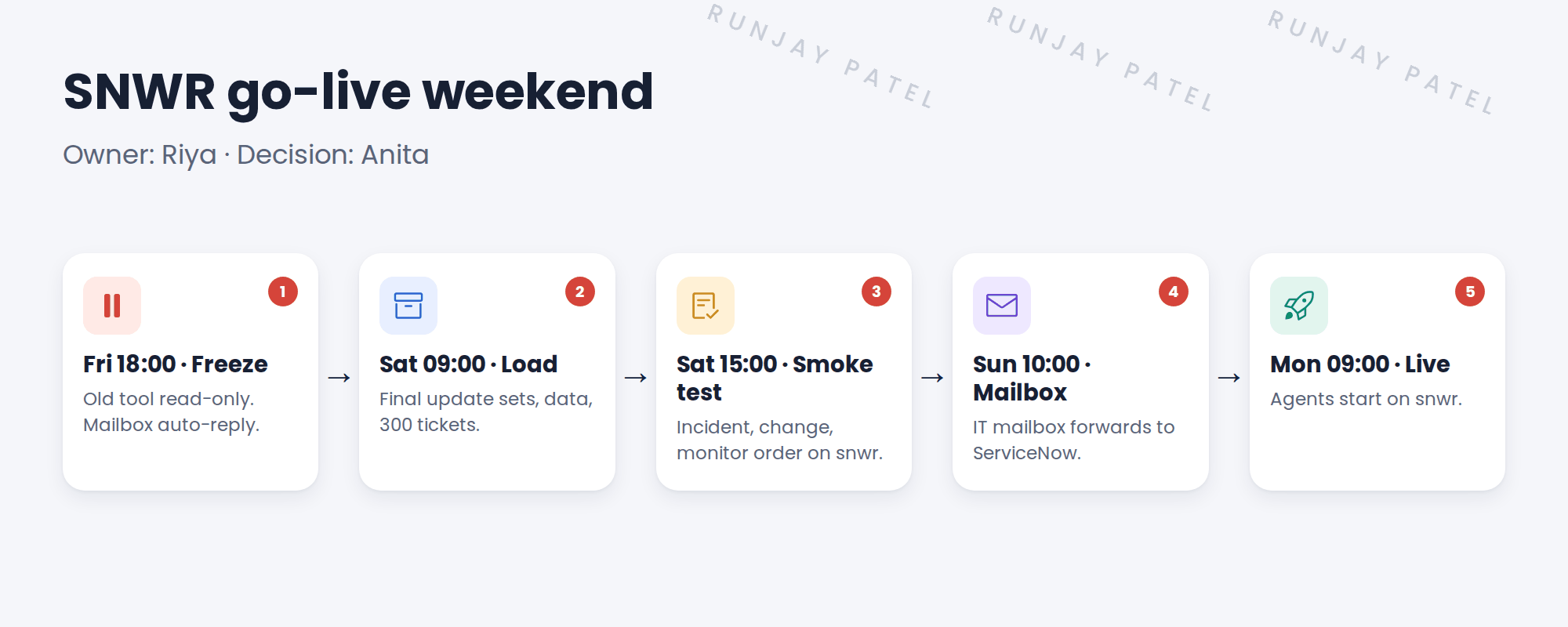
- SNWR’s go-live weekend, hour by hour
- What smoke tests check
- How to roll back if needed
🔁 Quick look back: Last time: Operational Readiness. You learned how the SNWR go/no-go checklist shows if the business is ready for go-live.
1 “Who does what on Saturday?”
Go-live is this weekend.
- Everyone knows roughly what to do.
- Nobody knows the order.
- Nobody knows when to stop and roll back.
👉 The fix: write a cutover plan: every step, its owner, its time, and a rollback point.
2 SNWR’s go-live weekend
Key term: Cutover
The switch from the old way of working to the new system.
Key term: Smoke test
A quick check that the main things work, right after go-live.
Key term: Rollback
Going back to the old way, if go-live fails.
3 The rollback point
- Saturday 18:00 is the last point to roll back easily.
- If smoke tests fail and can’t be fixed, the old tool opens again Monday.
- After the mailbox switch, rolling back is much harder.
⚠️ Golden rule: Never skip the smoke tests to save time. They’re your last check before real users arrive.
4 Let’s try it: write the cutover plan
- Make a table with columns: time, step, owner, done.
- Add every step from the figure, in order.
- Add three smoke tests, each with an expected result, such as “an incident from Sam gets the right priority and goes to the Service Desk”.
- Mark the rollback point, and who decides.
- Run your smoke tests on your PDI, as if it were snwr.
5 Quick recap
- A cutover plan lists every step, owner and time
- SNWR: freeze, load, smoke test, mailbox switch, live
- Smoke tests check the main things work
- Saturday 18:00 is the rollback point
- Never skip the smoke tests
6 Check yourself
Think of your answer first. Then tap to check.
1 What happens at Friday 18:00? Show answer
The freeze: the old tool goes read-only, with a mailbox auto-reply.
2 What is a smoke test? Show answer
A quick check that the main things work.
3 When is SNWR’s last easy rollback point? Show answer
Saturday 18:00.
4 Why switch the mailbox after the smoke tests? Show answer
After the switch, rolling back is much harder.
Nice work! SNWR’s go-live weekend is planned. 🎉
Next up: Hypercare and Handover
Was this lesson helpful?
Please log in to share lesson feedback.
Have a question or doubt?
Ask here and get help from instructors and fellow learners.
Only logged-in learners can post.





